
YouTube Channel Comparison: Evaluate Any Two Creators for Free
A reliable YouTube channel comparison instantly reveals which creator truly leads in any given niche. By using this tool to compare YouTube channels, marketers and content creators can evaluate side-by-side performance data without manually digging through complex analytics to find actionable insights.
Whether you are benchmarking against a direct competitor, vetting a potential collaboration partner, or simply tracking a rival’s growth trajectory, a structured head-to-head comparison removes guesswork and replaces it with data.
What Does This YouTube Channel Comparison Tool Do?
This YouTube channel comparison tool provides a direct benchmarking snapshot between any two creators. When you need to compare YouTube channels, this utility bypasses vanity metrics to extract the data that actually dictates platform success.
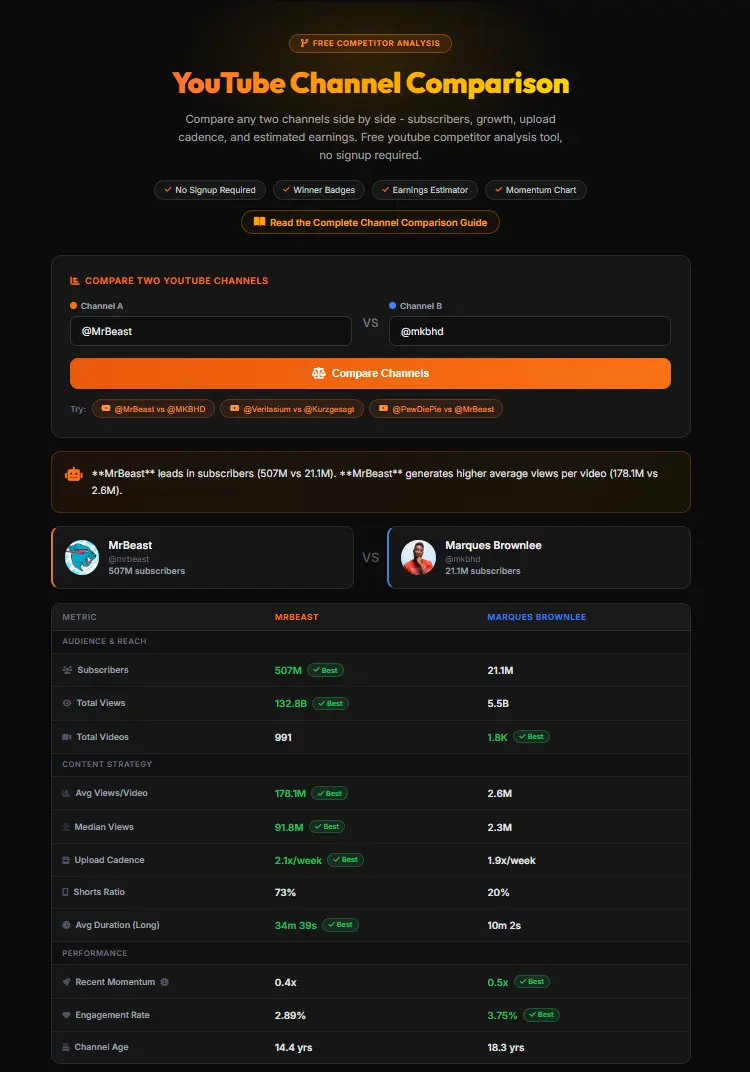
It automatically calculates and displays essential outputs, including active subscriber counts, historical upload cadence, the exact Shorts-to-long-form video ratio, and highly accurate earnings estimates, giving you a complete overview in seconds.
The tool pulls data directly from the official YouTube Data API across the last 15 uploads for each channel, then generates a winner badge per metric so you know at a glance which creator is outperforming their peer. An automated insight box distills the comparison into a single actionable sentence, making the competitive gap immediately clear.
Use our free YouTube Channel Comparison Tool to benchmark any two creators instantly - no signup, no search limits, no paywall.
How to Compare Two YouTube Channels (3 Steps)
Step 1: Enter Both Channel Handles or URLs
Simply paste the specific @handles or full profile URLs for the two creators into the respective search fields to initiate the query. The tool accepts:
- @handles:
@MrBeast - Full channel URLs:
youtube.com/@channelname - Legacy channel IDs:
UCxxxxxxxxxxxxxxxx
Step 2: Review the Side-by-Side Snapshot
Instantly analyze the generated data table and charts to see exactly how each creator performs across essential viewership and audience engagement metrics. Each row in the comparison table shows a green “Best” badge next to the winner for that specific metric. The insight box at the top gives you the key takeaway in one sentence.
Step 3: Adjust CPM to Estimate Earnings
Fine-tune the dynamic Cost Per Mille (CPM) slider to match the specific content niche, yielding a highly accurate projection of estimated ad revenue. Set the minimum and maximum CPM range to reflect your target audience geography - US and UK audiences typically generate 3-5x higher CPMs than developing markets.
Understanding the Comparison Metrics
Upload Cadence
This metric tracks how frequently a creator publishes new videos. Consistent upload cadence signals active channel management and provides the algorithm with steady data, directly impacting a creator’s visibility and momentum on the platform.
Upload cadence is calculated from the date range of the last 15 uploads. A channel publishing 5 videos per week gives the algorithm 5 fresh opportunities per week to push content to new viewers.
Shorts Ratio
This reveals the exact proportion of YouTube Shorts compared to traditional long-form videos. Balancing this ratio is critical, as short-form content drives rapid subscriber growth while long-form videos secure deeper audience retention.
A channel with an 80% Shorts ratio will have highly inflated subscriber and raw view counts. When benchmarking such channels, prioritize average views on long-form content rather than total view count to get a realistic picture of true audience size.
Average Views Per Video
Measuring the average views across recent uploads offers a clearer picture of active engagement than lifetime views. It indicates exactly how many loyal viewers reliably return whenever the creator publishes new content.
This metric is calculated from the last 15 uploads, making it resistant to old viral spikes that can distort a channel’s apparent reach. A channel with 5M subscribers but only 100K average views per video has a significantly less engaged audience than one with 500K subscribers averaging 80K views.
Channel Age
The creation date establishes vital context for growth trajectories. A newer channel achieving metrics similar to a legacy creator demonstrates exceptional momentum, highlighting a highly relevant and aggressive modern content strategy.
Recent Momentum
This metric compares the average views of the most recent 5 uploads against the previous 5. A momentum score above 1.0 means the channel is currently growing in algorithmic reach. A score below 1.0 signals a decline in recent performance, regardless of the channel’s overall subscriber count.
Engagement Rate
Calculated as the average of likes and comments relative to view count across recent uploads. Higher engagement rates signal that viewers are not just watching passively but actively responding to the content, which the algorithm interprets as a quality signal for broader distribution.
Why Upload Cadence Matters More Than Subscriber Count
Total subscriber count is often a misleading metric that represents historical reach rather than active viewership. Upload cadence directly dictates current algorithmic momentum.
A channel posting consistently generates fresh engagement signals, which is exactly why the tool’s Winner Summary often favors high-frequency uploaders over dormant channels with inflated, inactive subscriber numbers.
Consider this scenario: Channel A has 10 million subscribers but posts twice a month. Channel B has 1 million subscribers but posts daily. In most niches, Channel B’s daily content generates significantly more total monthly views than Channel A, commands more algorithmic amplification, and grows faster every week.
This is why the channel comparison tool highlights upload cadence as a primary metric rather than just showing raw subscriber numbers.
How Accurate Are the Earnings Estimates?
Earnings calculations are estimates based on a variable Cost Per Mille (CPM), representing what advertisers pay per 1,000 impressions. Because actual RPM fluctuates heavily based on audience geography, video length, and specific niches, these figures provide a realistic baseline rather than guaranteed income.
No third-party tool can access private AdSense dashboards. The estimates in this tool use industry-standard CPM averages combined with each channel’s actual recent average view counts from the YouTube Data API.
For a more granular earnings breakdown by niche and geography, see our YouTube Money Calculator which allows custom CPM inputs across 20+ content categories.
Channel Comparison vs Other YouTube Research Tools
While this benchmarking utility focuses on instant, head-to-head performance evaluation, the broader creator economy offers various specialized research platforms. Understanding when to use each ensures maximum analytical accuracy.
| Research Tool | Analytics Depth | Processing Speed | Free Tier |
|---|---|---|---|
| This Comparison Tool | Direct head-to-head benchmarking | Instantaneous | 100% Free, unlimited |
| Social Blade | Historical growth trends | Fast | Unlimited basic searches |
| SocialCounts | Real-time live subscriber counts | Real-time (2s updates) | 100% Free |
| HypeAuditor | Fraud detection and demographics | Deep analysis | Limited (paid from $299/mo) |
| NoxInfluencer | Multi-platform statistics | Moderate | Limited free tier |
Social Blade remains popular for tracking public historical subscriber growth over long periods, though it lacks direct side-by-side niche comparisons with earnings estimates.
SocialCounts specializes in pinging the YouTube API for real-time live subscriber updates, making it ideal for tracking milestone events rather than deep analytics.
HypeAuditor focuses intensely on audience authenticity, fraud detection, and multi-platform influencer discovery - designed for enterprise brand partnerships, not everyday content research.
NoxInfluencer offers broader multi-platform data but the free tier is heavily restricted and the comparison depth is limited.
Choosing the right utility depends entirely on whether you need a rapid competitive snapshot, deep historical data, or enterprise fraud detection. For day-to-day competitor monitoring and niche analysis, a free instant comparison tool provides the best return on time invested.
Tips for a Fair YouTube Channel Comparison
Getting the most useful insights from any youtube competitor analysis requires applying the right methodology. These five principles ensure your comparisons produce actionable data rather than misleading conclusions.
Compare within the exact niche. Gaming CPMs vastly differ from finance. Comparing a gaming channel to a finance channel yields skewed revenue perspectives because the advertiser demand and viewer demographics are entirely different. Use this tool primarily for comparing channels within the same content category.
Benchmark against similar sizes. Evaluate creators of a roughly similar subscriber tier to understand realistic competitive advantages and peer performance. Comparing a 10,000-subscriber channel to MrBeast provides no actionable insight - the performance gap is driven by brand recognition and algorithmic momentum, not content quality alone.
Focus on the last 30 days. Prioritize recent momentum over historical viral peaks to gauge current algorithmic favorability. A channel that had a viral video 2 years ago may have dramatically weaker current performance. The tool’s average views metric already filters for the last 15 uploads, which typically covers 30-90 days of recent activity.
Apply a realistic CPM. Adjust the revenue slider to reflect the target audience’s geographic location, as US viewership typically yields much higher returns. Finance content targeting US viewers commands $20-$40 CPM while gaming content targeting global audiences averages $3-$8 CPM.
Contextualize with channel age. Always weigh total lifetime metrics against the channel’s creation date to determine true daily growth rates. A 5-year-old channel with 1 million subscribers grew at 200,000 per year. A 1-year-old channel with 500,000 subscribers grew at 500,000 per year. The newer channel is growing 2.5x faster.
Related YouTube Analytics Tools
Use the channel comparison as the starting point for a deeper competitive research workflow:
- YouTube Outlier Finder - After comparing two channels, use the outlier finder to identify which specific videos drove algorithmic breakthroughs for the leading channel
- YouTube Engagement Rate Calculator - Calculate and benchmark engagement rates for any channel to supplement the comparison data
- YouTube Money Calculator - Get detailed earnings estimates with niche-specific CPM rates for any view count
- YouTube Average Views Calculator - Deep dive into any single channel’s view distribution beyond the 15-video comparison window
- YouTube Monetization Checker - Verify if either channel in your comparison is currently eligible for full YouTube Partner Program monetization
Frequently Asked Questions
Is this YouTube channel comparison tool free?
Yes, this YouTube channel comparison tool is completely free to use for all users. There are no hidden subscription fees, paywalls, or daily search limits to access the core benchmarking data. You can compare any two public YouTube channels as many times as you want.
Can I compare a small channel to a much bigger one?
Absolutely. Benchmarking a micro-creator against an established industry leader helps identify performance gaps. This practice is excellent for setting realistic growth targets within your specific niche. For smaller channels, metrics like upload cadence and engagement rate are often more meaningful indicators of growth potential than raw subscriber count.
How accurate are the earnings estimates?
The estimates rely on industry-standard CPM averages combined with actual view counts pulled from the YouTube Data API. However, exact revenue varies depending on viewer geography, video duration, and the specific niche’s RPM. These figures provide a directional estimate, not a guaranteed income projection. No third-party tool can access a creator’s private AdSense earnings data.
Does this tool track live subscriber counts?
This utility provides a highly accurate snapshot of current metrics specifically designed for comparative analysis. Data is fetched from the YouTube Data API and cached for up to 24 hours to protect API quota. For second-by-second live tracking, dedicated live counter tools pinging the API in real-time are recommended.
Can I compare channels in different niches?
You can, but the resulting comparison may lack vital context. A tech review channel naturally commands different viewer retention rates and ad revenue potentials than a daily vlog. For cross-niche comparisons, focus on structural metrics like upload cadence, momentum, and engagement rate rather than earnings estimates, which are heavily niche-dependent.
Does it work on mobile?
Yes, the interface is fully responsive across all devices. Users can easily benchmark creators, adjust CPMs, and view the data tables from any smartphone or tablet browser.
What does the Winner Badge mean?
The winner badge appears next to the channel that outperforms its competitor by more than 5% on any given metric. If both channels perform within 5% of each other, the metric is considered a draw and no badge is awarded. This threshold prevents awarding wins for statistically insignificant differences.
How is Upload Cadence calculated?
Upload cadence is calculated from the date range of the last 15 uploads divided by the time elapsed between the first and last video in that set. This gives a rolling weekly publication rate that reflects the channel’s recent posting habits rather than its historical average over years.