
YouTube Sponsorship Calculator: Discover the Real Worth of a Channel
The free, instant YouTube sponsorship calculator helps creators and brands find real-time, data-backed YouTube sponsorship rates without entering an email address. By inputting a channel URL or handle, users completely bypass annoying email gates to instantly access transparent market-rate quotes based on live, verified view metrics.
Whether you are a creator preparing for your first brand negotiation or a marketing agency evaluating a creator shortlist, having an objective, formula-driven number to anchor the conversation separates productive deals from wasted outreach.
What Is a YouTube Sponsorship Rate Calculator?
A YouTube sponsorship calculator is an essential influencer rate calculator that translates live channel performance into realistic baseline fees. Instead of outputting a single speculative figure, this professional tool provides three distinct, actionable pricing tiers: Conservative, Market, and Premium.
This tiered approach allows creators to understand their absolute pricing floor, their standard going market rate, and their maximum premium leverage before entering any brand negotiations. It also gives brands a realistic budget window to allocate before outreach, which dramatically reduces low-ball offer friction on both sides.
Use our free YouTube Sponsorship Calculator to get instant, data-backed pricing tiers - no email, no signup, no paywall.
How Much Should You Charge for a YouTube Sponsorship?
To determine how much to charge for a YouTube sponsorship, a creator should calculate a base rate of $20 to $50 CPM (Cost Per Thousand Views) based on average video views, and then adjust for niche, engagement, and contract terms.
If a channel averages 50,000 views, a standard market rate for an integrated sponsor segment is typically $1,000 to $2,500. Knowing exactly how much you should charge requires anchoring quotes on real viewership data and market demand rather than empty subscriber counts.
The single most common mistake creators make is quoting based on subscriber count rather than actual views. A channel with 500,000 subscribers but only 8,000 average views per video is worth significantly less to an advertiser than a channel with 80,000 subscribers delivering 40,000 reliable views per upload.
How to Use This Calculator
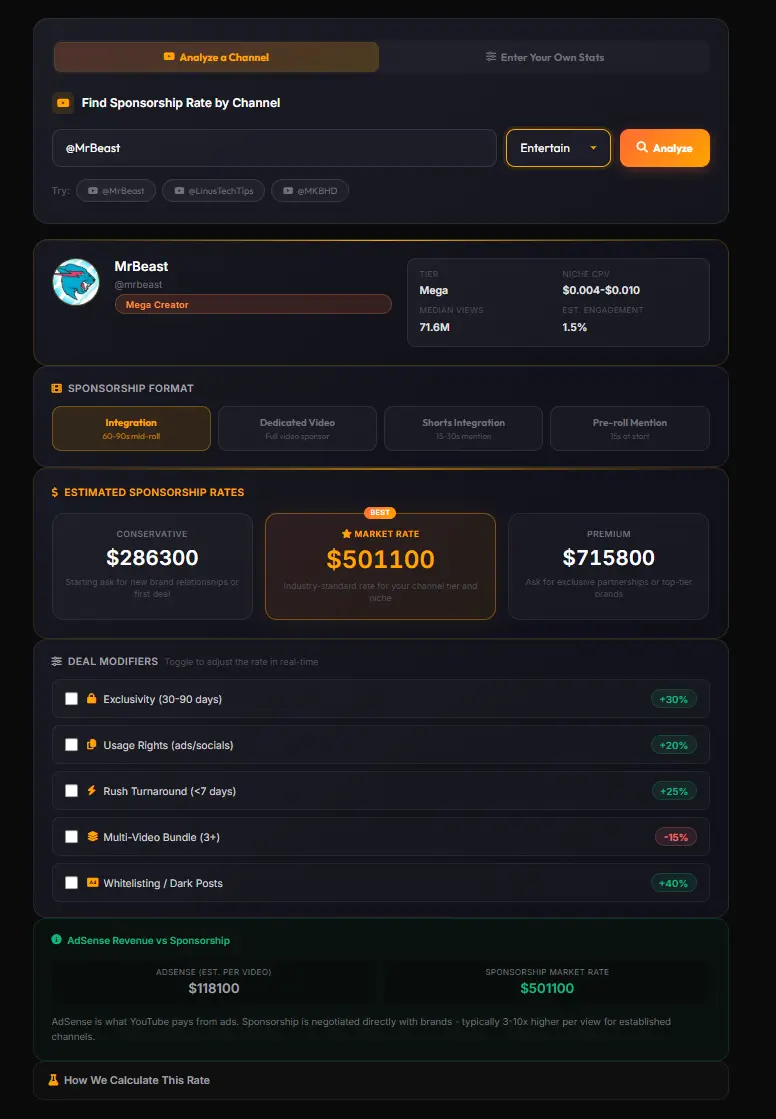
Step 1: Paste a Channel or Enter Your Own Stats
Users simply input the specific channel URL, handle, or estimated average view count to allow the algorithm to pull recent performance data. The tool supports:
- Handles:
@MrBeast,@mkbhd - Full profile URLs:
youtube.com/@channelname - Legacy channel IDs:
UCxxxxxxxxxxxxxxxx
For channels not publicly listed or for private benchmarking, switch to the Enter Your Own Stats tab and manually input subscriber count, average views, niche, and engagement rate.
Step 2: Choose Your Sponsorship Format
Select whether the deal encompasses a standard 60-second integration, a fully dedicated video, a Shorts mention, or a pre-roll placement to adjust the baseline multiplier appropriately. Each format carries a different value to brands:
- Integration (1.0x): 60-90 second mid-roll segment. The industry standard.
- Dedicated Video (2.5x): Full video revolves around the sponsor. Commands a significant premium.
- Shorts Integration (0.4x): 15-30 second mention. Efficient for reach, lower conversion intent.
- Pre-roll Mention (0.6x): 15 seconds at the top. Higher skip rates reduce value.
Step 3: Toggle Deal Modifiers to Refine Your Rate
Activate specific contract add-ons such as category exclusivity, paid usage rights, or rush turnaround times to see exactly how they impact the final valuation in real time.
How Is the Sponsorship Rate Calculated?
The analytical formula matches real-world media planning standards used by top marketing agencies. The calculation relies on the following mathematical logic:
Rate = Median Views x Niche CPV x Engagement Multiplier x Format Multiplier
- Median Views: The system takes the median of the last 15 long-form uploads rather than the average. This prevents a single viral outlier from inflating the baseline, giving brands a reliable delivery estimate.
- Niche CPV (Cost Per View): Each niche carries a distinct cost per view based on advertiser demand. Finance channels command $0.025-$0.042 per view because financial product advertisers bid aggressively. Gaming falls to $0.005-$0.012 due to younger demographics with lower purchase intent.
- Engagement Multiplier: Channels with engagement above 4% receive a positive multiplier (up to 1.35x). Channels with engagement below 1.5% receive a discount (0.85x). This reflects the real conversion value difference brands observe between active and passive audiences.
- Format Multiplier: Applied last to scale the base rate for the specific placement type selected.
The three tiers (Conservative, Market, Premium) map directly to the minimum, midpoint, and maximum of the niche’s CPV band, ensuring the spread reflects real market variability rather than arbitrary percentages.
YouTube Sponsorship Rates by Channel Size
Finding a reliable influencer pricing calculator is critical for securing fair YouTube sponsorship for small channels, as rates scale dynamically across distinct creator tiers based on median reach.
| Creator Tier | Subscriber Range | Avg Views Per Video | Typical Sponsored Rate |
|---|---|---|---|
| Nano | 1,000-10,000 | 5,000-15,000 | $100-$500 |
| Micro | 10,000-100,000 | 15,000-50,000 | $500-$5,000 |
| Mid-Tier | 100,000-500,000 | 50,000-250,000 | $5,000-$10,000 |
| Macro | 500,000-1,000,000 | 250,000-750,000 | $10,000-$20,000 |
| Mega | 1,000,000+ | 750,000+ | $20,000-$100,000+ |
These figures assume standard tech or education niche CPVs. Finance channels can command 2-3x these rates. Gaming and entertainment channels typically fall 40-60% below these benchmarks.
What Affects Your Sponsorship Rate?
Niche and CPM Band
Advertisers pay a premium for audiences with high purchasing intent. Finance and technology channels routinely command $30 to $80 CPMs, while broad entertainment content typically falls between $10 and $20 CPMs.
This niche differential is the single largest factor separating creator earnings across similarly-sized channels. A mid-tier finance channel can easily out-earn a mega entertainment channel on a per-view basis.
Engagement Rate
A highly engaged audience directly increases conversion potential for brands. Channels that exceed their tier’s baseline engagement rate (calculated as likes plus comments divided by views) receive a positive multiplier, whereas low engagement reduces the quoted rate.
Industry benchmarks for healthy engagement by tier:
- Nano/Micro channels: 4-8% (audiences are tightly knit and highly responsive)
- Mid-tier channels: 2-4% (broader audience, moderate interaction)
- Macro/Mega channels: 0.5-2% (mass reach, lower proportional interaction)
Sponsorship Format
The type of placement heavily dictates market price. A dedicated video where the entire content focuses on the sponsor commands a 1.5x to 2x premium over a standard 60-second mid-roll integration. Pre-roll placements have the highest skip rates and therefore command the lowest unit value despite appearing at maximum visibility.
Deal Modifiers
Extra contract terms add tangible value to a brand’s campaign:
- Exclusivity (30-90 days): +30% - Prevents the creator from working with direct competitors during the window.
- Usage Rights: +20% - Allows the brand to repurpose the creative for paid social, display, or TV.
- Rush Turnaround (under 7 days): +25% - Compensates for schedule disruption and expedited production.
- Multi-Video Bundle (3+): -15% - Offered as a discount in exchange for guaranteed repeat bookings.
- Whitelisting / Dark Posts: +40% - Grants the brand access to run paid ads directly from the creator’s account, delivering the highest advertiser value.
Sponsorship Rate vs AdSense Revenue - What Is the Difference?
Sponsorship rates and AdSense revenue represent entirely different monetization models. AdSense relies on programmatic ads placed by the platform, yielding an average RPM of $3 to $8 depending on content niche and viewer geography.
Conversely, direct brand sponsorships bypass platform revenue splits, allowing creators to negotiate full fees based on targeted CPMs. This frequently results in earnings significantly higher per view than AdSense alone.
A practical example: a channel delivering 200,000 views per video might earn $600-$1,600 from AdSense per upload. The same video with a mid-roll sponsor integration in a tech niche could generate $3,600-$6,000 from a single brand deal - representing a 3-4x multiplier on the same viewership.
The YouTube Money Calculator can help you model AdSense earnings separately to understand exactly how much of your total revenue potential is being left on the table without a direct sponsorship strategy.
Sponsorship Calculator vs Other Pricing Tools
When evaluating influencer pricing tools, data transparency and user friction serve as significant differentiators.
| Pricing Tool | Email Required? | Real Data? | Output Format |
|---|---|---|---|
| This Calculator | No | Yes | 3 Tiers (Conservative, Market, Premium) |
| Channeltics | No | Yes | 3 Tiers (Conservative, Market, Premium) |
| Sponsorship.so | Yes (for full data) | Yes | Single Estimate + Rights |
| Generic Calculators | Varies | No (subscriber-based) | Single Arbitrary Estimate |
Unlike generic calculators that rely solely on vanity subscriber counts, this tool uses median view counts and niche-specific CPVs. Furthermore, bypassing the email gate ensures creators and agencies can conduct rapid, unrestricted research across multiple channels without friction or account creation.
Tips for Negotiating Your Sponsorship Rate
Use Market Rate as a benchmark anchor. Negotiations should always begin using the market tier as the baseline. Treat the conservative tier strictly as an absolute walk-away floor, never as your opening quote.
Document engagement history. Brands pay for proven results. Presenting a media kit that highlights historical engagement rates and past successful campaigns justifies pushing toward the premium tier, particularly when your engagement exceeds your channel tier’s average.
Never accept the first offer. Brands frequently open negotiations 30-40% below their actual maximum budget. Countering with data-backed market knowledge consistently yields higher closing rates. Reference your calculator output during the negotiation.
Leverage strategic bundles. If a brand requests a lower unit rate, offering a multi-video package or bundling in YouTube Shorts secures the overall budget while providing them perceived value on the per-video cost.
Factor in audience geography. If your analytics show 60%+ US or UK audience share, use this as a premium argument. Advertisers in high-CPM markets pay significantly more for confirmed tier-one geography access.
Related YouTube Analytics Tools
Use the sponsorship calculator as part of a complete creator monetization research workflow:
- YouTube Channel Comparison - Benchmark your channel’s performance and engagement against a direct competitor before entering rate negotiations
- YouTube Money Calculator - Estimate AdSense revenue side by side with sponsorship income to understand total monetization potential
- YouTube Engagement Rate Calculator - Calculate your precise engagement rate to determine which multiplier tier your channel qualifies for
- YouTube Outlier Finder - Identify your top-performing videos to highlight in a media kit for brand outreach
Frequently Asked Questions
Is this YouTube sponsorship calculator really free?
Yes, the tool is entirely free to use for both creators and marketing agencies. There are no hidden paywalls, subscription requirements, or usage limits to view the standard pricing tiers.
Do I need to enter my email to see results?
No email registration is required at any point. The platform provides instant, frictionless access to valuation data without gating the results behind a signup form. This is a deliberate design decision - you should never have to trade your contact information for publicly derivable data.
Can I calculate a rate for a channel I do not own?
Absolutely. Brands, agencies, and researchers can input any public channel URL or handle to pull recent performance metrics and estimate fair market rates. This is particularly useful for pre-outreach budget planning.
What is the difference between this and my AdSense earnings?
AdSense earnings represent the programmatic ad revenue shared by the YouTube platform, calculated on a per-impression basis. This calculator estimates direct, flat-fee brand deals negotiated independently of YouTube’s ad system. Sponsorships typically yield 3-10x higher returns per thousand views than standard AdSense for mid-tier and above channels.
How accurate is the estimated rate?
The estimates are highly accurate for initial benchmarking. They rely on live median view analysis, current industry CPV bands by niche, and real engagement metrics where available from the API. External factors like celebrity status, audience geography, or unique production quality may alter the final negotiated rate, but the calculator provides a defensible starting range backed by transparent methodology.
What if my channel has no sponsorship history yet?
The algorithm evaluates current viewership and engagement potential rather than past deals. This ensures new creators can still receive a reliable, data-backed baseline to use during their first brand negotiations. Start with the Conservative tier for initial outreach and move toward Market Rate once you have one successful case study to reference.
Why does niche matter so much for sponsorship rates?
Niche determines which advertisers are competing for your audience’s attention. Financial services, SaaS software, and B2B tools pay 4-6x more per view than consumer gaming or entertainment brands because each converted viewer represents significantly higher lifetime value to their business. The CPV band in this calculator reflects actual advertiser bidding competition by category, not arbitrary multipliers.