Your First 10 YouTube Videos: What to Post and Content Plan [2026]
The channel is set up. The banner looks professional. The description is optimized. And now — nothing. The blank content calendar stares back at you, and one question freezes everything: “What should I actually post?”
This is the exact point where most new channels die. Not from lack of talent or equipment, but from overthinking the first video until it never gets published. YouTube’s algorithm needs data to learn who your audience is, and a channel with zero videos gives it zero data to work with.
This guide gives you the complete framework: why perfection kills new channels, the 3-bucket content strategy that balances discovery with loyalty, a ready-to-use 10-video plan, the optimal upload frequency, and the single mistake that wastes your entire first month.
This is part of our full setup guide: How to Create a YouTube Channel.
Why Your First Videos DON’T Need to Be Perfect
The most destructive myth in content creation is that your first video needs to match the production quality of channels with millions of subscribers. This belief creates “Gear Acquisition Syndrome” — delaying your launch for months waiting for the perfect camera, lighting, and backdrop. In reality, this perfectionism is procrastination disguised as quality control.
Here’s what actually happens when a brand new channel uploads its first video: YouTube’s recommendation system has zero historical data about your audience. It tests the video on a tiny exploratory sample. Unless you hit an unsaturated topic with exceptional packaging, it won’t go viral — regardless of how expensive your camera is.
Spending three months perfecting one video is the worst possible use of your time.
Your first 10–20 videos serve as a training ground — for you to develop your on-camera presence and editing workflow, and for the algorithm to start matching your channel with the right viewer segments.
The Production Hierarchy (Where to Invest First)
Not all production elements matter equally. Here’s the priority order for new creators:
| Element | Priority | Why It Matters | Beginner Solution |
|---|---|---|---|
| Audio quality | 🔴 Critical | Bad audio makes viewers leave instantly, destroying Average View Duration | $20–50 USB or lavalier mic. Use AI noise removal tools. |
| Lighting | 🟡 Medium | Dark visuals reduce perceived credibility | Natural window light or a budget ring light. Never backlight yourself. |
| Camera quality | 🟢 Low | YouTube compresses video; 4K details are lost on phone screens (70%+ of viewers) | Any modern smartphone is sufficient for your first 50–100 videos. |
| Editing polish | 🟡 Medium | Flashy effects can’t compensate for weak storytelling | Jump cuts to remove silence and filler words. CapCut or iMovie (free). |
The data is clear: viewers in 2026 value authenticity and knowledge over polished production. Unscripted, genuine content consistently outperforms corporate-style videos because it builds stronger parasocial connections.
Your goal with each video: 1% better than the last one. That’s it.
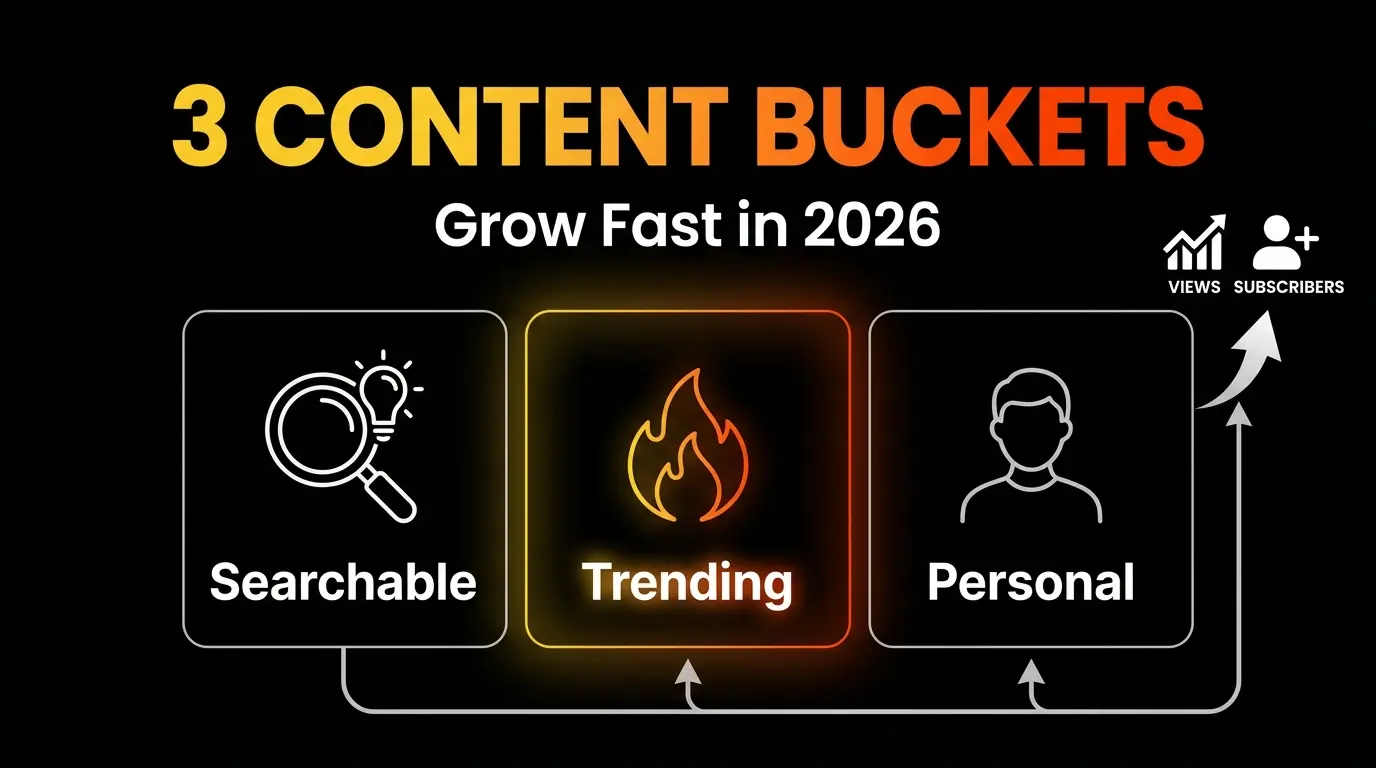
The “3 Bucket” Content Strategy for New Channels
Random posting confuses both your audience and the algorithm. Posting only one type of content leads to burnout. The solution is a structured mix of three content categories — each serving a different strategic purpose.
Bucket 1 — Searchable Content (Tutorials, How-to’s)
What it is: Videos designed to answer specific questions people are actively searching for.
Why it’s your foundation: A channel with zero subscribers has no existing audience to notify. You depend entirely on viewers who find you through YouTube Search — which still generates roughly 35% of all platform traffic.
Format examples: Step-by-step tutorials, “how to” guides, software walkthroughs, tool comparisons, myth-busting videos.
Content lifespan: Evergreen — generates consistent traffic for months or years.
SEO rules for 2026:
- Target long-tail keywords (3–5 words) with moderate search volume and low competition
- Place the primary keyword in the first 40 characters of your title
- Say the keyword out loud within the first 60 seconds (YouTube’s AI captions index spoken words)
- Use YouTube’s search autocomplete and Google Trends to find exact phrases
Instead of targeting “photography tips” (impossible to rank), target “budget camera settings for indoor product photography”
Recommended share: 50–60% of your first 10 videos.
Bucket 2 — Trending/Reactive Content
What it is: Videos tied to current events, industry news, viral moments, or trending formats.
Why it matters: When a topic trends, demand temporarily exceeds supply. New channels that publish quality takes within this window can “hijack” algorithmic momentum and reach tens of thousands of viewers overnight.
Format examples: News reactions, industry analysis, challenge participation, new product first impressions, cultural commentary tied to your niche.
Content lifespan: Short — massive spike in 48–72 hours, then sharp decline.
Critical rule: Always connect trending content back to your niche. A finance channel analyzing a celebrity’s real estate purchase works. An unrelated drama recap does not.
Recommended share: 20–25% of your first 10 videos.
Bucket 3 — Personal/Story Content
What it is: Videos centered on your personality, journey, failures, routines, and behind-the-scenes reality.
Why it converts: A viewer might find you through a tutorial (Bucket 1) and discover you through a trending take (Bucket 2), but they subscribe and stay because of your personal content (Bucket 3).
In 2026, AI can generate unlimited informational content. What it cannot replicate is your authentic human experience. Personal content builds parasocial relationships — the psychological bond that transforms casual viewers into loyal community members.
Format examples: “Day in my life” vlogs, Q&A sessions, behind-the-scenes of your workflow, failure/success stories, workspace tours, milestone celebrations.
Content lifespan: Medium to long for existing subscribers.
Timing note: Don’t make personal content your first video. Strangers don’t care about someone they haven’t received value from yet. Introduce personal content by video 3 or 4.
Recommended share: 20–25% of your first 10 videos.
| Bucket | Discovery Engine | Psychological Trigger | Lifespan |
|---|---|---|---|
| Searchable | YouTube Search, Google SGE | Problem-solving, learning | Months to years |
| Trending | Browse feed, Suggested videos | FOMO, curiosity | Days to weeks |
| Personal | Subscriptions, returning viewers | Trust, belonging, empathy | Medium-long for subscribers |
A 10-Video Content Plan Template
Stop planning. Start with this matrix. Fill in your niche-specific topics and begin filming:
| # | Bucket | Video Concept | Strategic Purpose |
|---|---|---|---|
| 1 | 🔍 Search | Beginner’s 101 Guide — foundational tutorial on your core topic | Break the starting barrier. Target a high-volume long-tail keyword. |
| 2 | 🔍 Search | ”X Mistakes to Avoid” — 3–5 common beginner errors in your niche | Leverage negativity bias (people click to avoid failure). High CTR potential. |
| 3 | 🧑 Personal | ”Why I Started This Channel” — your origin story and motivation | Convert search viewers from videos 1–2 into subscribers. Humanize your brand. |
| 4 | 🔥 Trending | Industry News Reaction — analyze a current event in your niche | Hijack algorithmic momentum. Reach a wider audience through Suggested feed. |
| 5 | 🔍 Search | Tool/Product Review — honest review of a popular tool in your space | Capture high-intent buyer search traffic. Affiliate revenue opportunity. |
| 6 | 🧑 Personal | Behind the Scenes / Day in My Life — document your creative process | Deepen community bonds. Lighter format balances heavy tutorials. |
| 7 | 🔍 Search | Micro-Problem Solver — short, specific tutorial solving one frustrating issue | Ultra-high search intent. These often achieve 60%+ Average View Duration. |
| 8 | 🔥 Trending | ”I Tried X for 30 Days” — document a trending challenge with results | High clickability. Challenges create curiosity loops that boost retention. |
| 9 | 🔍 Search | Comparison Video (A vs. B) — two methods, tools, or approaches compared | Attract decision-stage viewers. Generates high comment engagement. |
| 10 | 🧑 Personal | Q&A / 10-Video Review — answer questions from comments, reflect on the journey | Reward your early community. Strong “returning viewer” signal for the algorithm. |
Pre-Production Workflow
- Batch plan all 10 before filming video #1. Use beat sheets (1-line hook + 3–5 key points + CTA), not word-for-word scripts.
- Batch film 2–4 videos per session. Change your shirt between takes to simulate different days.
- Practice data blindness during the first 10 videos. Don’t obsessively check analytics after video #2. The algorithm needs 15–20 videos to accurately map your channel. Deep analysis starts after video #10.
How Often Should a New Channel Upload?
The “upload daily” advice is a myth that burns out creators and tanks channel quality. In 2026, YouTube’s algorithm prioritizes viewer satisfaction over upload volume. Five mediocre videos per week that viewers abandon after 30 seconds teach the algorithm your channel produces low-satisfaction content.
One exceptional video per week that holds 60% retention outperforms five forgettable ones every time.
Recommended Frequency for Beginners
| Format | Frequency | Why |
|---|---|---|
| Long-form videos | 1–2 per week | Enough time for research, filming, and editing without sacrificing quality. Builds a predictable weekly viewing habit. |
| YouTube Shorts | 3–4 per week | Shorts run on a separate algorithm focused on discovery. 74% of Shorts views come from non-subscribers — making them a top-of-funnel engine. |
Best Publishing Times (2026 Data)
| Day | Optimal Window (Viewer’s Local Time) | Why |
|---|---|---|
| Mon–Tue | 2:00 PM – 5:00 PM | Catches attention during late-day slumps and commutes |
| Wednesday | 3:00 PM – 5:00 PM | Strongest weekday for sustained engagement |
| Thu–Fri | 12:00 PM – 5:00 PM | Friday afternoons work well for longer/entertainment content |
| Sat–Sun | 9:00 AM – 1:00 PM | Weekend viewers binge-watch in relaxed morning sessions |
Important: Optimize for your audience’s time zone, not yours. Check the “When your viewers are on YouTube” heatmap in YouTube Studio → Audience tab.
The One Mistake That Wastes Your First Month
It’s not your camera. It’s not your upload frequency. The single most destructive mistake is failing to optimize your packaging and opening hook.
Half 1: Weak Thumbnails and Titles
You can spend 20 hours on a video, but if the thumbnail and title don’t force a click, the video effectively doesn’t exist. Platform-wide CTR averages 2–10%. Drop below 2–3% and the algorithm stops recommending your video entirely.
Fix: Design your thumbnail and title before filming — not after. Follow the one-idea rule:
- High-contrast image with a clean background
- Expressive face showing clear emotion (data shows +20–30% CTR lift)
- Minimal bold text (under 12 characters) that complements the title
- Title front-loads the primary keyword and promises a specific outcome
Half 2: Burying the Hook
A viewer who clicks your excellent thumbnail enters an 8-second consideration window. If your opening is a 30-second animated logo intro followed by “Hey guys, welcome back, don’t forget to like and subscribe, so today I wanted to talk about…” — they’re gone.
Losing 50% of viewers in the first 30 seconds tells the algorithm your content is clickbait. It stops suggesting your video permanently.
Fix: Use the surgical hook formula:
- 0–5 seconds (Promise): State exactly what the viewer will gain.
- 5–8 seconds (Proof): Show a quick preview of the result, or state your qualification.
- 8+ seconds (Deliver): Dive directly into the content. No logo animations. No subscribe requests until you’ve delivered undeniable value first.
Look directly at the camera lens — not at your flip screen or monitor. Breaking eye contact breaks the parasocial connection.
Your First Month Checklist
- All 10 video topics planned before filming video #1
- Each video assigned to a bucket (Search / Trending / Personal)
- Thumbnails designed before filming (not after)
- Audio is clean (mic + noise removal)
- Hook delivers the promise within 8 seconds
- Titles front-load keywords and promise specific outcomes
- Upload schedule set (1–2 long-form + 3–4 Shorts per week)
- Analytics review postponed until after video #10
- Each video links to the next logical step on your channel
Your content plan is set. Now make sure every video reaches YouTube the right way. Read: How to Upload Videos to YouTube the Right Way.
Need help crafting titles? Try our free YouTube Title Generator.
![How to Get Your First 1000 YouTube Subscribers [2026]](/images/growth/how-to-get-1000-youtube-subscribers/1000-youtube-subscribers.webp)
![How Long Does It Take to Get 1000 YouTube Subscribers? [2026 Data]](/images/growth/how-long-to-get-1000-subscribers/1000-subscribers.webp)