YouTube Thumbnail Download: Ultimate Guide + Best Tools ⭐
If you’ve ever wanted to download a YouTube thumbnail—whether for competitive research, creating mood boards, or backing up your own designs—you’re in the right place. This comprehensive guide covers every method available, from the simplest one-click solutions to advanced developer techniques.
 Caption: Multiple ways to download YouTube thumbnails in various qualities
Why Download YouTube Thumbnails?
Before diving into the “how,” let’s understand the “why.” There are several legitimate reasons creators and marketers download thumbnails:
1. Competitive Research & Analysis
The most valuable use case. By studying thumbnails from successful channels in your niche, you can:
- Identify patterns that drive high CTR (Click-Through Rate)
- Analyze color schemes that dominate your niche
- Study text placement and typography choices
- Understand expression styles that resonate with audiences
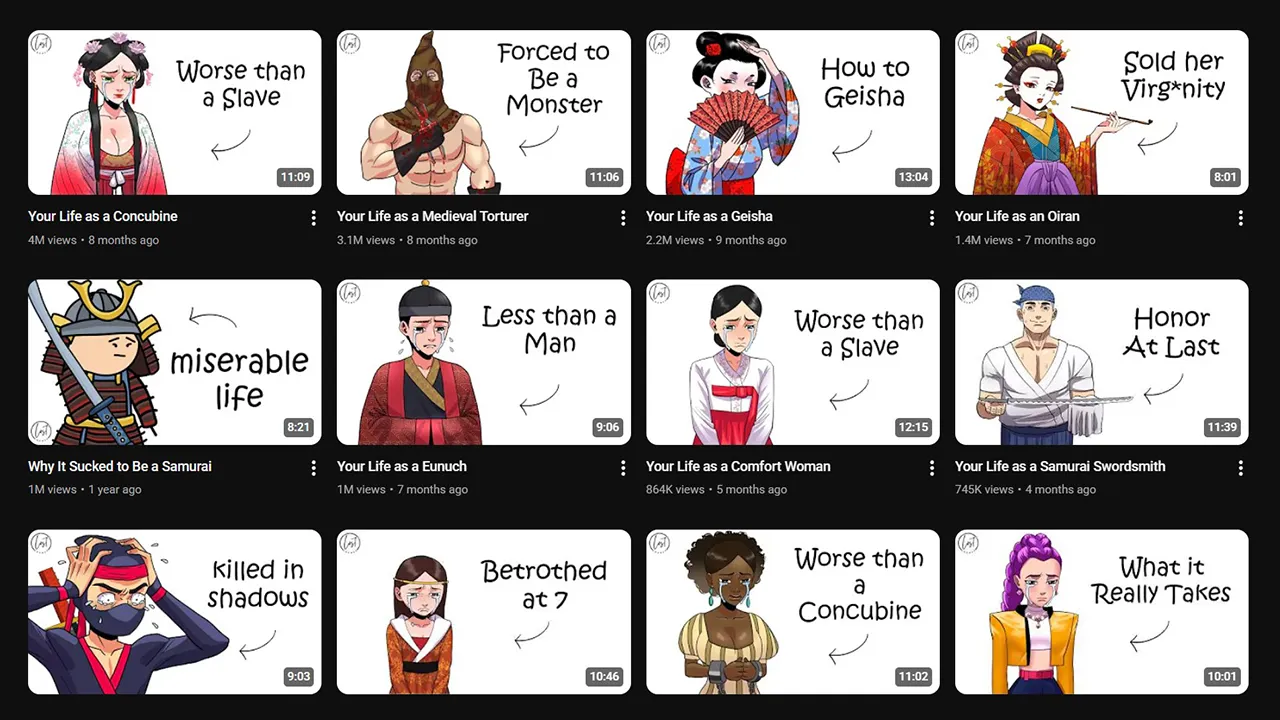
 Caption: Analyzing competitor thumbnails reveals patterns you can adapt
2. Inspiration & Swipe Files
Every professional designer maintains a swipe file—a collection of designs that inspire and inform their work. Downloading thumbnails lets you:
- Build a visual library organized by style
- Create mood boards for client presentations
- Reference successful designs when creating new thumbnails
- Study the evolution of top creators’ thumbnail styles
3. Backing Up Your Own Thumbnails
Many creators don’t save their original thumbnail files. Downloading from YouTube serves as:
- Emergency backup when local files are lost
- Quick access for reuse in other marketing materials
- Archive of your channel’s visual evolution
4. Client Presentations
When pitching thumbnail design services or presenting case studies:
- Show before/after comparisons
- Demonstrate industry standards
- Create portfolio pieces with proper attribution
5. Educational Analysis
Teachers, course creators, and YouTube educators often need thumbnails to:
- Illustrate best practices in video content
- Create tutorial materials
- Demonstrate techniques in design courses
Method 1: Online Tool (Fastest & Easiest) ⭐⭐⭐
The fastest and most reliable method is using a dedicated online tool. No installation, no technical knowledge required.
Our Recommended Tool: YouTube Thumbnail Downloader
We’ve built a free, fast, and privacy-focused thumbnail downloader right here on our site:
👉 YouTube Thumbnail Downloader - Save HD & 4K Images (Free)
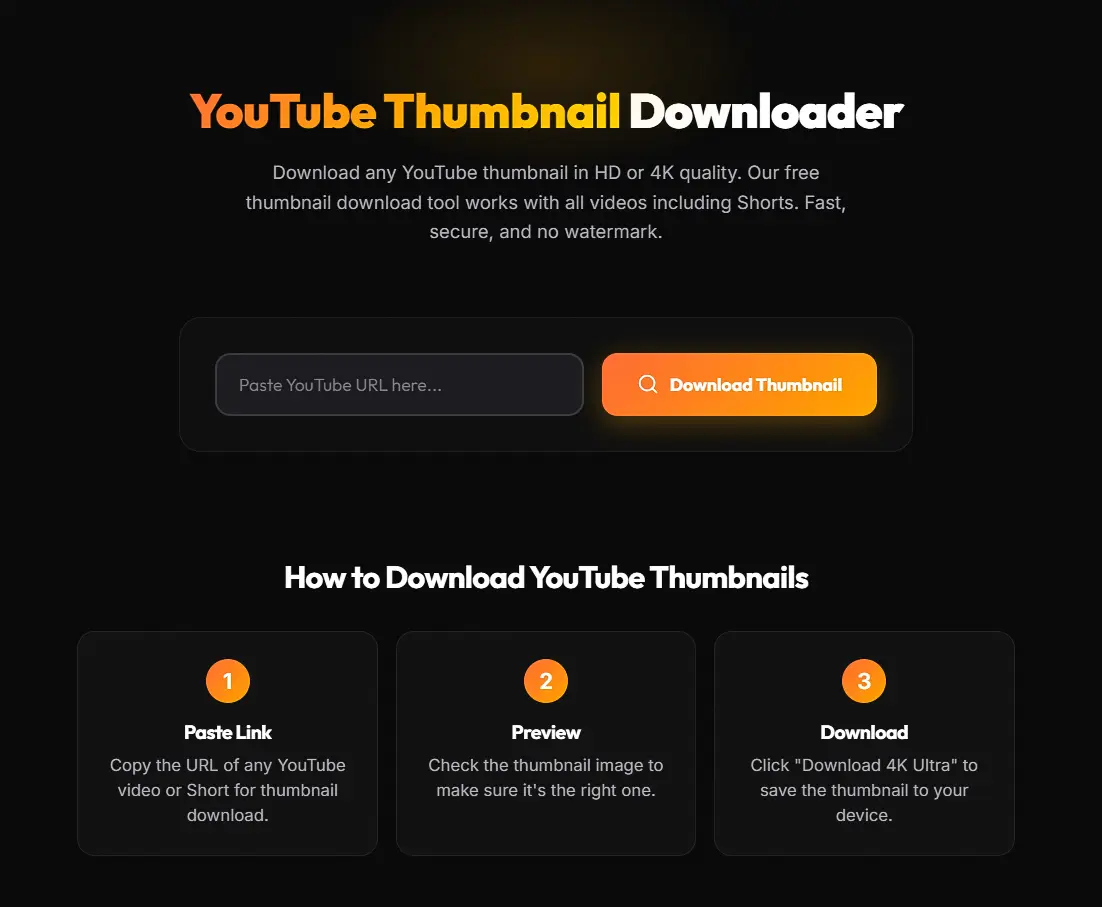 Caption: Our free YouTube Thumbnail Downloader - paste, click, download
Why Our Tool is the Best Choice:
| Feature | Our Tool | Others |
|---|---|---|
| Speed | Instant | Varies |
| Quality Options | All (4K, HD, SD) | Limited |
| Ads | None | Heavy |
| Privacy | No tracking | Unknown |
| Mobile-Friendly | ✅ Responsive | Often not |
| Bulk Download | ✅ Coming soon | Rarely |
How to Use Our Tool:
- Copy the YouTube video URL (any format works)
- Paste into our tool
- Click “Get Thumbnails”
- Choose your quality (4K, HD, SD, etc.)
- Click “Download” - done!
Supported URL Formats:
https://www.youtube.com/watch?v=VIDEO_IDhttps://youtu.be/VIDEO_IDhttps://youtube.com/shorts/VIDEO_ID- Just the video ID itself
Quality Options Available:
- maxresdefault.jpg - 1280×720 (HD) or 1920×1080 (Full HD) when available
- sddefault.jpg - 640×480 (Standard Definition)
- hqdefault.jpg - 480×360 (High Quality)
- mqdefault.jpg - 320×180 (Medium Quality)
- default.jpg - 120×90 (Thumbnail size)
Pro Tip: Not all videos have maxresdefault quality available. Our tool automatically detects the highest quality available for each video.
Method 2: Manual URL Trick (Free, No Tools)
If you prefer the DIY approach, you can manually construct thumbnail URLs. This is completely free and requires no tools—just your browser.
Step 1: Find the Video ID
Every YouTube video has a unique 11-character ID. Here’s where to find it:
From a standard URL:
https://www.youtube.com/watch?v=dQw4w9WgXcQ
                              └────────────┘
                              This is the Video ID
From a short URL:
https://youtu.be/dQw4w9WgXcQ
                └────────────┘
                This is the Video ID
Step 2: Construct the Thumbnail URL
Use this template, replacing VIDEO_ID with the actual ID:
https://img.youtube.com/vi/VIDEO_ID/maxresdefault.jpgExample:
https://img.youtube.com/vi/dQw4w9WgXcQ/maxresdefault.jpgStep 3: Open and Save
- Paste the constructed URL into your browser
- Right-click the image
- Select “Save Image As…”
- Done!
Quality Options Explained
| Quality | URL Ending | Resolution | When Available |
|---|---|---|---|
| Maximum | maxresdefault.jpg | 1280×720 or 1920×1080 | HD videos only |
| Standard | sddefault.jpg | 640×480 | Most videos |
| High | hqdefault.jpg | 480×360 | All videos |
| Medium | mqdefault.jpg | 320×180 | All videos |
| Default | default.jpg | 120×90 | All videos |
Copy-Paste Template URLs:
# Maximum quality (try first)
https://img.youtube.com/vi/VIDEO_ID/maxresdefault.jpg

# Standard quality (fallback)
https://img.youtube.com/vi/VIDEO_ID/sddefault.jpg

# High quality (always works)
https://img.youtube.com/vi/VIDEO_ID/hqdefault.jpg

# Medium quality
https://img.youtube.com/vi/VIDEO_ID/mqdefault.jpg

# Thumbnail size
https://img.youtube.com/vi/VIDEO_ID/default.jpg
Note: If maxresdefault returns a gray placeholder image, the video doesn’t have HD quality thumbnail—try sddefault or hqdefault instead.
Method 3: Browser Extensions (Quick Access)
Browser extensions add a download button directly on YouTube pages, making the process seamless.
For Chrome Users
Several extensions can add thumbnail download functionality to YouTube. Search the Chrome Web Store for “YouTube thumbnail downloader” and look for:
Key features to look for:
- ✅ High ratings (4+ stars)
- ✅ Regular updates
- ✅ Minimal permissions
- ✅ No excessive ads
- ✅ Multiple quality options
How to Install:
- Go to Chrome Web Store
- Search for “YouTube thumbnail downloader”
- Check reviews and permissions
- Click “Add to Chrome”
- Visit any YouTube video and look for the download button
For Firefox Users
Firefox Add-ons marketplace also has several options. The installation process is similar:
- Go to Firefox Add-ons
- Search for thumbnail downloader extensions
- Check permissions carefully
- Install and use on YouTube
⚠️ Privacy & Security Considerations
Before installing ANY extension:
- Check permissions - An extension that needs access to “all your data” for thumbnail downloading is suspicious
- Read recent reviews - Look for complaints about ads, malware, or data collection
- Verify the developer - Unknown developers may have malicious intent
- Fewer is better - Only install extensions you truly need
- Update regularly - Outdated extensions can have security vulnerabilities
Our Recommendation: Online tools like our YouTube Thumbnail Downloader are often safer than extensions because they don’t have access to your browsing data.
Method 4: Developer Tools (Advanced)
For those comfortable with browser developer tools, you can extract thumbnails directly from the page source.
Right-Click Inspect Method
- Right-click on the thumbnail on YouTube
- Select “Inspect” or “Inspect Element”
- In the Elements panel, look for
<img>tags - Find the
srcattribute with the thumbnail URL - Copy the URL and open in new tab
- Right-click and save
Network Tab Method
This method captures all images loaded by the page:
- Open Developer Tools (F12 or Ctrl+Shift+I)
- Go to the “Network” tab
- Filter by “Img” (images only)
- Refresh the page
- Look for files named maxresdefault, sddefault, etc.
- Right-click → “Open in new tab” → Save
Method 5: YouTube API & Scripts (Automation)
For developers or those needing bulk downloads, the YouTube Data API offers programmatic access.
YouTube Data API v3
The official API provides thumbnail URLs for any video:
API Endpoint:
GET https://www.googleapis.com/youtube/v3/videos
    ?part=snippet
    &id=VIDEO_ID
    &key=YOUR_API_KEY
Response includes:
{
  "items": [{
    "snippet": {
      "thumbnails": {
        "default": { "url": "...", "width": 120, "height": 90 },
        "medium": { "url": "...", "width": 320, "height": 180 },
        "high": { "url": "...", "width": 480, "height": 360 },
        "standard": { "url": "...", "width": 640, "height": 480 },
        "maxres": { "url": "...", "width": 1280, "height": 720 }
      }
    }
  }]
}
Python Script Example
Here’s a simple Python script for bulk downloading:
import requests
import os

def download_thumbnail(video_id, quality='maxresdefault', output_dir='thumbnails'):
    """Download YouTube thumbnail by video ID."""

    # Create output directory if it doesn't exist
    os.makedirs(output_dir, exist_ok=True)

    # Construct URL
    url = f"https://img.youtube.com/vi/{video_id}/{quality}.jpg"

    # Download image
    response = requests.get(url)

    if response.status_code == 200:
        # Check if it's a valid image (not placeholder)
        if len(response.content) > 1000:  # Real images are larger
            filepath = os.path.join(output_dir, f"{video_id}_{quality}.jpg")
            with open(filepath, 'wb') as f:
                f.write(response.content)
            print(f"✅ Downloaded: {filepath}")
            return True

    print(f"❌ Failed or placeholder: {video_id}")
    return False

# Usage
video_ids = [
    "dQw4w9WgXcQ",
    "VIDEO_ID_2",
    "VIDEO_ID_3"
]

for vid in video_ids:
    download_thumbnail(vid)
For bulk automation:
- Create a text file with video IDs (one per line)
- Loop through and download each
- Add delay between requests to avoid rate limiting
- Implement retry logic for failed downloads
Legal Considerations
Fair Use for Research
Downloading thumbnails for educational analysis, research, and criticism generally falls under fair use in most jurisdictions. This includes:
- Reviewing and analyzing design techniques
- Teaching and educational content
- Commentary and criticism
- Non-commercial research
Copyright and Attribution
Remember that thumbnails are copyrighted by their creators:
- Don’t claim others’ work as your own
- Provide attribution when showing others’ thumbnails
- Don’t use downloaded thumbnails in commercial projects without permission
Commercial Use Restrictions
Using downloaded thumbnails commercially (selling, advertising, etc.) without permission is copyright infringement. If you need thumbnails for commercial purposes:
- Create your own original designs
- Purchase stock images
- Get explicit permission from the creator
Terms of Service
YouTube’s ToS technically restricts downloading content. However, thumbnails are publicly accessible images, and downloading for personal/educational use is widely practiced and generally tolerated.
Organization System for Downloaded Thumbnails
Once you start building a collection, organization becomes crucial.
Folder Structure
📁 Thumbnails/
├── 📁 By Niche/
│   ├── 📁 Gaming/
│   ├── 📁 Tech Reviews/
│   ├── 📁 Vlogs/
│   └── 📁 Educational/
├── 📁 By Competitor/
│   ├── 📁 MrBeast/
│   ├── 📁 MKBHD/
│   └── 📁 Linus Tech Tips/
├── 📁 By Style/
│   ├── 📁 Shocked Face/
│   ├── 📁 Split Screen/
│   ├── 📁 Product Focus/
│   └── 📁 Text Heavy/
├── 📁 My Thumbnails/
│   ├── 📁 Published/
│   └── 📁 Drafts/
└── 📁 Mood Boards/
Naming Conventions
Use consistent naming for easy searching:
[Channel]_[Title-Keywords]_[Date]_[Quality].jpg

Example:
MrBeast_100K-Challenge_2026-01-15_maxres.jpg
MKBHD_iPhone-Review_2026-01-20_hd.jpg
Tagging and Metadata
For serious collections, consider:
- Image management software (Adobe Bridge, Lightroom)
- Note-taking apps with image support (Notion, Obsidian)
- Spreadsheet database tracking source URL, download date, channel, style notes
Advanced Use Cases
Competitive Analysis Workflow
- Identify top 10 competitors in your niche
- Download their top 20 thumbnails (by views)
- Create a comparison grid in Photoshop/Figma
- Analyze patterns: colors, text, faces, composition
- Document findings in a style guide
- Apply insights to your own thumbnails
Creating Mood Boards
Combine downloaded thumbnails with other visual inspiration:
- Use tools like Miro, Figma, or Pinterest
- Group by emotion, color palette, or style
- Reference during your design process
Training Design Teams
When teams create thumbnails, provide reference collections:
- “Do” examples (high-performing competitors)
- “Don’t” examples (common mistakes)
- Channel-specific style guides
Downloading from Private/Unlisted Videos
Unlisted Videos
Unlisted videos work with all methods above—you just need the video ID.
Private Videos
Private videos cannot be accessed. Thumbnails aren’t publicly available, so there’s no way to download them without being added as an authorized viewer.
Quality Restoration
When You Get Low-Resolution Downloads
If only low-quality thumbnails are available:
AI Upscaling Tools
AI-powered upscaling can significantly improve low-res thumbnails:
- Increase resolution 2-4x
- Sharpen details
- Reduce artifacts
Popular options:
- Adobe Photoshop (Neural Filters → Super Resolution)
- Topaz Gigapixel AI
- Let’s Enhance (online)
- Waifu2x (free, open-source)
Manual Enhancement
In Photoshop:
- Image → Image Size (set to 300% with “Preserve Details 2.0”)
- Filter → Sharpen → Smart Sharpen
- Filter → Noise → Reduce Noise
Bulk Download Strategies
For Large Collections
- Use the API method with a script
- Maintain a video ID list in a spreadsheet
- Schedule downloads to avoid rate limiting
- Implement error handling for failed downloads
- Organize as you go using the naming conventions above
Rate Limiting Considerations
When bulk downloading:
- Add 1-2 second delays between requests
- Use multiple sessions spread over time
- Implement retry with exponential backoff
Format Conversion
WebP to PNG/JPG
Some YouTube thumbnails may be served as WebP format. To convert:
Online converters:
- Search for “WebP to JPG converter”
- Upload and download in your preferred format
In Photoshop:
- Open the WebP file (requires plugin for older versions)
- File → Save As → Choose JPEG or PNG
Command line (ImageMagick):
convert thumbnail.webp thumbnail.jpgMobile Download Methods
iOS (iPhone/iPad)
- Use Safari to visit our YouTube Thumbnail Downloader
- Paste the YouTube URL
- Long-press on the thumbnail image
- Select “Save to Photos”
Alternative: Use the manual URL method in Safari, then save the image.
Android
- Open Chrome and visit our tool
- Paste the YouTube URL
- Long-press on the thumbnail
- Select “Download image”
Via YouTube App:
- Share video → Copy link
- Open browser
- Use any of the methods above
Troubleshooting Common Issues
”Gray Placeholder” Image
Problem: You get a gray/blank image instead of the actual thumbnail.
Solution: The video doesn’t have that quality available. Try:
- sddefault.jpg instead of maxresdefault.jpg
- hqdefault.jpg as fallback
”File Not Found” Error
Problem: 404 error when accessing thumbnail URL.
Solution:
- Double-check the video ID (exactly 11 characters)
- The video may have been deleted
- Try copying the ID directly from YouTube
Low Quality Despite Using maxresdefault
Problem: The maxresdefault exists but is low quality.
Explanation: This means the video was uploaded before YouTube’s HD requirements, or the creator uploaded a low-res thumbnail.
Solution: Use AI upscaling tools mentioned above.
How to Download YouTube Shorts Thumbnails
YouTube Shorts use a vertical 9:16 format (1080 × 1920 pixels), and downloading their thumbnails works slightly differently than standard videos.
Why Shorts Thumbnails Are Different
Shorts thumbnails appear in multiple formats across YouTube:
| Where It Appears | Format Shown | Aspect Ratio |
|---|---|---|
| Shorts shelf (scrolling feed) | Vertical crop | 9:16 |
| Search results | Horizontal | 16:9 |
| Channel page | Horizontal | 16:9 |
| Suggested videos | Horizontal | 16:9 |
When you download a Shorts thumbnail, YouTube serves the 16:9 horizontal version — the same maxresdefault.jpg format used for regular videos.
Method: Download Shorts Thumbnails
Using our tool (easiest):
- Open the Short in your browser
- Copy the URL — it looks like:
https://youtube.com/shorts/VIDEO_ID - Paste into our YouTube Thumbnail Downloader
- All quality options appear automatically
Using the manual URL trick:
Shorts use the same video ID system. Extract the ID from the Shorts URL:
https://youtube.com/shorts/abc123XYZqw
                              └──────────┘
                              This is the Video ID
Then construct the thumbnail URL:
https://img.youtube.com/vi/abc123XYZqw/maxresdefault.jpgCustom Shorts Thumbnails (2026 Update)
YouTube now allows creators to upload custom thumbnails for Shorts — a feature that didn’t exist before 2025. This means:
- More Shorts now have high-quality, designed thumbnails available for download
- The
maxresdefault.jpgquality is increasingly available for Shorts - Custom Shorts thumbnails follow the same download methods as regular videos
For detailed Shorts thumbnail sizing specs, see our YouTube Thumbnail Size Guide — Shorts Section.
4K Thumbnails: YouTube’s 50MB Update (2026)
In early 2026, YouTube raised the thumbnail file size limit from 2MB to 50MB — a 25× increase. This directly affects what you can download.
What Changed for Downloads
| Spec | Before (Pre-2026) | After (March 2026) |
|---|---|---|
| Max file size uploaded | 2 MB | 50 MB |
| Max resolution available | 1920×1080 | Up to 3840×2160 (4K) |
Download quality via maxresdefault | 1280×720 HD | 1280×720 HD (unchanged) |
| Download quality via API | Up to 1920×1080 | Up to 3840×2160 |
How to Download 4K Thumbnails
YouTube’s standard URL trick (maxresdefault.jpg) still serves 1280×720 — the same as before. To get the actual 4K version:
Method 1: YouTube Data API v3
The API now returns a maxres thumbnail object that may point to a higher-resolution file for channels that upload 4K thumbnails:
"thumbnails": {
  "maxres": {
    "url": "https://i.ytimg.com/vi/VIDEO_ID/maxresdefault.jpg",
    "width": 3840,
    "height": 2160
  }
}
Method 2: Our tool (automatic detection)
Our YouTube Thumbnail Downloader automatically detects when a higher-resolution version is available and offers it as a download option.
Do You Actually Need 4K Thumbnails?
For most use cases — no. Here’s why:
- 70% of YouTube views happen on phones where thumbnails display at ~156×88 pixels
- The quality difference is only visible on large 4K TV screens (65”+)
- A well-optimized 1280×720 HD thumbnail looks pixel-perfect everywhere else
When 4K downloads matter:
- You’re analyzing thumbnails for a design or photography channel
- You need to zoom in and study fine typography details
- You’re creating print materials or large-format presentations
For the complete technical breakdown of the 50MB update, read our YouTube Thumbnail Size Guide — 50MB Section.
Summary: Choose Your Best Method
| Method | Speed | Ease | Quality | Best For |
|---|---|---|---|---|
| Our Online Tool | ⚡ Instant | ⭐⭐⭐⭐⭐ | All options | Everyone |
| Manual URL | Medium | ⭐⭐⭐ | All options | Quick one-offs |
| Browser Extension | Fast | ⭐⭐⭐⭐ | Varies | Regular users |
| Developer Tools | Slow | ⭐⭐ | All options | Tech-savvy |
| API/Scripts | Setup time | ⭐ | All options | Bulk/automation |
Our recommendation: Start with our YouTube Thumbnail Downloader for the best combination of speed, quality, and simplicity. It’s free, ad-free, and works on any device.
Frequently Asked Questions
How do I download a YouTube thumbnail?
The fastest way is to use a free online tool like our YouTube Thumbnail Downloader. Paste any YouTube video URL, click “Get Thumbnails,” and download in your preferred quality (HD, SD, or 4K when available). No registration or software installation required.
Can I download YouTube thumbnails in HD or 4K?
Yes. Most YouTube videos have thumbnails available in 1280×720 (HD) quality via the maxresdefault.jpg URL endpoint. As of March 2026, YouTube’s new 50MB file size limit allows creators to upload up to 3840×2160 (4K) thumbnails, though not all videos have this quality available yet.
How do I download a YouTube Shorts thumbnail?
YouTube Shorts use the same video ID system as regular videos. Copy the Shorts URL (e.g., youtube.com/shorts/VIDEO_ID), paste it into our thumbnail downloader tool, and download. The tool automatically handles the Shorts URL format.
Is it legal to download YouTube thumbnails?
Downloading thumbnails for personal research, competitive analysis, educational purposes, and criticism generally falls under fair use. However, thumbnails are copyrighted by their creators — don’t claim others’ work as your own or use downloaded thumbnails in commercial projects without permission.
Why do I get a gray placeholder instead of the thumbnail?
This happens when the requested quality level doesn’t exist for that video. Not all videos have maxresdefault (HD) thumbnails. Try downloading sddefault.jpg (640×480) or hqdefault.jpg (480×360) instead — these are available for all YouTube videos.
What is the URL format for YouTube thumbnails?
YouTube thumbnails follow this pattern: https://img.youtube.com/vi/VIDEO_ID/QUALITY.jpg where VIDEO_ID is the 11-character video identifier and QUALITY is one of: maxresdefault (1280×720), sddefault (640×480), hqdefault (480×360), mqdefault (320×180), or default (120×90).
Can I download thumbnails from private YouTube videos?
No. Private video thumbnails are not publicly accessible. You must be added as an authorized viewer to access a private video’s content, including its thumbnail. Unlisted videos, however, work normally — you just need the video ID.
What size are YouTube thumbnails?
The standard YouTube thumbnail size is 1280 × 720 pixels with a 16:9 aspect ratio. The maximum file size for uploads is now 50MB (raised from 2MB in March 2026). For complete dimension specs, safe zones, and mobile display sizes, see our YouTube Thumbnail Size Guide.
How do I download thumbnails in bulk?
For bulk downloading, use the YouTube Data API v3 with a Python script. The API provides thumbnail URLs for any video via the snippets.thumbnails endpoint. Add 1–2 second delays between requests to avoid rate limiting. See the Python script example in this guide.
Do YouTube thumbnail grabber tools work on mobile?
Yes. Our YouTube Thumbnail Downloader is fully responsive and works on iPhone (Safari), Android (Chrome), and tablets. Paste the video URL, select your quality, and long-press the image to save it to your device.
Start Building Your Thumbnail Library
Whether you’re researching competitors, backing up your own work, downloading Shorts thumbnails, or studying 4K designs on the latest YouTube update — having the right method makes all the difference.
Quick start:
- Visit our YouTube Thumbnail Downloader
- Download your first thumbnail in HD
- Start building your organized research collection
Keep learning: