2D Animation Thumbnails: The AI Prompt Guide That Actually Works (2026)
Three channels. Three different launch dates. One identical animation thumbnail formula.
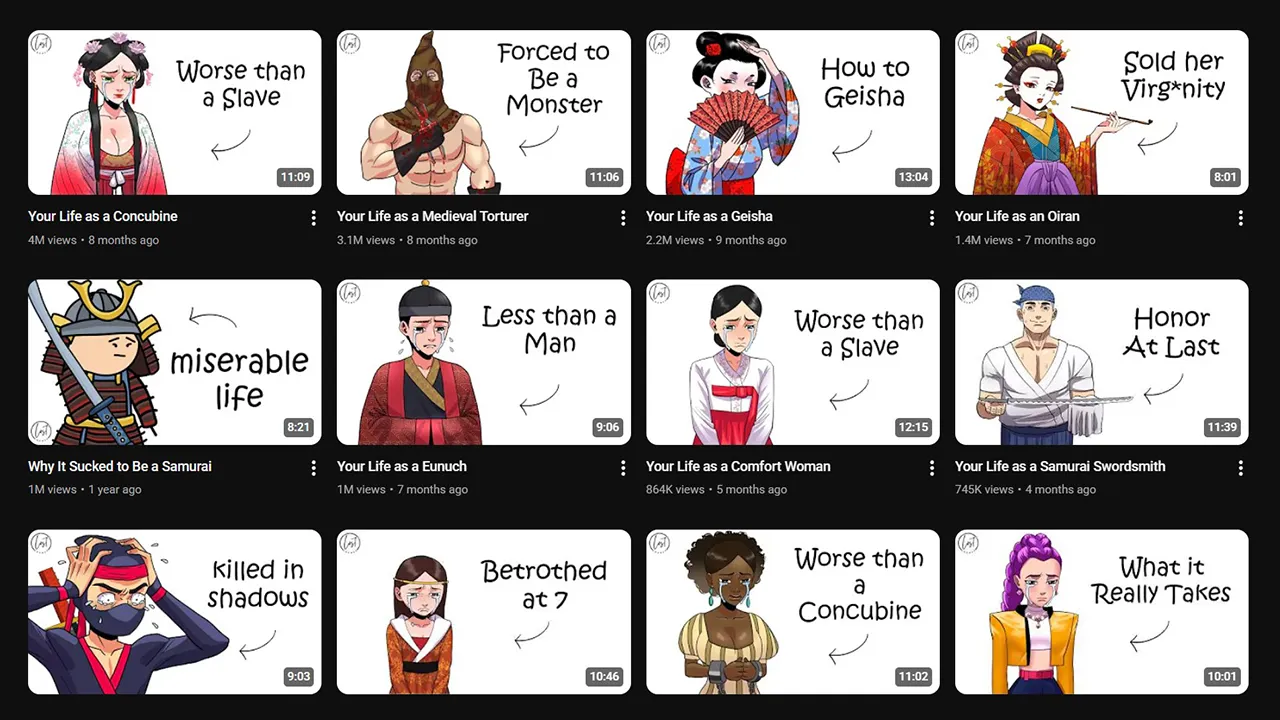
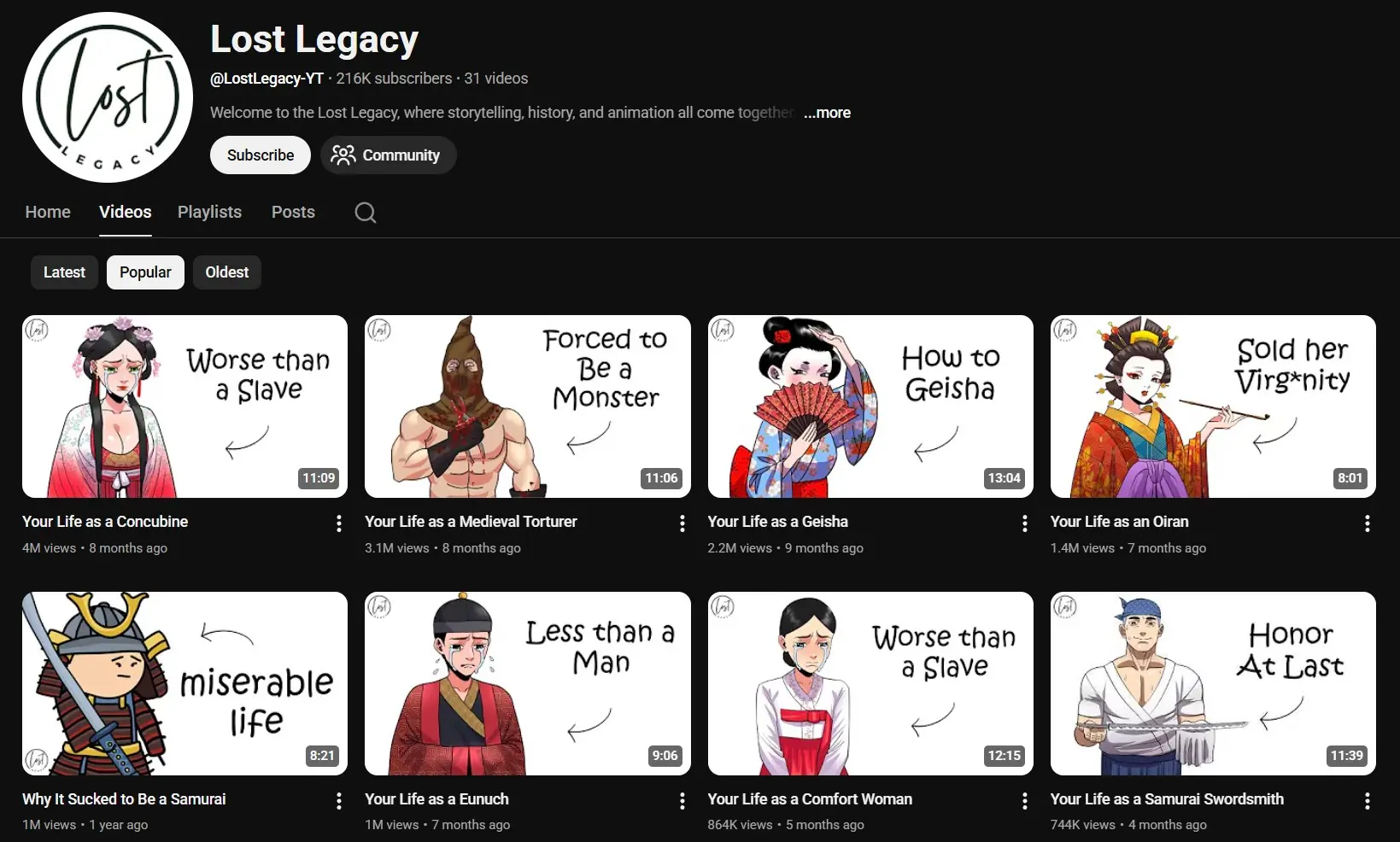
Lost Legacy launched in November 2024. By early 2026 they had crossed 21 million views and 216K subscribers across just 31 videos.
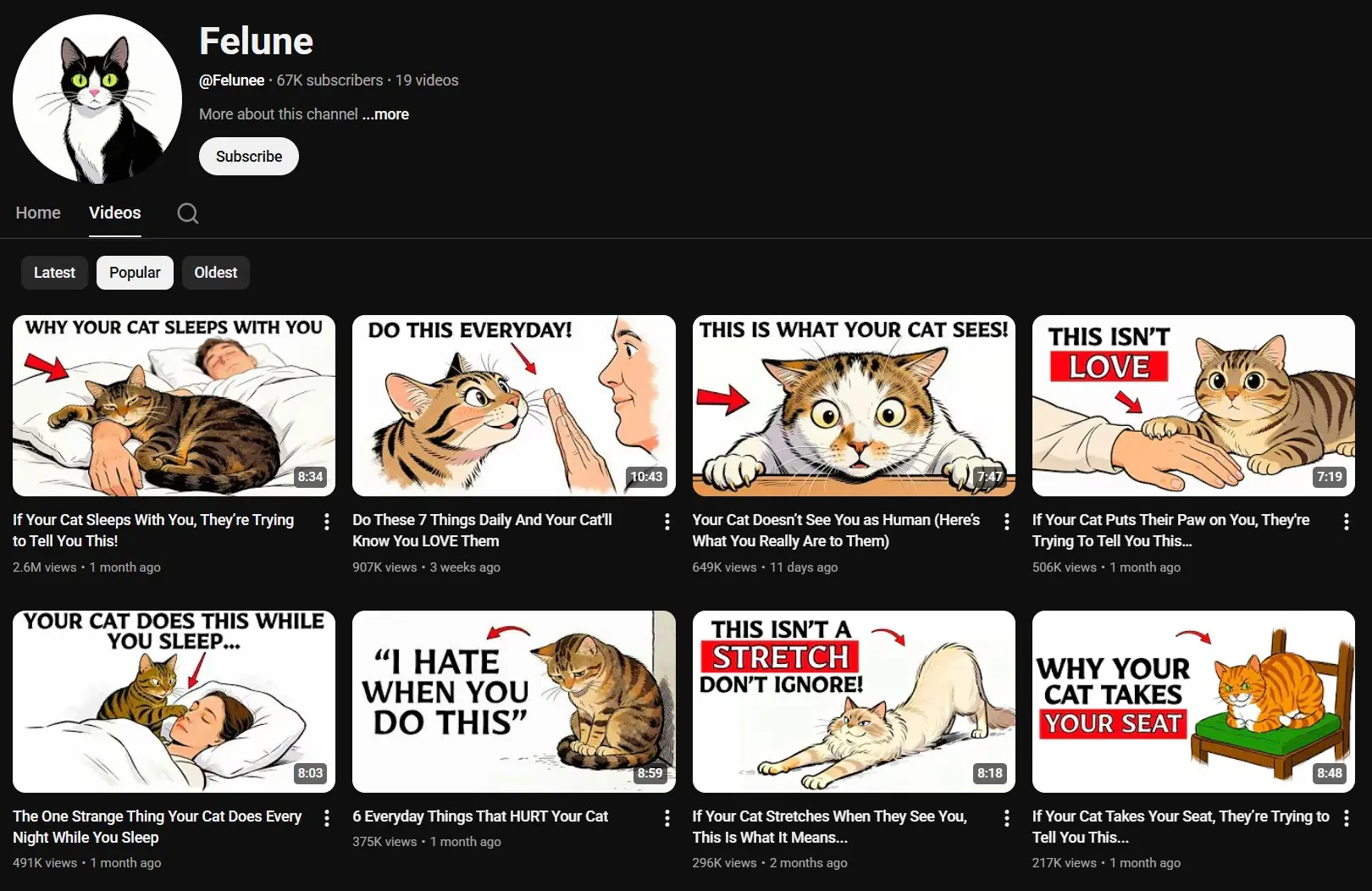
Felune launched in January 2026. Within weeks they were at 67K subscribers and 6.9 million views across 19 videos.
SimpleMindMap launched May 2025. Now sitting at 100K subscribers and 4 million views from 57 videos.
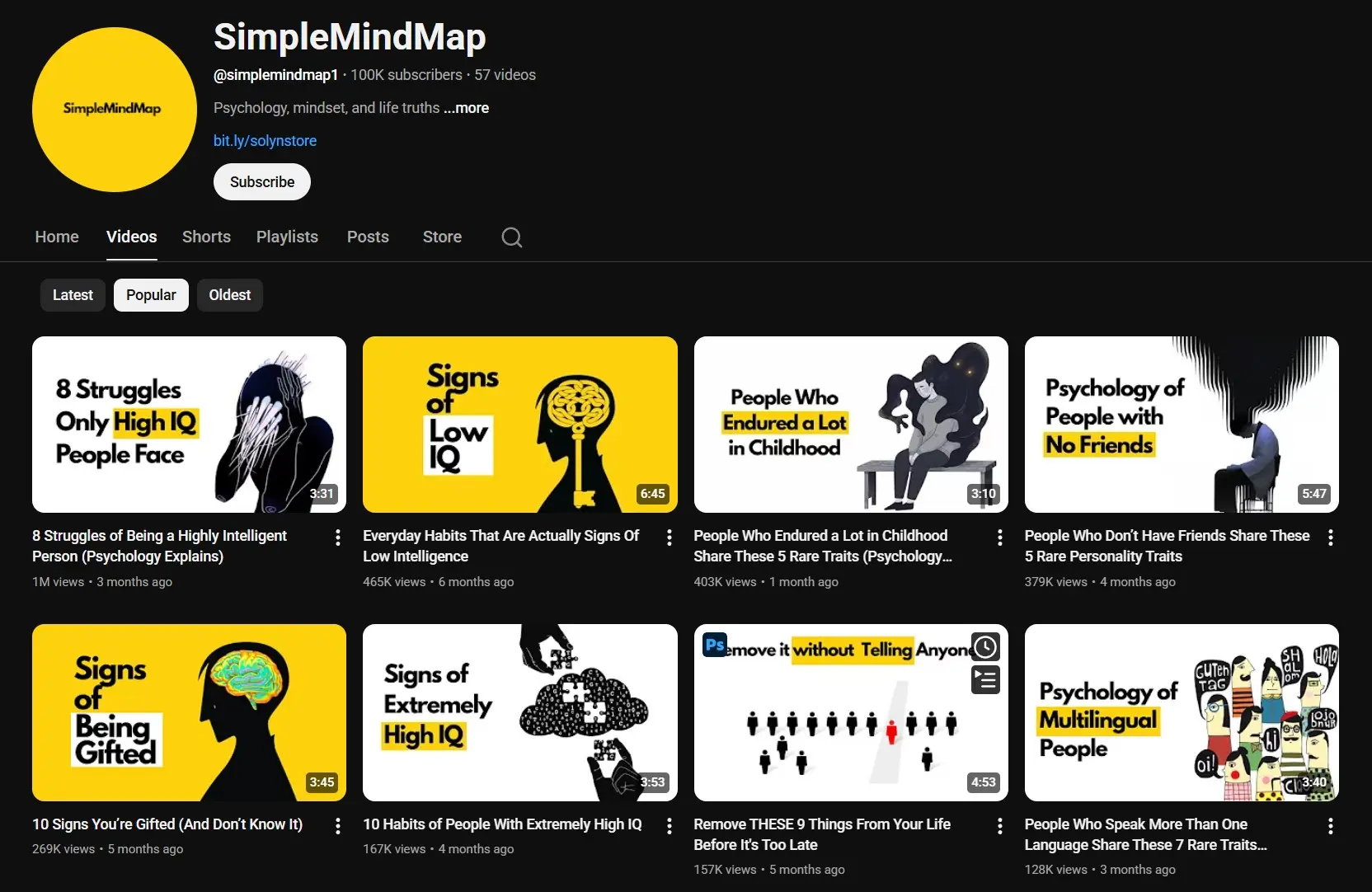
None of these channels shows a face. None of them uses a studio. And every single one of them uses the same animated YouTube thumbnail blueprint: white background, one illustrated character (upper body only), two short words stacked on the right, one small curved arrow pointing left.
This is the most detailed cartoon YouTube thumbnail and 2D animation thumbnail guide available. It gives you the exact AI prompt used to create these thumbnails, the visual rules behind them, and ready-to-use examples.
You will get:
- The complete master prompt ready to copy in one click
- A breakdown of every visual rule and why it works
- 3 full examples showing inputs and final image prompt
- A 5-step workflow from idea to uploaded thumbnail
Why This Thumbnail Style Works
Before copying any prompt, it helps to understand what makes 2D animated documentary thumbnails visually distinct from standard YouTube thumbnails.
Here is what every successful channel in this niche has in common:
| Element | Standard YouTube Thumbnail | 2D Documentary Thumbnail |
|---|---|---|
| Background | Colorful, scene-based | White or very light grey |
| Character | Real photo or hyper-realistic | Semi-realistic 2D illustration, upper body only |
| Text | 2 to 4 words, bold color | 1 to 2 words stacked vertically |
| Emotion | Excitement, reaction | Cold, intense, controlled |
| Composition | Busy, layered | One character, clean, no clutter |
| Extra element | Arrows, circles | Small curved arrow pointing left |
The white background is not a stylistic accident. A clean canvas makes your illustrated character stand out with zero visual competition. It is the same principle behind every Lost Legacy thumbnail that crossed 3 million views.
The two stacked words in contrasting colors are the first thing the eye lands on in under 0.3 seconds when scrolling. They create an instant psychological trigger before the viewer has processed anything else.
This style of animated thumbnail for YouTube works across every topic niche: history, psychology, military, crime, mythology. The visual formula stays identical. Only the character and words change.
The Secret of Element Positioning: Rule of Thirds
Before generating a single image, you need to understand why these thumbnails feel magnetic. The answer is one principle applied to every single one of them.
Rule of Thirds divides any canvas into a 3x3 grid using two horizontal lines and two vertical lines. The four intersection points of these lines are the most visually powerful positions in the frame. The human eye naturally gravitates to these points before reading anything else.
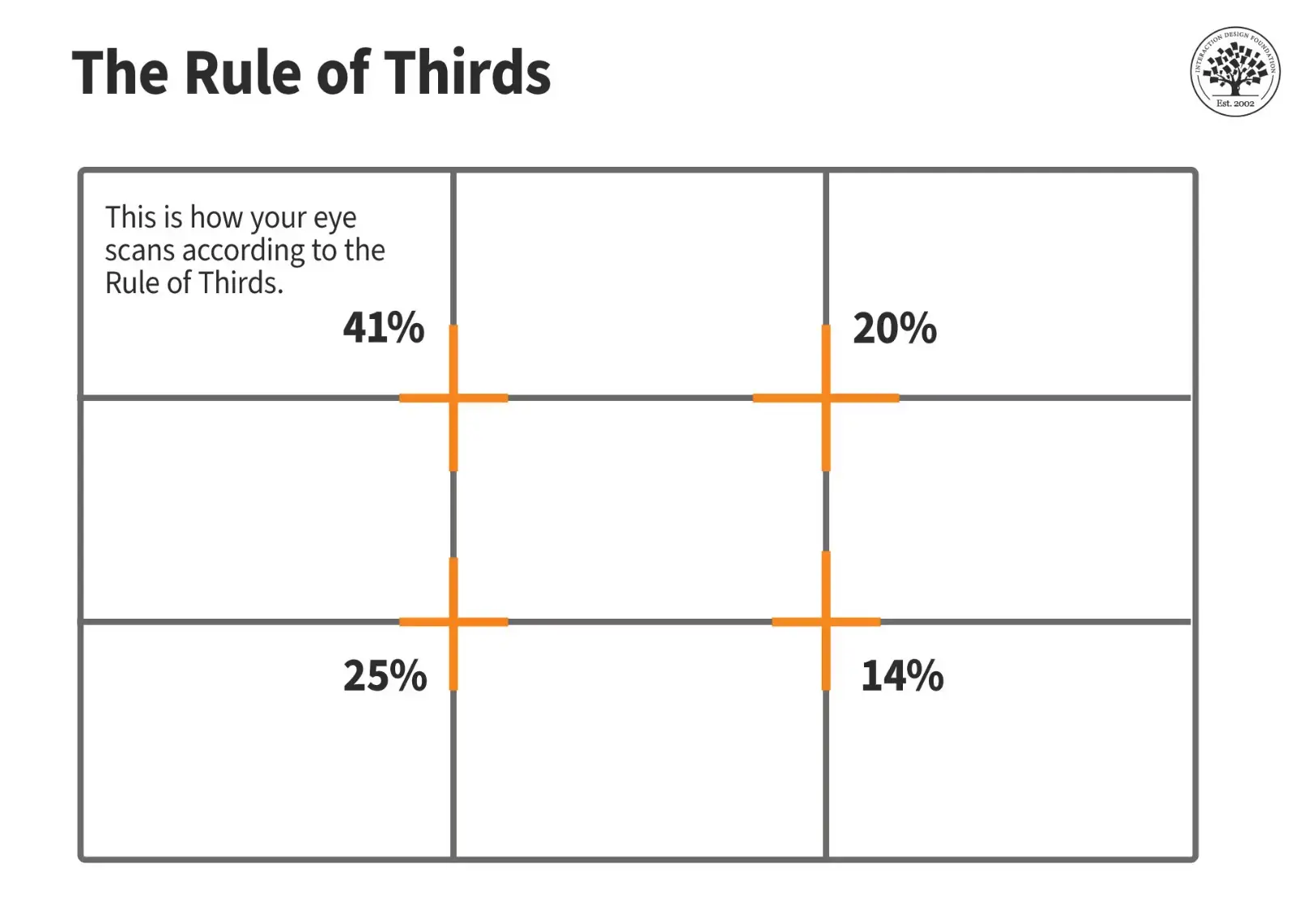
Here is how this niche applies it precisely:
| Zone | Position (1280x720px canvas) | What Goes There |
|---|---|---|
| Left Third | x: 0 to 427px | Character upper body, fills edge to edge |
| Center Third | x: 427 to 854px | Empty white, breathing room only |
| Right Third | x: 854 to 1280px | Text block + small curved arrow |
| Top intersection | y: ~240px | Character eyes or top of head |
| Bottom intersection | y: ~480px | Character belt line (crop point) |
Why does this work? When the character occupies the left third and the text occupies the right third, the eye is forced to travel across the frame. That travel creates tension. Tension creates a click.
When everything is centered, the eye stops at the middle and moves on. There is no tension, no pull.
When to break this rule: Perfect symmetry works for logo-style thumbnails or when the character itself is highly graphic. But for 2D animated documentary channels, always use the left-right split.
The Master Prompt System
This is a two-step system:
- Step 1: Fill the 5 input fields below → paste into ChatGPT → get a complete image prompt
- Step 2: Copy that image prompt → paste into any AI image tool (Nano Banana Pro, Whisk AI, etc.)
Five fields. One prompt. Every 2D documentary thumbnail you’ll ever need.
Your 5 Inputs
Before copying the prompt, decide on these 5 things:
① TOPIC / TITLE (required) Write your video topic, your full video title, or the exact words you want on the thumbnail.
[!TIP] Best result: Paste your exact video title (e.g. “Your Life as Every Level of a CIA Ghost Agent”). The more specific, the better the thumbnail concept. A general topic like “spy” works but a specific title gives the AI full context to build the tension and text around.
② TEXT COLOR (default: black) Leave blank for black text. Or specify:
- One color for all text: e.g.
white - Per-word colors: e.g.
Line 1 word 1 = white, word 2 "KNEW" = red— customize any word individually.
③ FONT WEIGHT (default: Regular) Choose how heavy the text looks:
Regular— clean, editorial feelMedium— slightly stronger presenceBold— high impact, most channels use thisBlack— maximum weight, very aggressive look
④ ARROW COLOR (default: black)
The curved arrow is black by default. You can change it to any color: white, red, yellow, etc.
⑤ CHARACTER DESCRIPTION (optional) Describe the character you want — style, gender, clothing, era, accessories. Leave blank and the AI will generate the most fitting character based on your topic.
Examples:
A 1970s KGB officer in grey trench coat, cold expression- `A Roman gladiator, muscular, holding sword d### The Master Prompt (Copy-Ready)
Fill your 5 inputs, then paste this entire block into ChatGPT:
You are a cinematic YouTube thumbnail strategist and AI image prompt engineer.
Generate ONE complete thumbnail concept using the exact inputs and rules below.

━━━━━━━━━━━━━━━━━━━━━━━━━━━━
📥 MY INPUTS
━━━━━━━━━━━━━━━━━━━━━━━━━━━━

① TOPIC / TITLE: [Paste your video title or topic here — or the exact words you want on the thumbnail]

② TEXT COLOR: [Default: black — or specify e.g. "white" / "word 1: white, word 2: red"]

③ FONT WEIGHT: [Default: Regular — or choose: Medium / Bold / Black]

④ ARROW COLOR: [Default: black — or specify any color]

⑤ CHARACTER: [Optional — describe style, clothing, gender, era. Leave blank = AI generates]

━━━━━━━━━━━━━━━━━━━━━━━━━━━━
🎨 STYLE RULES (DO NOT CHANGE)
━━━━━━━━━━━━━━━━━━━━━━━━━━━━

CANVAS: 16:9 aspect ratio — 1280×720px or 1920×1080px. Horizontal format only.
BACKGROUND: Pure white or very light grey (#F5F5F5) — completely clean, no textures, no scene details, no gradient.
CHARACTER FRAMING: Upper body only — from the belt/waist line upward. Do NOT show full body.
  This fills the left third of the frame completely with NO empty space above or below the figure.
CHARACTER STYLE: Semi-realistic 2D illustrated — not photorealistic, not 3D, not cartoon.
EXPRESSION: Cold, intense, controlled, dominant — the character knows something the viewer does not.
LIGHTING: High contrast cinematic — sharp shadows under chin, jaw, and shoulders. No soft lighting.
COMPOSITION — Rule of Thirds (EXACT):
  • LEFT THIRD (x: 0 to 427px at 1280px wide): Character upper body fills this zone completely.
    Body centered at roughly x=213px, top of head near top edge, belt line at bottom edge of frame.
  • CENTER THIRD (x: 427 to 854px): Negative space — empty white. Creates visual breathing room.
  • RIGHT THIRD (x: 854 to 1280px): Text block and arrow occupy this zone.
No clutter · No background elements · No watermark · 4K · Sharp outlines · Minimalist

━━━━━━━━━━━━━━━━━━━━━━━━━━━━
📝 TEXT RULES (DO NOT CHANGE)
━━━━━━━━━━━━━━━━━━━━━━━━━━━━

- MAXIMUM 2 words total — one word per line, stacked vertically (like: "miserable" / "life")
- Or 1 single word only if it carries enough weight
- Each word on its OWN line — never two words on the same line
- Apply color from ② — one word may be a different color (e.g. black + red)
- Do NOT use question format · Do NOT use exclamation marks
- Cold, observational, slightly unsettling tone — no clickbait, no hype words
- Font weight from ③ — large bold sans-serif, subtle drop shadow
- Placement: RIGHT THIRD of frame (x: 854–1280px), vertically centered in the frame
  Line 1 at ~40% from top, Line 2 directly below with tight line spacing

━━━━━━━━━━━━━━━━━━━━━━━━━━━━
➡️ ARROW RULES (DO NOT CHANGE)
━━━━━━━━━━━━━━━━━━━━━━━━━━━━

- One small curved arrow in color from ④
- Starts from just LEFT of the text block (center-right area)
- Points LEFT toward the character’s most dramatic element (face, hands, weapon, or document)
- Arrow is subtle — not oversized. Guides the eye, does not distract.

━━━━━━━━━━━━━━━━━━━━━━━━━━━━
📤 OUTPUT (STRICT FORMAT)
━━━━━━━━━━━━━━━━━━━━━━━━━━━━

VIDEO TITLE: [Cinematic title: "Your Life as [X]" / "What It's Like to Be [X]" / "POV: You're a [ROLE]"]

IMAGE PROMPT: [One complete, ready-to-paste AI image generation prompt specifying:
· Canvas: 16:9 horizontal, 1280×720px (or 1920×1080px)
· Character (from ⑤ or AI-generated): upper body only (waist to top of head), semi-realistic 2D illustration
· Position: LEFT THIRD of frame (x: 0–427px), body fills the zone top to bottom with no empty space
· Expression: cold, intense, controlled
· Background: pure white or #F5F5F5, completely clean
· Lighting: high contrast, sharp shadows on chin/jaw/shoulders
· CENTER THIRD: empty white space — negative space only
· Text block: RIGHT THIRD (x: 854–1280px), vertically centered
  Line 1: [Word 1] in color/weight from ②①
  Line 2: [Word 2] in color/weight from ②① (directly below, tight spacing)
· Curved arrow from ④ starting just left of text, pointing LEFT toward character’s focal point
· 4K · Sharp clean outlines · No watermark · No background elements · Minimalist]
How to use: Fill your 5 inputs, paste the whole block into ChatGPT, then copy only the IMAGE PROMPT and paste into Nano Banana Pro, Whisk AI, Ideogram, or any AI image tool.
Breaking Down Every Rule (And Why It Works)
🎨 Style Requirements
Upper body only — from waist to top of head This is the rule that separates amateur 2D thumbnails from viral ones. A full-body character on a white background leaves empty space above and below, making the figure look small and the composition weak. Upper body only fills the left third completely — zero wasted space.
Look at Lost Legacy (211K subscribers, 4M+ views per video): every thumbnail shows the character from the waist up, filling their side of the frame edge-to-edge.
16:9 canvas — explicit in every prompt
Always specify 1280×720px (16:9) or 1920×1080px in the image prompt. AI tools default to square if not told otherwise.
White or very light grey background (#F5F5F5) No gradients. No textures. The character floats on the canvas. This is not optional — it’s the visual signature of the entire niche.
Semi-realistic / high-detail vector style Not a photo. Not cartoon. The semi-realistic 2D illustration style signals “documentary” instantly.
High contrast lighting + sharp shadows Soft lighting = forgettable. Sharp shadows under the chin and jaw create cinematic weight.
📝 Text Rules
Maximum 2 words — one word per line Text on a 2D documentary thumbnail is not a sentence. It’s a single emotional signal. Two words, each on its own line, stacked vertically. That’s it.
From Lost Legacy:
miserable/lifekilled in/shadows(3 words max when needed)Worse than/a Slave
Longer text competes with the character. Short text amplifies it.
Color from ②, one word may contrast The second word (or the emotionally heavier one) can be a different color for instant visual hierarchy. The eye reads contrast before it reads meaning.
Cold, observational tone — no clickbait “killed in shadows” is unsettling. “SHOCKING SECRET EXPOSED” is noise. The documentary viewer wants controlled gravity, not hype.
➡️ The Curved Black Arrow
The curved black arrow is a subtle but powerful compositional tool. It acts as a visual instruction — telling the eye exactly where to look. Place it pointing toward the character’s most dramatically charged element: face, document, weapon, or hands.
3 Complete Examples
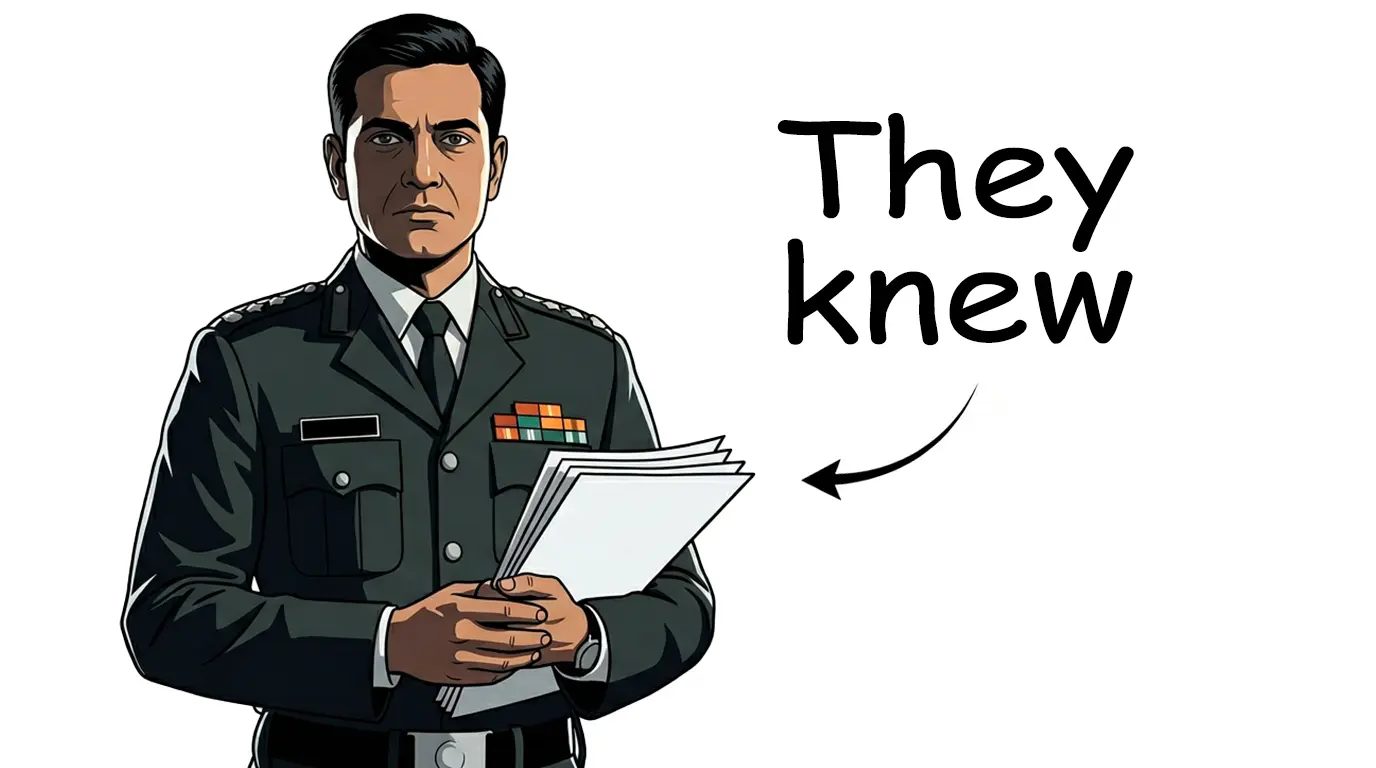
Example 1 — AniDoc Historical (Military / Intelligence)
Your 5 Inputs:
① TOPIC / TITLE: Your Life as Every Level of an Indian Intelligence Officer in Kargil
② TEXT COLOR: word 1 “THEY” black, word 2 “KNEW” red
③ FONT WEIGHT: Bold
④ ARROW COLOR: black
⑤ CHARACTER: Indian intelligence officer, formal military attire, mid-40s, holding classified documents, cold expression
ChatGPT Output:
VIDEO TITLE: Your Life as Every Level of an Indian Intelligence Officer in Kargil

IMAGE PROMPT:
Canvas: 16:9 horizontal, 1280×720px.
Background: pure white (#FFFFFF), completely clean, no textures, no scene.

CHARACTER (LEFT THIRD — x: 0 to 427px):
Semi-realistic 2D illustrated Indian intelligence officer, mid-40s, formal military
attire, upper body only (waist/belt to top of head — NO full body).
Body fills the entire left third top-to-bottom with zero empty space.
Face partially lit from the left, cold expressionless eyes, holding classified
documents with a tight grip. High contrast dramatic side lighting, sharp crisp
shadows under chin, jaw, and shoulders.

CENTER THIRD (x: 427 to 854px): empty white — negative space only.

TEXT BLOCK (RIGHT THIRD — x: 854 to 1280px), vertically centered:
Line 1: “THEY” — Bold sans-serif, black, large
Line 2: “KNEW” — Bold sans-serif, RED, large (directly below, tight spacing)
Subtle drop shadow on both words.

ARROW: Small curved black arrow starting just left of text block,
curving LEFT toward the documents in his hand.

4K · Sharp clean outlines · No watermark · Minimalist
Why it works: Upper body fills the frame, no wasted space. “THEY” (black) + “KNEW” (red) stacked = the eye reads the split in under 0.3 seconds. Arrow guides straight to the document.
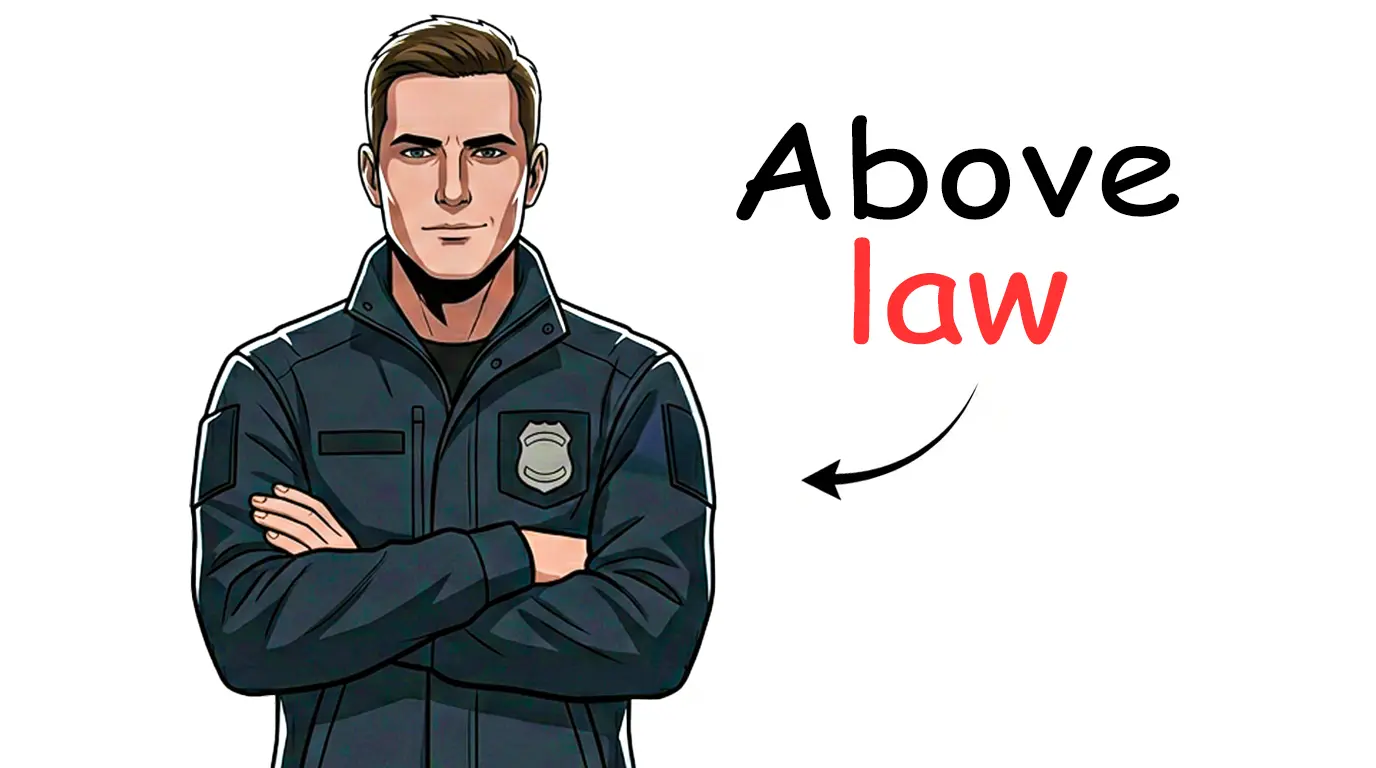
Example 2 — POV Dark World (Intelligence / Underground)
Your 5 Inputs:
① TOPIC / TITLE: Your Life at Every Level of a CIA Ghost Agent
② TEXT COLOR: word 1 “ABOVE” white, word 2 “LAW” red
③ FONT WEIGHT: Black (maximum weight)
④ ARROW COLOR: white
⑤ CHARACTER: (leave blank — AI generates)
ChatGPT Output:
VIDEO TITLE: Your Life at Every Level of a CIA Ghost Agent

IMAGE PROMPT:
Canvas: 16:9 horizontal, 1280×720px.
Background: pure white (#FFFFFF), completely clean.

CHARACTER (LEFT THIRD — x: 0 to 427px):
Semi-realistic 2D illustrated male figure in dark tactical jacket and black pants,
upper body only (waist to top of head — NO full body).
Body fills the left third completely from top to bottom, no empty space.
Arms crossed, cold neutral expression, barely visible controlled smirk.
Harsh rim lighting from directly above, dramatic shadow beneath chin and jaw.

CENTER THIRD (x: 427 to 854px): empty white — negative space only.

TEXT BLOCK (RIGHT THIRD — x: 854 to 1280px), vertically centered:
Line 1: “ABOVE” — Black-weight sans-serif, white, very large
Line 2: “LAW” — Black-weight sans-serif, RED, very large (directly below, tight spacing)
Subtle drop shadow on both words.

ARROW: Small curved white arrow starting just left of text block,
curving LEFT toward the chest badge area.

4K · Sharp clean outlines · No watermark · Minimalist
Why it works: Black-weight font at maximum size + the stacked color contrast (white / RED) communicates power hierarchy instantly. White arrow on white background = subtle cinematic detail.
Example 3 — Historical / Stickman-Compatible
Your 5 Inputs:
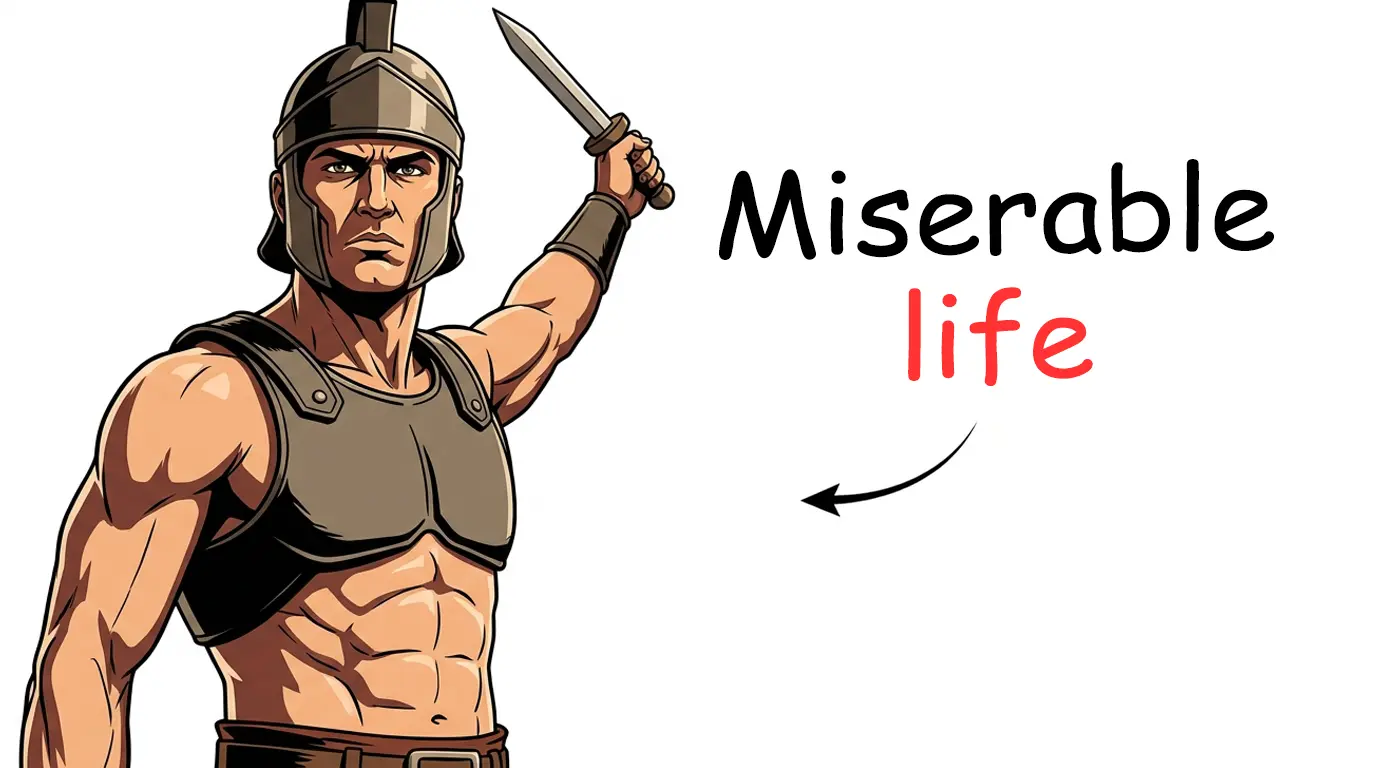
① TOPIC / TITLE: What It's Like to Be Every Level of a Roman Gladiator
② TEXT COLOR: word 1 “MISERABLE” black, word 2 “LIFE” red
③ FONT WEIGHT: Bold
④ ARROW COLOR: black
⑤ CHARACTER: Roman gladiator, muscular upper body, holding short sword raised, intense proud expression
ChatGPT Output:
VIDEO TITLE: What It's Like to Be Every Level of a Roman Gladiator

IMAGE PROMPT:
Canvas: 16:9 horizontal, 1280×720px.
Background: pure white (#FFFFFF), completely clean.

CHARACTER (LEFT THIRD — x: 0 to 427px):
Semi-realistic 2D illustrated Roman gladiator, muscular defined upper body only
(from waist/belt to top of head — NO full body, NO legs visible).
Body fills the left third completely top-to-bottom, no empty space around figure.
Helmet, chest armor, one arm raised holding a short sword upward.
Intense proud expression, eyes looking directly at viewer.
Strong overhead lighting, sharp dramatic shadows along jaw, neck, and armor edges.

CENTER THIRD (x: 427 to 854px): empty white — negative space only.

TEXT BLOCK (RIGHT THIRD — x: 854 to 1280px), vertically centered:
Line 1: “MISERABLE” — Bold sans-serif, black, large
Line 2: “LIFE” — Bold sans-serif, RED, large (directly below, tight line spacing)
Subtle drop shadow on both words.

ARROW: Small curved black arrow starting just left of text block,
curving LEFT toward the raised sword.

4K · Sharp clean outlines · No background elements · No watermark · Minimalist
Why it works: Upper body fills the frame completely, no empty space, no small figure. “MISERABLE” (black) / “LIFE” (red) = exact same formula as Lost Legacy’s most viral thumbnails.
5-Step Workflow
Step 1 → Decide your 5 inputs (topic, text color, font weight, arrow color, character)
Step 2 → Fill the inputs in the Master Prompt above
Step 3 → Paste the complete block into ChatGPT → Get VIDEO TITLE + IMAGE PROMPT
Step 4 → Copy the IMAGE PROMPT only
Step 5 → Paste into Nano Banana Pro / Whisk AI / any AI image tool → Generate → Download
The prompt works on any AI image tool. Nano Banana Pro (via OpenArt) gives the sharpest semi-realistic 2D style. Whisk AI is the best free option.
[!TIP] Run the same IMAGE PROMPT 3–4 times and choose the sharpest result. AI generation has variance — selecting the best from a batch is how top channels maintain consistent quality.
Keeping Your Thumbnails Consistent
Consistency is what turns a thumbnail into a brand signal. Viewers scrolling past your video should recognize it as yours before reading the title.
Rules for consistency across your channel:
- Same background color on every thumbnail (white or the same light grey)
- Same font family for your text (bold sans-serif: Inter, Montserrat, or similar)
- Same text color scheme (black primary word, red secondary word)
- Same character style: if your channel features a recurring character, use the first generated image as a reference in every subsequent generation
- Lock the Seed in Whisk AI to maintain the same visual fingerprint across outputs
Before uploading, always preview your thumbnail on mobile so that 70% of YouTube views happen on phones, and your thumbnail must be readable at 168x94px.
CTR Rules for This Niche
Getting the thumbnail right is step one. Getting clicks is step two. Here’s what drives CTR specifically in 2D animated documentary channels:
1. Never reveal the ending The thumbnail shows the moment of tension, never the resolution.
2. The two words must create a gap Stack one neutral word over one charged word. The brain tries to connect them and cannot without clicking.
3. The arrow points to the tension, not the face Pointing the arrow to a document, weapon, or object rather than the face creates more curiosity. The viewer wants to know what the character is holding.
4. The title and thumbnail should complement, not repeat If your title says “Your Life as Every Level of a CIA Agent”, your thumbnail text should not say “CIA AGENT.” The thumbnail text is a tease, not a summary.
5. Study your camera angles The angle of the character shot matters as much as the style. A slightly low camera angle reads as dominance. A straight-on angle reads as confession. If you want to go deeper on this, read the AI Camera Angles Guide where we cover all 52 shot angles used in professional video and thumbnail composition.
For more on engineering clicks, see the guide on boosting YouTube thumbnail CTR.
Technical Specs Before Uploading
Always verify your exported thumbnail meets YouTube’s requirements:
| Spec | Requirement |
|---|---|
| Dimensions | 1280 × 720 px (or 1920 × 1080) |
| Aspect Ratio | 16:9 |
| File Format | JPG or PNG |
| File Size | Under 2MB (JPG at 85% quality recommended) |
| Color Profile | sRGB |
| Text minimum | 60px font (ideally 100–140px at 1280×720 canvas) |
For the complete technical breakdown including mobile safe zones and the new 50MB YouTube limit, see the YouTube thumbnail size guide.
Pre-Upload Checklist
Before uploading your thumbnail to YouTube Studio, run through this list:
- White or very light grey background
- One dominant illustrated character, upper body only, no clutter
- Maximum 2 words, one per line, stacked vertically
- Two contrasting colors (one neutral, one charged)
- Small curved arrow pointing left toward the character
- No watermark, no background details
- Text readable at 168x94px (mobile size)
- File size under 2MB
- Generated 3 to 4 variants, selected the sharpest
Frequently Asked Questions
What AI tool is best for 2D documentary thumbnails?
Nano Banana Pro, available on OpenArt, currently produces the highest-quality semi-realistic 2D vector illustrations for this style. Whisk AI is the best free alternative with no credit system. The master prompt in this guide works on both, as well as on Ideogram and Midjourney.
Can I use Whisk AI for free?
Yes. Whisk AI is completely free with no daily credit limit. You can generate unlimited images, making it ideal for testing multiple thumbnail variations before committing to a paid tool.
How do I keep the character consistent across thumbnails?
After generating your first strong character image, save it as a reference image and upload it alongside every new prompt. In Whisk AI, use the Lock the Seed feature. In OpenArt, use the reference image upload feature in the advanced settings.
Should I always use a white background?
For 2D animated documentary channels: yes. White backgrounds are the visual signature of this niche and directly contribute to the high CTR of channels like Lost Legacy (21M+ views) and SimpleMindMap. The only exception is POV dark-world channels, where a deep dark background reinforces the forbidden knowledge theme.
Does the prompt work for non-English channels?
Yes. The image generation prompt is in English regardless of your channel language. Only the embedded text words in the thumbnail need to match your audience language. Replace the words with their equivalents in your language.
How many thumbnail variants should I generate?
Generate at least 3. AI image generation has variance. Some outputs will be sharper, better composed, or have cleaner outlines than others. Always choose the best from a batch rather than uploading the first result.
The Bottom Line
Thumbnails in the 2D animated documentary niche follow a precise visual formula — and now you have the complete prompt system to execute it.
This prompt system gives you:
- A white-background, single-character composition
- Cold intensity over shock or clickbait
- Two stacked words with contrasting colors
- A curved arrow directing the viewer’s eye
- Output ready for any AI image platform
Copy the prompt. Replace the topic. Generate. Done.
One prompt. Every 2D documentary thumbnail you’ll ever need.
Keep building your channel:
- YouTube Thumbnail Size Guide 2026 - exact upload specs
- How to Boost Thumbnail CTR - what gets clicks in 2026
- Viral Thumbnail Patterns - reverse engineering what works
- AI Camera Angles Guide (52 Shots) - master composition for every thumbnail
- Preview Your Thumbnail on Mobile - test before you publish
To use the prompt, go to ChatGPT, paste the master prompt with your 5 inputs filled in, then take the IMAGE PROMPT output to OpenArt or Whisk AI to generate your final thumbnail.