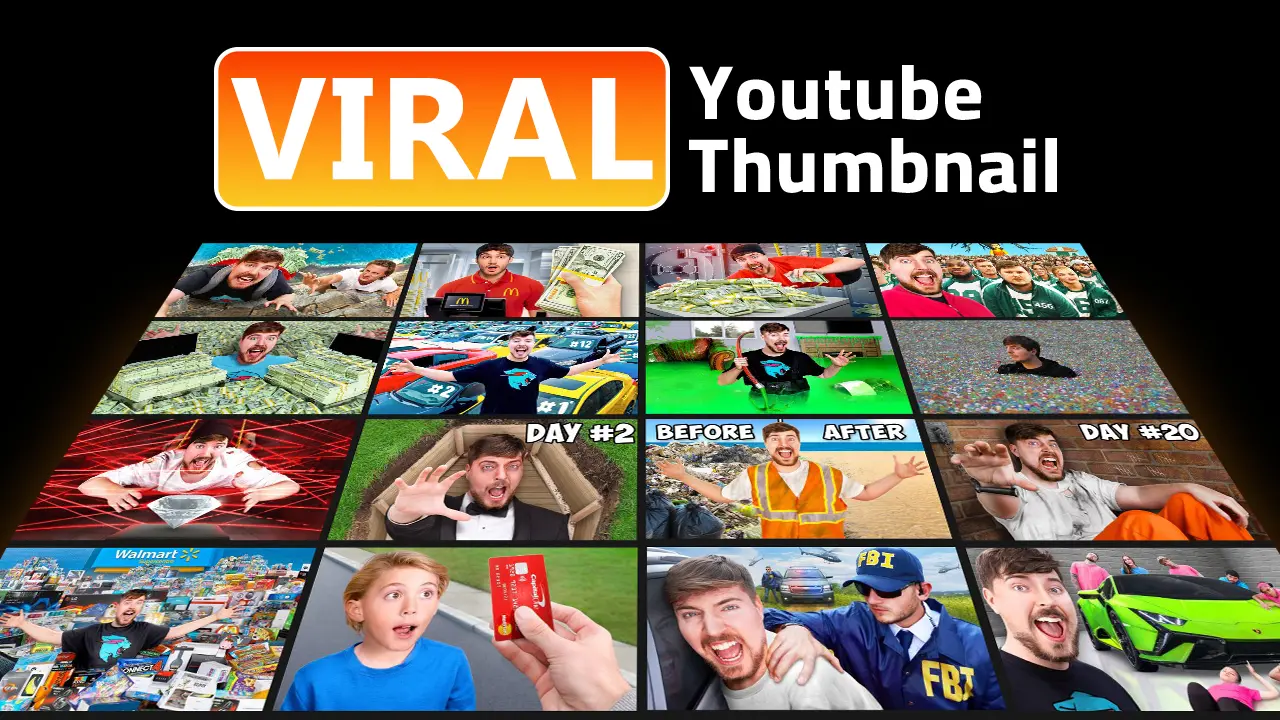
How to Make a Viral Thumbnail: Patterns Reverse-Engineered From 100M+ View Videos
Quick answer: Viral thumbnails are not accidental. They are built from a repeatable set of psychological triggers - high contrast, a face with visible emotion, a curiosity gap, and mobile-legible text under 12 characters. This guide deconstructs the exact patterns from videos with 100 million+ views and shows you how to replicate them.
What Makes a Thumbnail Go Viral? The 4 Core Triggers
Before studying patterns, understand the mechanism. A thumbnail goes viral when it generates a click-through rate high enough to trigger the YouTube algorithm’s recommendation engine. YouTube’s algorithm does not promote quality - it promotes clicks combined with watch time. The thumbnail is the first and most important variable in that equation.
Four psychological triggers appear in virtually every viral thumbnail:
1. Familiarity Bias
The brain processes known faces 200ms faster than unknown ones. When a viewer recognizes a creator, a celebrity, or even a familiar type of face (extreme emotion, dramatic reaction), the thumbnail bypasses the conscious evaluation process and triggers an instinctive click.
Research from analysis of 10,000+ videos shows thumbnails with recognizable faces average 921,000 more views than faceless thumbnails in the same category. The optimal face placement fills 40-60% of the frame with direct eye contact - enough to feel personal without crowding the composition. For a complete breakdown of how different structural frameworks control subject placement and visual flow, see the visual composition guide.
2. High Contrast and Color Pop
The YouTube feed is a wall of competing thumbnails. In that context, contrast is survival. Thumbnails that went viral almost universally share one trait: the subject is instantly separable from the background at a glance.
The most effective contrast combinations based on viral pattern analysis:
- Blue background + orange/yellow subject (complementary contrast)
- Dark background + bright white text (luminosity contrast)
- Red/yellow text on any dark background (alert colors trigger attention)
3. The Curiosity Gap
Behavioral economist George Loewenstein identified the “curiosity gap” - the psychological discomfort we feel when there is a gap between what we know and what we want to know. Viral thumbnails deliberately create this gap.
The mechanism: a thumbnail shows enough information to establish stakes (a man holding $1,000,000 in cash) but withholds the outcome (did he keep it? lose it? give it away?). The brain experiences this incompleteness as discomfort. Clicking is the only resolution.
Curiosity gap formulas that appear in viral thumbnails:
| Formula | Example | Why It Works |
|---|---|---|
| Number + Extreme | ”$456,000 in 24 Hours” | Stakes are quantified, outcome unknown |
| Contradiction | ”I Gave Away My House” | Violates expectations |
| Process Mid-Action | Person mid-fall, car mid-air | Zeigarnik effect - unresolved tension |
| Question Implied | Man in coffin underground | Viewer asks: “Will he survive?” |
| Versus/Comparison | ”$1 vs $1,000,000 Hotel” | Triggers comparison instinct |
4. Exaggerated Emotion
Mirror neurons cause us to involuntarily experience the emotions we observe on other faces. A thumbnail showing genuine shock, joy, fear, or disgust triggers a micro-emotional response in the viewer before any conscious evaluation occurs.
Emotion performance data from viral thumbnail analysis:
| Expression | % of Viral Thumbnails | Average Views |
|---|---|---|
| Happy/Excited | 25.3% | High volume |
| Surprised/Shocked | 18.2% | High volume |
| Sad/Distressed | 1.8% | 2.3M average (highest per video) |
| Disgusted/Confused | 8.4% | High curiosity trigger |
| Determined/Intense | 12.1% | Growing in 2025-2026 |
The surprise finding: sad faces significantly outperform all others on a per-video basis. They appear rarely (creating novelty) and trigger empathy (a powerful engagement driver). Most creators never test this.
Common Elements in 100M+ View Videos
Studying thumbnails from videos that crossed 100 million views reveals consistent structural patterns:
| Element | Frequency | Impact |
|---|---|---|
| Human Face | 75%+ of thumbnails | +921K views average |
| Strong Visible Emotion | 70%+ | +30% CTR vs neutral face |
| Bold Text (under 12 chars) | 60%+ | +40% readability at mobile size |
| Bright Colors (Red/Yellow dominant) | 65%+ | 2x scroll-stop rate |
| Arrows or Directional Lines | 40%+ | +30% focal point clarity |
| Single Focal Object | 80%+ | Reduces processing time |
The “One Face” Rule
Analysis consistently shows that solo faces outperform group shots by 37%. More faces create visual complexity that slows processing. The brain must decide which face to focus on - and that moment of hesitation reduces clicks.
Exception: split-face thumbnails (two subjects facing each other) perform well for debate, comparison, and interview content because the composition itself implies conflict and resolution.
The Text Density Rule
Thumbnails with fewer than 12 characters of text significantly outperform text-heavy designs. The title already appears below the thumbnail - text in the thumbnail must add new information (a stake, a number, an emotion word) rather than repeat the title.
The best-performing thumbnail text patterns:
- A number alone:
$1,000,000 - Two words maximum for stakes:
I QUITorI WON - A time or quantity:
50 Hoursor100 Players
Niche-Specific Viral Thumbnail Formulas
The same psychological triggers manifest differently depending on the content category. Using a gaming formula on a finance channel, or a beauty formula on an education channel, signals a mismatch to the viewer that damages trust and CTR.
Gaming Thumbnails
Formula: Character close-up + reaction overlay + status text + neon glow
Viral gaming thumbnails rely on in-game assets rendered in high definition, a player’s shocked or triumphant reaction face overlaid on the game visual, and text like “INSANE!” or “IMPOSSIBLE” in Burbank Big Condensed or similar bold fonts. Neon color glows (green, purple, cyan) signal gaming culture to the target audience.
Example pattern: Game screenshot (60% of frame) + face reaction (upper left, 30% size) + bold text “I DID IT” in neon yellow
Beauty and Lifestyle Thumbnails
Formula: Before/after split + celebrity comparison + “I TRIED…” framing
Beauty thumbnails use vertical splits showing transformation, or side-by-side comparisons with a celebrity version of the same look. The “I Tried [Famous Person]‘s Routine” frame works because it promises a result (celebrity outcome) with a relatable protagonist (regular creator).
Business and Finance Thumbnails
Formula: Wealth contrast + growth chart + specific dollar amount + shocked expression
Finance thumbnails require tangible visual stakes - never abstract concepts. A person holding a stack of cash outperforms a pie chart every time. Specific numbers ($47,000 not “a lot of money”) perform better because they feel like real data rather than hyperbole.
Education Thumbnails
Formula: Paradox claim + question hook + authority aesthetic
Education thumbnails (Veritasium, Kurzgesagt, Wendover Productions style) avoid exaggerated emotion in favor of intellectual curiosity. The hook is a claim that contradicts common sense: “The Universe Is Not What You Think.” The aesthetic is clean, trust-signaling, and authority-projecting rather than high-energy.
Tech Review Thumbnails
Formula: Product isolated on clean background + comparison text + hands-on framing
Tech thumbnails show the product at an angle that implies quality and desire. Comparisons (“iPhone vs Pixel”) outperform single-product shots because they imply a definitive answer that only the video can provide.
How to Create a Viral Thumbnail: Step-by-Step
This is the replication workflow based on patterns from viral creators.
Step 1: Start With the Thumbnail, Not the Video
MrBeast’s team designs thumbnail concepts before filming the video. If a compelling thumbnail cannot be created, the video concept is reconsidered. This forces you to identify the visual promise before committing to production.
Before filming, answer: “What single image could communicate the most intriguing version of this video’s outcome?”
Step 2: Identify Your Curiosity Gap
Write three possible curiosity gaps for your video concept. The best gap:
- Implies stakes (something at risk or to gain)
- Withholds the outcome
- Can be communicated in a single image
Step 3: Design 3+ Variants
Never test one thumbnail against zero alternatives. Design at minimum:
- Variant A: The proven formula for your niche (face + text + stakes)
- Variant B: One key element changed (different emotion, different background color)
- Variant C: A wildcard (completely different composition or framing)
Step 4: Apply the Mobile Legibility Test
Before uploading, resize your thumbnail to 120 x 68 pixels - the smallest size YouTube renders on mobile. Ask:
- Can you identify the face?
- Can you read the text?
- Is the primary subject instantly clear?
If any answer is no, remove elements until all three are yes. Use our YouTube Thumbnail Preview Tool to test across all YouTube surfaces simultaneously.
Step 5: A/B Test with YouTube’s Native Tool
Upload all variants and use YouTube’s “Test and Compare” feature. Do not rely on CTR alone - monitor Watch Time Share (total minutes watched per impression). A thumbnail with 12% CTR but 40% audience retention outperforms one with 18% CTR and 20% retention.
Wait for a minimum of 1,000 impressions before declaring a winner. YouTube needs sufficient data to determine statistical significance.
Step 6: Iterate on the Winner
When you find a winning variant, don’t stop. Test the winner against a new challenger. The MrBeast team tests continuously - even months-old videos get new thumbnails when data suggests a different design could perform better.
[!IMPORTANT] Need Professional Help Creating Viral-Grade Thumbnails?
Designing multiple custom variants, engineering curiosity gaps, and testing compositions takes significant time. Our dedicated YouTube thumbnail design team crafts viral-ready, high-CTR thumbnails for your channel so you can focus 100% on making great content.
👉 Get Custom High-CTR YouTube Thumbnails Designed for You
How to Make a Viral Thumbnail With AI
AI tools can dramatically accelerate the thumbnail creation process. The key distinction: use AI for specific elements, not for the complete final thumbnail.
What AI Does Well for Thumbnails
| AI Task | Tool | Use Case |
|---|---|---|
| Background generation | Midjourney, Adobe Firefly | Cinematic environments, blurred studio backgrounds |
| Background removal | Adobe Express, Remove.bg | Clean subject extraction from photos |
| Color palette suggestions | Adobe Color | Complementary color combinations |
| Concept brainstorming | ChatGPT | Generating curiosity gap variations |
| Text effects | Photopea, Canva | Stroke, shadow, glow text styling |
What AI Does NOT Do Well for Thumbnails
Fully AI-generated faces trigger the “uncanny valley” effect - an instinctive distrust response that damages CTR. MrBeast’s team briefly experimented with fully AI-generated thumbnails in 2025 and reversed course after audience rejection. Viewers detect synthetic faces faster than any other AI artifact.
The winning formula is AI-assisted, human-curated: AI generates the environment, the textures, the color grading concept. A human photographer captures the face. A human designer makes the final composition decisions.
AI Prompts for Viral Thumbnail Backgrounds
For AI-generated thumbnail backgrounds, prompt specificity matters. Vague prompts produce generic results. Specific cinematic prompts produce backgrounds that separate your subject from the crowd.
Our AI Director’s Cheat Sheet includes 52 tested cinematic prompts with camera angles and lighting setups specifically optimized for YouTube thumbnail backgrounds. Each prompt includes variations for different niche aesthetics (gaming, finance, lifestyle, education).
15 Viral Case Studies: Unexpected Lessons
| # | Case | Lesson |
|---|---|---|
| 1 | ”Greatest Freakout Ever” (112M) - auto-generated frame was the thumbnail | Raw emotion beats polish |
| 2 | Solo face +37% vs. group shots | More faces does not mean better |
| 3 | Sad faces average 2.3M views (highest) | Underused emotions stand out |
| 4 | MrBeast red laser pointer doubled CTR | Historical data informs current tests |
| 5 | Low-budget reaction videos went viral | Algorithm rewards engagement, not production value |
| 6 | Indigenous music thumbnail hit 80M | Novelty creates curiosity - novelty breaks patterns |
| 7 | Scandal/controversy thumbnail hit 2.5M | Negative emotion thumbnails have underrated power |
| 8 | ”Wrong” color scheme increased CTR 45% | Testing beats assumptions and formulas |
| 9 | Text-only thumbnail hit 20M | Rules can be broken strategically with the right hook |
| 10 | ”Ugly” thumbnail won A/B test by 28% | Authenticity signals often outperform polished design |
| 11 | Nostalgic color grading (desaturated film look) went viral | Color grading is the most underutilized CTR lever |
| 12 | Adding a ”?” to thumbnail text increased CTR 18% | Punctuation triggers cognitive responses |
| 13 | Thumbnail deliberately contradicting the title | Strategic misalignment drives curiosity clicks |
| 14 | Zero-face gaming thumbnail hit 50M | Know your niche exceptions before applying formulas |
| 15 | Timer/countdown overlay in thumbnail = +22% CTR | Visual urgency creates FOMO before the click |
Luck vs. Strategy: The Honest Answer
Every creator wants to believe viral success is reproducible. The truth is more nuanced.
Luck plays a role in: algorithm timing, cultural moment alignment, and random amplification spikes. These variables cannot be engineered.
Strategy controls: CTR (through thumbnail design), retention (through content quality), and iteration speed (through systematic testing). These variables compound over time.
The difference between creators who go viral once and those who do it repeatedly is this: luck brings the first viral video. Strategy creates the conditions for the next ten.
MrBeast’s method is not magic - it is a process:
- Create 20+ thumbnail variants per video
- A/B test before and after publishing
- Target 8-12% CTR (vs. industry average of 4-5%)
- Treat thumbnails as data science, not art
- Let the data override creative intuition
The truth: Luck sparks initial views. Skill retains them and creates the next ones.
Quick Pre-Upload Checklist
Must-Have Before Publishing
- Face with visible strong emotion (if applicable to niche)
- High contrast - subject is instantly separable from background
- Text under 12 characters (or no text at all)
- Curiosity gap is clear - stakes implied, outcome withheld
- Legible at 120x68px mobile size
Testing Protocol
- 3+ variants created
- A/B test scheduled via YouTube Test and Compare
- Watch Time Share (not just CTR) set as success metric
- Backup variant ready if first 6 hours underperform
Frequently Asked Questions
How do I make a viral thumbnail?
There is no formula that guarantees virality, but there is a process that maximizes the probability: (1) Identify a curiosity gap before designing. (2) Use a real face with visible emotion - not stock photography. (3) Limit text to under 12 characters. (4) Design 3+ variants and A/B test. (5) Monitor Watch Time Share, not just CTR. (6) Replace underperforming thumbnails without hesitation, even on published videos.
What makes a thumbnail go viral on YouTube?
A thumbnail goes viral when it generates a high enough CTR for YouTube’s algorithm to push the video into the recommendation feed. The three most reliable CTR drivers are: (1) a face with a visible, extreme emotion, (2) a clearly implied curiosity gap (stakes shown, outcome hidden), and (3) high contrast that separates the thumbnail from the surrounding feed at a glance.
Can I use AI to create a viral thumbnail?
AI tools help with specific elements - background generation, color palette selection, text effect creation - but fully AI-generated faces consistently underperform real photographs due to the “uncanny valley” effect. The most effective approach is AI-assisted: use AI for environments and concepts, use a real photo for the face, and have a human designer make the final composition decisions.
How long does it take to make a viral thumbnail?
For creators who use pre-built Photoshop actions or templates, the process takes 15-30 minutes per variant. MrBeast’s professional team creates 20 variants per video as part of a full-day production process. For most creators, designing 3 quality variants takes 45-90 minutes with the right tools and workflow.
Does thumbnail size affect virality?
Indirectly, yes. YouTube renders thumbnails at very small sizes on mobile - as small as 120x68 pixels. A thumbnail designed for desktop viewing will often fail on mobile because text becomes unreadable and faces lose detail. Designing and testing at mobile sizes first, then scaling up, consistently improves performance across all surfaces.
What are the best colors for a viral thumbnail?
The most consistently high-performing color combinations are blue/orange (complementary contrast), black/yellow (maximum luminosity contrast), and red/white. However, the most important principle is contrast within your feed - if every competitor uses blue backgrounds, a yellow or red background creates pattern interruption that stops the scroll. Study your specific competition’s color patterns before choosing.
Related guides:
- 🏆 MrBeast Thumbnail Secrets: The Complete Design Formula
- ✨ MrBeast Face Effect: 6-Step Photoshop Tutorial
- 🔤 MrBeast Thumbnail Font: Obelix Pro Guide
- 📊 High CTR Thumbnails: 10 Proven Tips + 25 Examples
- 📐 YouTube Thumbnail Size: Dimensions & Format Guide
- 🧪 YouTube Thumbnail A/B Testing: Double Your CTR
- 🔍 YouTube Thumbnail SEO: Rank in Google Images
- 🛠️ Best YouTube Thumbnail Tools for Creators
![50+ Camera Angles for AI Prompts: Complete Shot Types Guide [2026]](/images/thumbnails/camera-angles-guide/hero.webp)