
Most YouTube thumbnails suffer from a terminal design flaw: they are shot at standard, eye-level perspectives. Content creators spend hours writing scripts and perfecting color grading, only to apply a flat, face-on image onto the final video packaging. In a hyper-competitive homepage feed crowded with millions of uploads, an eye-level thumbnail behaves like visual white noise. It feels flat, predictable, and becomes completely invisible to a scrolling audience.
Click-through rates surge when a thumbnail breaks this visual monotony. By shifting the camera’s perspective, a subject can appear incredibly powerful, highly dramatic, or deeply intriguing in a fraction of a second. What previously required expensive physical cinema gear and complex studio setups can now be generated instantly using AI tools like Midjourney or Stable Diffusion. Abandoning the standard eye-level view serves as the ultimate psychological pattern interrupt, turning passive scrolling impressions into active clicks.
For the complete technical breakdown of all 52 cinematic camera angles and the universal prompt formula, see the full AI camera angles guide. This article focuses on the 5 angles that directly impact YouTube thumbnail CTR.
Why Camera Angle Affects Click-Through Rate
Before a viewer consciously reads a video title, the human brain evaluates the thumbnail’s physical layout and spatial hierarchy in under 0.3 seconds. Evolutionary psychology reveals that humans process camera levels and spatial orientation through deep-seated survival mechanisms.
Looking up at a subject (a low angle) instantly triggers subconscious feelings of power, dominance, and authority. This spatial dynamic draws the viewer in by creating a psychological curiosity gap regarding who holds authority. Throwing a frame off its horizontal axis creates immediate visual friction, signaling to the brain that something is structurally wrong or chaotic. Deviating from flat eye-level shots deliberately triggers this visual curiosity. It disrupts the mindless scroll and forces the viewer’s eyes to lock onto the video’s underlying promise.
| Camera Angle | Subconscious Trigger | Optimal Content Application |
|---|---|---|
| Low Angle | Authority, Dominance, Power | Business, Tech Reviews, Finance |
| Overhead / High Angle | Structure, Omniscience, Scale | Education, Workspace, DIY |
| Dutch Angle (Tilted) | Tension, Chaos, Unease | Drama, Crisis Commentary |
| Extreme Close-Up | Intrigue, Mystery, Intimacy | Reaction Content, Mystery |
| Over-the-Shoulder | Immersion, Participation, Suspense | Vlogs, Adventure, Walkthroughs |
5 Thumbnail Angles That Outperform Eye-Level
1. The Low Angle - The Power Angle
The low angle positions the camera below the subject’s eye line, tilting upward. This precise perspective taps into evolutionary survival triggers, tricking the brain into perceiving the subject as physically imposing, highly authoritative, and dominant.
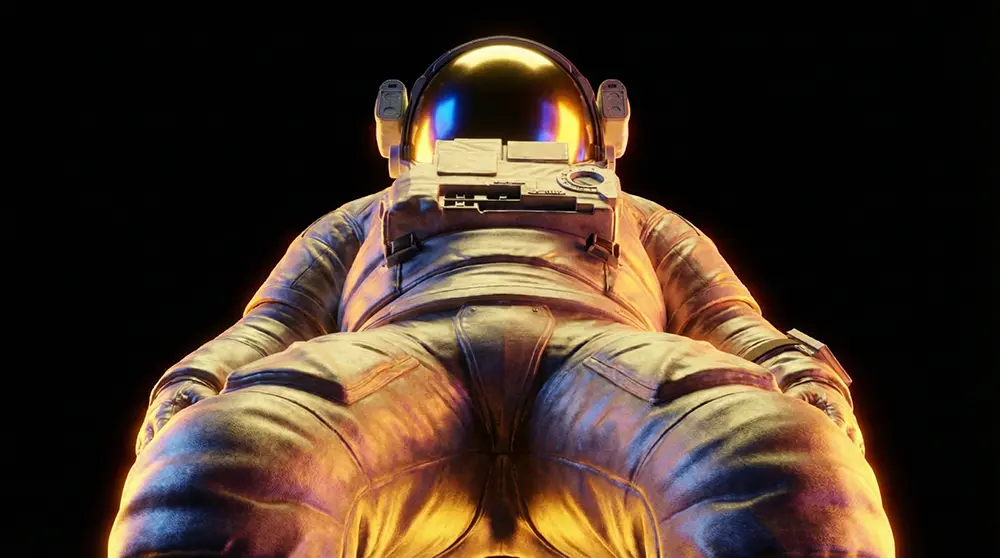
Before (Standard Eye-Level): A flat, straight-on headshot of a creator holding a tech device renders the subject passive, mimicking a generic webcam snapshot that blends seamlessly into the surrounding feed.
After (Cinematic Low Angle): The camera sits at chest level, tilting upward at 35 degrees. The device looms massively in the foreground with volumetric backlighting, establishing the creator as an authoritative titan revealing a world-changing invention.
Use this when: You are showcasing a major milestone, introducing a massive challenge, or establishing yourself as the ultimate authority on a specific topic.
The exact prompt for this thumbnail - including the lens focal length, aperture setting, and lighting direction required to generate this perspective - is in the Cheat Sheet.
2. The Dutch Angle - The Tension Angle
The Dutch Angle involves intentionally tilting the camera on its roll axis to throw the horizon line completely off-kilter. This deliberate lack of physical balance triggers subconscious distress, urgency, and immediate psychological tension.
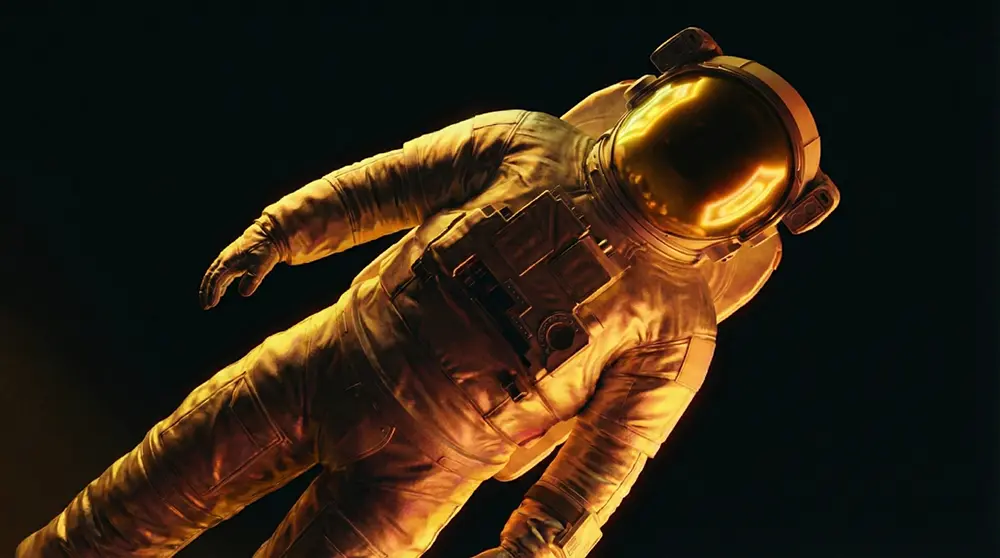
Before (Standard Eye-Level): A creator sitting at a desk with a shocked expression. Because the background room remains perfectly horizontal and orderly, the “shock” feels artificial, low-stakes, and staged.
After (Cinematic Dutch Angle): The frame is tilted 25 degrees. The desk lines slice diagonally across the canvas, and background neon lights blur on an off-kilter axis, transforming the basic reaction into a highly believable scene of chaotic panic.
Use this when: Your video features a devastating mistake, a critical warning, a major crisis, or any scenario where plans went completely wrong.
The exact prompt for this thumbnail is in the Cheat Sheet.
3. The Overhead Shot - The God’s-Eye View
The Overhead Shot places the camera at a perfect 90-degree angle directly above the subject, looking straight down. This clinical, top-down perspective provides a satisfying, highly structured map of objects that is incredibly easy for mobile screens to parse at small thumbnail sizes.

Before (Standard Eye-Level): A cluttered pile of productivity tools scattered on a desk, photographed from a normal sitting height. It looks messy, busy, and completely illegible at a small thumbnail scale.
After (Cinematic Overhead Shot): A pristine, vertical top-down view of the exact same gear, mathematically arranged on a matte-black surface with moody side-lighting, making each tool pop as a structured, premium asset.
Use this when: You are showcasing a complete workspace transformation, a gear reveal, or presenting a highly structured physical layout.
The exact prompt for this thumbnail is in the Cheat Sheet.
4. The Extreme Close-Up - The Intrigue Angle
The Extreme Close-Up (ECU) zooms in aggressively on a single macro-level detail, entirely cropping out the surrounding environment. By intentionally hiding the broader context, the design creates a massive curiosity gap that forces the viewer’s brain to search for answers.

Before (Standard Eye-Level): A typical waist-up shot of a trader looking surprised at a laptop screen. The screen remains unreadable, and the overall image lacks focus or a direct emotional punch.
After (Cinematic Extreme Close-Up): A macro focus cropped tightly onto a single human eye. Reflected clearly inside the iris is a bright neon-green line chart crashing vertically downward, capturing raw panic in hyper-realistic detail.
Use this when: You want to highlight an intense emotional reaction, reveal a hidden microscopic detail, or build an irresistible mystery around a specific object.
The exact prompt for this thumbnail is in the Cheat Sheet.
5. The Over-the-Shoulder POV - The Immersive Angle
The Over-the-Shoulder (OTS) POV places the camera just behind the subject’s shoulder, looking directly at what they are facing. This immediately shifts the viewer from a passive spectator to an active participant, dragging them directly into the narrative.
.jpg)
Before (Standard Eye-Level): A basic front-facing photo of a creator standing in front of an old, abandoned house. The viewer feels like a disconnected observer watching someone else look at a house.
After (Cinematic Over-the-Shoulder): The camera sits right behind the creator’s dark silhouette on the left third of the frame. The viewer looks over their shoulder down a dark, ominous hallway toward a single glowing door, creating intense immersion.
Use this when: You are crafting story-driven vlogs, mystery investigations, real-life adventure videos, or highly immersive on-screen walkthroughs.
The exact prompt for this thumbnail is in the Cheat Sheet.
How to Test Angles on Your Own Thumbnails
Generating a cinematic camera angle with AI represents only the first step. Verifying how that angle performs under real-world algorithm pressure is required to maximize the click-through rate. Two specific analytical tools must be integrated into the publishing workflow to validate visual hierarchy before publishing.
Step 1: Preview Against Real Competition
Designs should be analyzed through a YouTube Thumbnail Previewer before publishing. This utility allows creators to upload newly generated AI thumbnails and preview them live inside a simulated YouTube homepage, search result, and mobile feed against real competitors.
It verifies whether a dynamic low angle or tilted horizon holds up visually in crowded feeds. More importantly, it ensures that YouTube’s UI overlays - specifically the black duration badge in the bottom-right corner - do not obscure a critical visual focal point or character expression. An extreme close-up that focuses on an eye can be completely destroyed by the duration badge if the composition is not pre-validated.
Step 2: Research What Already Stops the Scroll
Creators should leverage a YouTube Outlier Finder to conduct data-driven niche research. Instead of guessing which layouts work, this tool identifies specific videos within a niche that are performing up to 10x above their channel’s typical view average.
By reverse-engineering outlier thumbnail compositions, creators frequently discover that breakout videos went viral specifically because their packaging shattered standard eye-level norms, utilizing dramatic angles to stop the scrolling audience.
Frequently Asked Questions
Can cinematic camera angles be achieved using standard, basic AI prompts?
Rarely. When provided with basic text prompts, AI image generators default to a flat, medium eye-level shot to play it safe. Rendering cinematic angles requires injecting specific technical cinematography instructions into the prompt - such as lens focal lengths (35mm, 12mm), precise aperture settings (f/2.8), and defined camera elevation positions. For the complete formula and platform-specific syntax, see How to Write Camera Angle Prompts for AI Images.
Which specific camera angle drives the absolute highest click-through rate?
CTR performance depends entirely on the video’s core emotional hook. The Low Angle proves incredibly effective for building trust in authority, business, and tech niches, while the Dutch Angle consistently wins for reaction content, drama, and high-tension storytelling. The table earlier in this article maps each angle to its optimal content type.
Will extreme camera angles hurt my click-through rate if they appear too intense?
Negative impacts only occur if the visual intensity fails to match the expectation established by the video’s title. Visual alignment remains the most critical factor. If a title promises a major disaster but the thumbnail utilizes a calm, flat eye-level shot, clicks are lost to cognitive dissonance. When a high-tension Dutch angle is applied to a crisis-oriented title, the visual matches the hook flawlessly, causing CTR to scale.
How do I keep my character’s face consistent across multiple thumbnail angles?
Character consistency across different camera perspectives is one of the hardest technical challenges in AI image generation. The cross-attention mechanism in diffusion models frequently overwrites facial identity when the camera angle token is introduced. For the complete technical solution including the prompt architecture that prevents this, see How to Keep the Same Face Across Different AI Camera Angles.
Related Guides
- 50+ Camera Angles for AI Prompts: Complete Shot Types Guide - The complete reference for all 52 cinematic angles and their psychological impact
- How to Write Camera Angle Prompts for AI Images - The universal prompt formula and platform syntax breakdown
- How to Keep the Same Face Across Different AI Camera Angles - Character consistency solution for multi-angle thumbnail series
- YouTube Thumbnail Previewer - Test how your AI-generated thumbnail looks across all YouTube surfaces before uploading
- YouTube Outlier Finder - Find which thumbnail compositions are driving 10x views in your niche
![50+ Camera Angles for AI Prompts: Complete Shot Types Guide [2026]](/images/thumbnails/camera-angles-guide/hero.webp)