Fiverr Gig Gallery Image Size 2026: 1280x769 + Minimum 1 Image Required
Quick answer: Fiverr’s recommended gig gallery image size is 1280 x 769 px. To publish a gig, Fiverr requires at least 1 image in the gallery. Accepted image formats are JPG or PNG, and the gallery supports up to 3 images, 1 video, and 2 PDFs.
If you searched terms like “fiverr gig gallery image size 1280 x 769” or “fiverr gig gallery at least one image required”, this guide gives the exact 2026 specs first, then practical optimization steps. The goal is simple: help you avoid formatting errors and improve clicks from Fiverr search.
Official Fiverr Gig Gallery Requirements (2026)
| Requirement | Official Value |
|---|---|
| Recommended image size | 1280 x 769 px |
| Minimum accepted size | 712 x 430 px |
| Maximum accepted size | 4000 x 2416 px |
| Max image file size | 5 MB |
| Accepted image formats | JPG, PNG |
| Minimum required to publish | At least 1 image |
| Gallery limits | Up to 3 images, 1 video, 2 PDFs |
This guide covers how to apply these requirements correctly, prevent cropping issues, and keep your primary thumbnail consistent when adding a gig video.
Why Your Fiverr Gig Thumbnail Matters More Than You Think
In a marketplace where buyers scroll through dozens of gigs in seconds, your thumbnail is the only thing standing between invisibility and a click. Understanding exactly how it drives results changes how you approach everything.
The Difference Between Impressions, Views, and Clicks — and How Thumbnail Design Affects Each
Fiverr measures gig performance with three key metrics that sellers often confuse. Here are the official definitions straight from Fiverr’s Gig Statistics page:
- Impressions — “the number of times your Gig appeared in Fiverr’s thumbnails (i.e., on the homepage, category/subcategory page, search, and user page)”
- Clicks — “the number of clicks after a user saw it once on the homepage, category/subcategory page, search, and user page”
- Conversion Rate — officially defined as “total impressions divided by orders”
Your fiverr gig thumbnail is the only variable that directly controls the middle step: turning an impression into a click. When your CTR rises, Fiverr’s search and recommendation system — which officially weighs “historical performance” and “client satisfaction” using machine learning models — interprets this as a signal of higher quality and rewards you with more impressions, creating a compounding growth loop.
For a deeper understanding of CTR-first thinking applied to thumbnails in general, see our High CTR Thumbnail Guide — the same principles apply whether you’re designing for YouTube or Fiverr.
Community data confirms this: sellers who updated their gig thumbnail and video reported a +30% increase in impressions and 2x more orders in the weeks that followed. The algorithm isn’t watching your skills — it’s watching whether people choose your thumbnail over the competition.
What Buyers Actually Look At (And What They Ignore)
Here’s the uncomfortable truth about buyer behavior on Fiverr: “Buyers are notorious for not reading anything and only looking at pictures.” This insight, shared by an experienced seller analyzing the platform, isn’t an opinion — it’s a behavioral pattern confirmed across e-commerce research.
When a buyer scrolls a search results page with 20+ gigs, their brain is in rapid-scan mode. It skips blocks of text, ignores small elements, and only slows down when a visual pattern catches its attention. The fiverr gig image is the trigger — or it isn’t. Everything else (title, price, reviews) only gets read after the thumbnail earns the initial stop.
This means your visual hierarchy — how information is arranged visually — isn’t just a design preference. It’s directly tied to your conversion rate.
📌 Copycat Signal: There’s a secondary benefit to a strong thumbnail that most sellers overlook. Community data shows: “When copycats appeared with less stunning thumbnails they stayed buried below me.” When a competitor copies your title and tags but fails to replicate your design quality, buyers instinctively choose the more professional-looking option. A well-designed fiverr gig thumbnail is natural competitive protection.
Fiverr Gig Thumbnail Size: What You Upload vs. What Buyers Actually See
This is one of the most confused topics among Fiverr sellers — and the source of most cropping problems. The official documentation gives you one number, but reality is different across every surface where your gig appears.
📋 Official source: Fiverr’s Guidelines for Selecting Gig Images specify an upload size of 1280 × 769 px — but as we’ll see below, this is just the starting point.
Fiverr Gig Gallery: At Least 1 Image Required to Publish
One of the most repeated Fiverr errors is: “Gig gallery must include at least one image.” This is a hard publishing requirement. Even if your gig has a video or PDF, you still need at least one image in the gallery to publish successfully.
For best stability, upload your primary image first at 1280 x 769 px, then add video and PDF assets. This keeps your base thumbnail workflow clean and reduces publish errors during edits.
The Official Size vs. The Actual Display Size
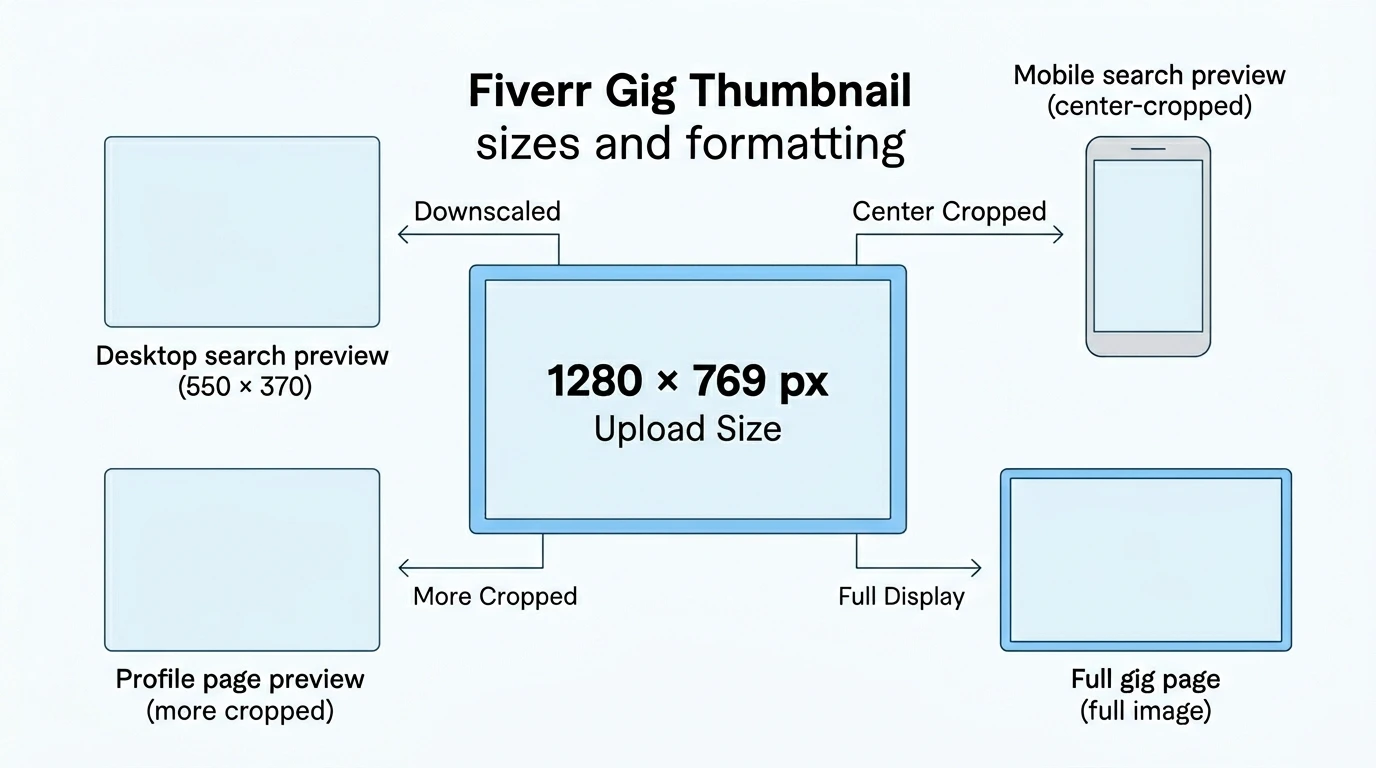
| Display Environment | Dimensions Observed | Effect on Your Fiverr Gig Thumbnail |
|---|---|---|
| Official Upload Recommendation | 1280 × 769 px | The raw file size — upload at this resolution to avoid compression artifacts |
| Desktop Search Results | ~550 × 370 px | Significant downscale — small text becomes unreadable |
| Mobile App (Search Page) | ~1024 px wide (center-cropped) | Left and right edges are aggressively cropped |
| Mobile App (Profile Page) | ~1000 px wide (center-cropped, rounded left edge) | Further cropping — edges completely disappear |
| Gig Page (Full View) | Full size maintained | Complete image shown — your only guaranteed full display |
The key insight: 1280 × 769 is the upload canvas, not the display size. Fiverr’s algorithm takes this canvas and reshapes it depending on the device and page context. A seller who painstakingly measured actual display sizes from screenshots found that the play button overlay on the browser search page is 114 × 114 px, while on mobile it’s a different position entirely — neither of which you see in any official documentation.
The practical implication: design at 1280 × 769 px, but design for a 550 × 370 display environment where text must be large and the message must be clear.
📐 Official dimension range (from Fiverr’s guidelines):
- ✅ Recommended: 1280 × 769 px, 72 DPI
- ⚠️ Minimum accepted: 712 × 430 px (avoid — will look blurry when displayed)
- 🔺 Maximum accepted: 4000 × 2416 px
- 📦 Max file size: 5 MB
- 📁 Format: Horizontal (landscape) only — JPG or PNG
Why Fiverr Crops Your Image Differently on Every Page
The cropping inconsistency that frustrates so many sellers — “The gig image issue pisses me off. Every time I try to fix it, it still stays wonky” — isn’t carelessness from Fiverr. It’s the result of two deliberate system behaviors:
1. Responsive Design: Fiverr’s interface adjusts to every screen size. A desktop browser at 1920px wide shows thumbnails differently than a phone at 390px. Since there’s no way to upload separate images per device, the system applies a center-crop algorithm that crops from the edges inward to fit the available space.
2. A/B Testing: Fiverr actively runs visual experiments on their interface layout. This means the cropping behavior you see today may differ from what the same gig looks like next month — a known source of seller frustration that has appeared in multiple community reports.
Both of these behaviors explain why a thumbnail that looks perfect on your desktop preview might appear cropped, off-center, or even distorted when a buyer views it on their phone.
The Safe Zone Rule: How Much Padding to Add
The answer to the frequently-asked question “Padding for gig thumbnail?” is specific and tested.
Leave a minimum of 70 pixels of padding on both the left and right edges. This means your safe design area is approximately 1140 × 769 px centered within the 1280-wide canvas.
What this means in practice:
- ✅ Background colors and gradients can extend to the full edges
- ✅ Decorative elements can bleed to the edge
- ❌ Text, logos, service names, and key visual elements must stay within the safe zone
- ❌ Any information you need buyers to actually read cannot be placed in the outer 70px on either side
This fiverr gig thumbnail safe zone rule is the single most effective way to ensure your design communicates properly on both desktop and mobile without redesigning for each.
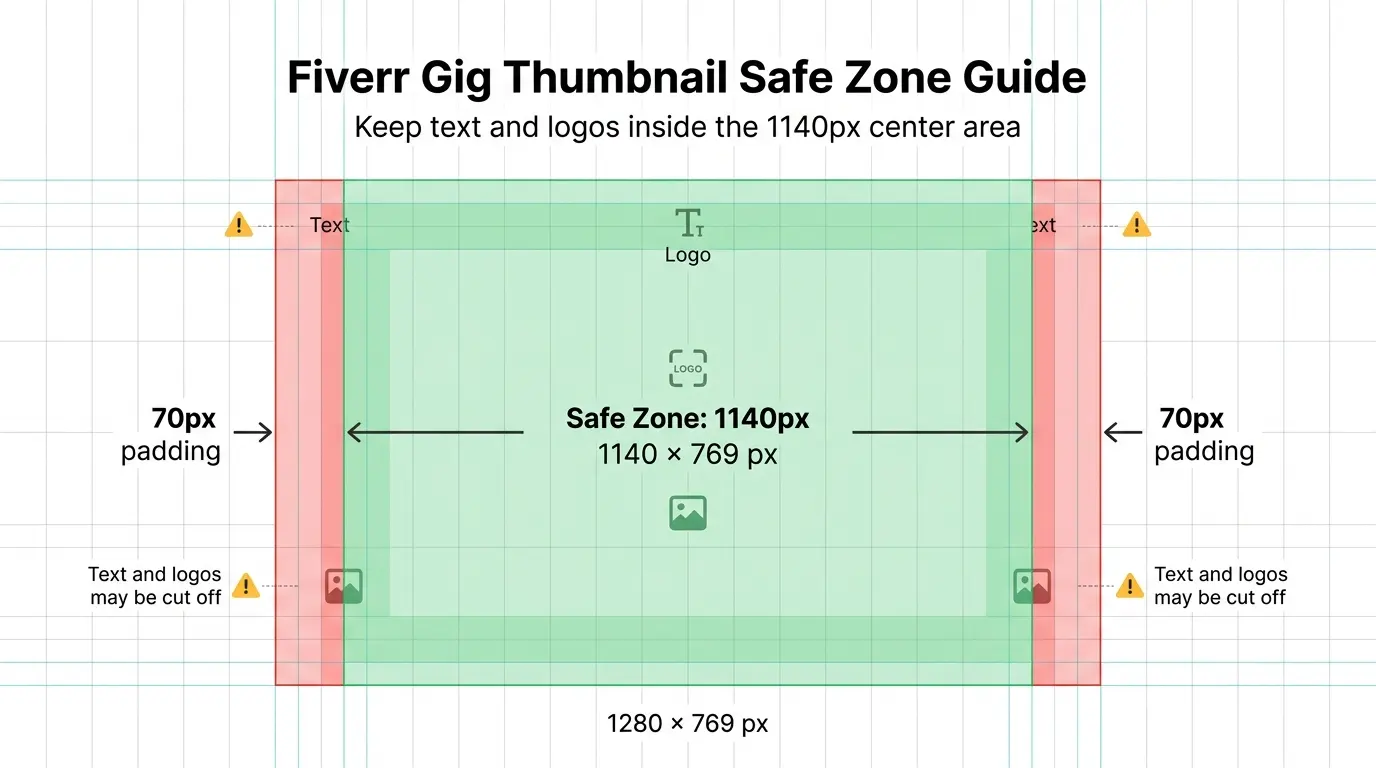 The fiverr gig image safe zone: keep all important text and logos within the center 1140px
The #1 Problem: Your Video Is Overriding Your Gig Thumbnail (And How to Fix It)
This is the most common technical issue in the entire Fiverr seller community. Analysis of seller posts shows this problem appearing in 13 separate discussion threads — all asking the same question in different words. It deserves its own section with clear, step-by-step solutions.
Why Does Fiverr Use a Video Frame as the Main Thumbnail?
When you upload a video to your gig gallery, Fiverr’s system automatically promotes it to Primary Listing Media status. This is intentional: the platform’s internal data shows that gigs with videos receive more engagement, so the algorithm gives video priority in search results.
The problem is what happens next. Since Fiverr can’t auto-play videos in search results, it needs a static image to represent the video. Its solution: grab a random frame from somewhere in the video and use that as the thumbnail.
This frame is pulled algorithmically — not intelligently. It might catch a transition frame, a moment of motion blur, a dark screen between scenes, or (most painfully) a completely unflattering facial expression mid-sentence. The result is a fiverr video thumbnail that looks unprofessional and kills your CTR before a single buyer has time to evaluate your actual skills.
Step-by-Step: How to Set a Custom Thumbnail for Your Gig Video
The button that solves this problem exists — but it’s hidden in a way that leads sellers to believe it doesn’t exist at all. Community reports confirm that “8 separate threads” were opened specifically asking about this hidden button. Here’s exactly where it is:
- Log in to your Fiverr seller account
- Navigate to My Gigs and click Edit Gig on the gig you want to fix
- Proceed through the edit steps until you reach the Gallery tab (the last step)
- Find your uploaded video in the gallery section
- Hover your mouse cursor over the video thumbnail preview — a set of icons will appear
- Click the pencil/edit icon that appears on the video
- A video player will open with a timeline scrubber at the bottom
- Drag the scrubber to find a frame that represents your gig well (a clean, clear moment with good composition)
- Click “Set as Preview” or “Set Thumbnail” to lock that frame as your thumbnail
🎯 Key detail: The edit icon only appears when you hover over the video in the gallery. Many sellers miss it because they’re clicking in the wrong place or looking for a separate button in the interface.
This is how to set thumbnail fiverr gig properly — the feature exists, it’s just poorly discoverable.
Pro Tip: Embed Your Thumbnail Design Into the Video’s Opening Frame
What if you want to use your custom-designed fiverr gig image (the 1280×769 graphic you designed) as the thumbnail, not just a video frame? The community found a workaround that works reliably.
One seller described solving the problem “the dumbest way possible” — but it’s actually quite clever: embed your thumbnail design directly into the video file as the first frame or last frame.
In your video editing software:
- Import your designed thumbnail graphic as a static image clip
- Add it to the beginning of your video timeline (make it 0.5–1 second long at minimum, enough to be a selectable frame)
- Export the final video with this intro frame included
- Upload to Fiverr and use the Set Thumbnail process above
- Drag the scrubber to that first second — your custom design will appear
- Click Set as Preview to lock it in
Result: Fiverr shows your professionally designed thumbnail in search results, while buyers still get the full promotional video experience when they click your gig.
How to Fix Gig Gallery Order (When Your Thumbnail Shows Up in the Wrong Position)
A related but separate issue: even when you haven’t uploaded a video, your designed thumbnail might appear as the second or third image in your gallery instead of the first — making a different (often worse) image appear as your search result thumbnail.
Why Fiverr Doesn’t Have a “Reorder” Feature (And the Workaround)
Unlike virtually every other platform with a media gallery, Fiverr does not support drag-and-drop reordering of gallery images. The system uses strict chronological upload order: whatever was uploaded first becomes image #1 and the default thumbnail.
Community members have confirmed this frustration repeatedly, with comments noting this is a “basic feature” that simply doesn’t exist.
The only working solution for fiverr gallery order issues:
- Go to Edit Gig → Gallery
- Delete every image and video in the gallery
- Re-upload them one by one in the exact order you want them to appear
- The first image you upload becomes your primary thumbnail
- Save the gig
Note: If you also have a video, it will automatically take precedence as the primary listing media regardless of upload order — use the Set Thumbnail method from §3 to control what frame appears.
🖼️ Official gallery limits: According to Fiverr’s guidelines, each gig can include up to 3 images, 1 video, and 2 PDFs. The gallery is often a buyer’s first impression — Fiverr officially recommends tailoring content to your niche (logo variations for design, code screenshots for development, resume samples for career services).
Bonus: Tag Your Gallery Items to Attract More Relevant Traffic
Most sellers completely overlook this feature. Fiverr officially allows you to add keyword tags to each individual gallery item — and according to Fiverr’s gallery tagging guide, this directly affects how the algorithm connects your gig with buyers who have matching needs.
How it works: When a buyer’s search intent matches the tags on your gallery items, Fiverr prioritizes showing your gig to that specific buyer — including in reviews-with-files displays.
How to add gallery tags:
- Go to Manage Gigs → Edit → Gallery tab
- Next to each image, click “Add tags to this sample”
- Select tags that precisely match the content shown in that specific image
⚠️ Important warning from Fiverr: “Non-relevant tags can actually hurt your Gig and reduce its overall performance.” Only tag each gallery item with keywords that exactly describe what’s shown in that image — not general gig keywords.
Fiverr Gig Thumbnail Design: What Makes Buyers Click
Technical correctness gets you a usable canvas. Design excellence is what fills it with something that converts. This is where your advantage as a designer comes in — because most tutorial sites explain the technical specs but never touch the psychology of what makes a fiverr gig image design actually work.
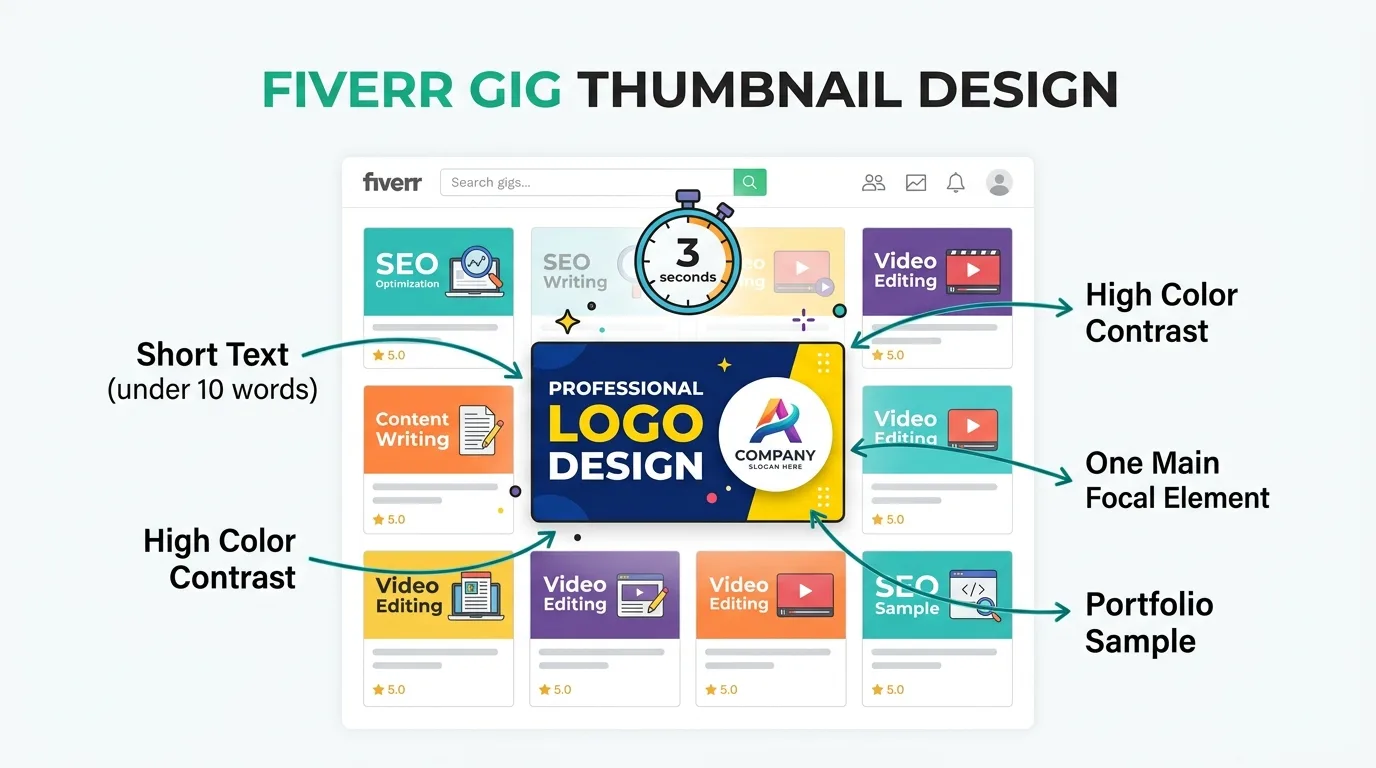
The 3-Second Rule: What Your Thumbnail Must Communicate Instantly
In search results, buyers move fast. Think of your thumbnail as “a billboard at top speed” — that’s how one experienced Fiverr community member described the challenge. A billboard on the highway doesn’t have time for paragraphs.
Within 3 seconds, your thumbnail needs to answer three questions in the buyer’s mind:
- What service is this? (the type of deliverable, not the process)
- What quality level? (signals through design sophistication)
- Is this for me? (niche signals, style indicators)
Any design element that creates confusion about any of these three questions is costing you clicks. Clever or abstract imagery that requires interpretation — however beautiful — is a conversion killer in this environment.
Typography in Gig Thumbnails: What to Write and Where
Text placement in your fiverr gig thumbnail follows specific rules that most designers ignore:
Word count: According to Fiverr’s official image guidelines, text overlays should be under 10 words, clear, and with sufficient contrast to the background. The community consensus backs this up — buyers in rapid-scan mode don’t read sentences.
Logos & graphics limit: Fiverr officially allows up to 5 logos or graphics of relevant platforms (e.g., social media icons). Beyond 5, your gig image becomes cluttered and risks removal.
Color contrast rule (official): The text or graphic color should be either notably darker or notably lighter than the background — mid-range contrast causes readability failure at small display sizes.
The Front-Load Noun rule: Since Fiverr forces every gig title to begin with “I will”, putting “I will design logos” in your thumbnail wastes space and states the obvious. Instead, put the result noun first — the word that represents what the buyer is getting:
- ✅ “LOGOS” in giant text, with a subtitle for your style
- ✅ “THUMBNAILS” prominently, with a niche qualifier
- ❌ “Professional creative logo design” — too wordy, no visual hierarchy
Font size: Given that your image displays at roughly 550×370 in desktop search, your main text should be at minimum 100px at 1280px canvas — which looks enormous in design view but becomes barely adequate at actual display size.
Text touch your edges? Remember the 70px safe zone rule — all text must stay well within it.
Face vs. No Face: Does Showing Your Photo Increase Trust?
This is one of the most asked questions in the community, appearing explicitly in multiple posts. Here’s what the data actually shows:
Arguments for including a face:
- Community data: “Video as a thumbnail is 10x better overall” (referenced specifically for video with face)
- Human faces activate attention pathways in the brain — buyers pause longer when they see a person looking at them
- Builds trust, especially for service-based gigs where the buyer is hiring you specifically
Arguments against:
- Stock photography works fine according to sellers in technical niches
- Some sellers use AI-generated faces — though this carries risk if buyers notice
- Privacy and security concerns are valid (many sellers don’t want their face publicly associated with a freelance profile)
The designer’s recommendation: If your gig is in a creative field (design, video, writing), a real photo showing your professional self alongside samples of your work creates the strongest trust signal. If privacy is a concern, a high-quality professional illustration or a strong “no-face” portfolio layout works well — but a generic stock image of a person who isn’t you adds zero trust.
For visual composition and bold design principles that drive clicks, our MrBeast Thumbnail Design Formula breaks down exactly what makes a dominant focal point work at any display size.
If you do show your face, ensure it occupies 30–50% of the frame — large enough to register at mobile display sizes.
Color, Contrast & Visual Hierarchy: Standing Out in Search Results
Your thumbnail doesn’t exist in isolation — it appears surrounded by your competitors. The most sophisticated design in the world is invisible if it blends into the visual noise around it.
Practical contrast strategy:
- Identify the dominant color palette of your top 5 competitors in search
- Choose a principal color that creates maximum contrast against their palette
- If competitors use dark backgrounds, choose a vivid, light-colored design
- If competitors use bright/white layouts, a dark or jewel-toned background will stand out
Color rules:
- Maximum 3 colors in your palette (background, primary element, accent/text)
- Use high-saturation values — muted, “tasteful” colors are invisible at thumbnail size
- Test by shrinking your design to 550×370 and squinting — can you still identify the focal point?
Visual hierarchy checklist:
- One dominant element (the main service name or sample image) should be 60%+ of the visual weight
- Secondary element (your style or niche qualifier) should be immediately below in the reading order
- No competing elements at equal visual weight — your eye should land somewhere specific, then flow naturally
Portfolio Samples Inside the Thumbnail: Yes or No?
The community is clear on this: “Buyers look at samples and reviews, not description.” For creative service gigs, showing actual work samples inside your fiverr gig thumbnail is one of the highest-impact design decisions you can make.
Effective approaches:
Before/After layout: Show a weak input and your polished result side-by-side. This immediately demonstrates your skill and answers the buyer’s core question (“what will I get?”) in a single glance.
Sample grid: For design services with multiple variations, a tight 2×2 or 3×2 grid of your best work communicates portfolio breadth in a compact format.
Single hero sample: If your work has strong visual impact (photo editing, illustration), one large, impressive output sample with minimal text can outperform multi-sample layouts.
Important: The sample must be genuinely impressive at thumbnail size. A sophisticated portfolio piece that requires zooming to appreciate is worse than a simpler, bolder piece that reads well at small display sizes.
Common Mistakes That Kill Your Gig Thumbnail (And Your Rankings)
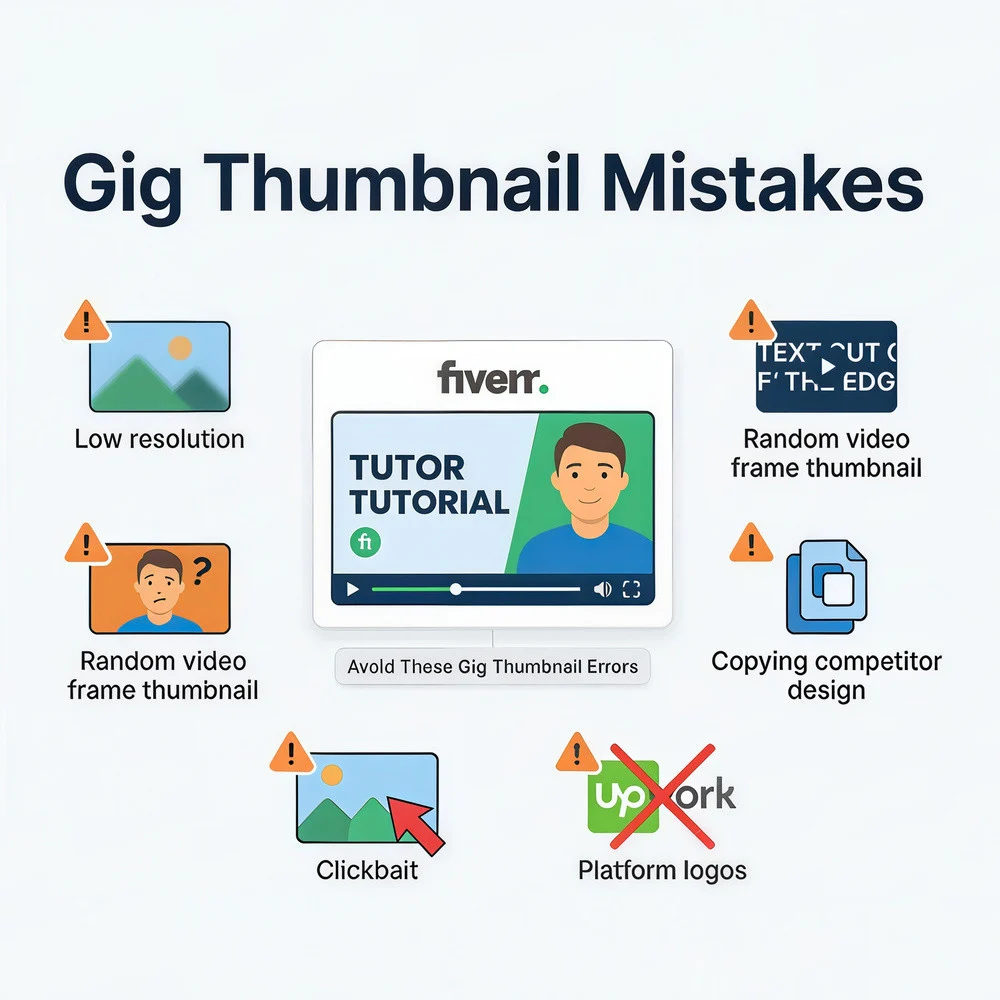
These six mistakes are directly documented in community data — not theoretical warnings:
1. Relying on Fiverr’s auto-generated thumbnail The default behavior of letting Fiverr pick a random video frame is the single most common mistake. It produces a thumbnail that’s almost always blurry, unflattering, or meaningless. Always set your thumbnail manually.
2. Changing your thumbnail while your ranking is strong Every edit to a live gig triggers a re-crawl period. The algorithm temporarily removes your gig from rankings while it recalculates your CTR with the new thumbnail. This process takes 4–8 weeks according to community observations. One seller reported going from 30–40 impressions per day to 4–5 impressions after a gig edit — and staying there for weeks. Edit strategically, not constantly.
3. Placing important text near the edges Ignoring the 70px safe zone means your text gets cropped on mobile. A truncated message looks unprofessional and, worse, may not communicate anything useful.
4. Using logos of competing platforms (e.g., Upwork logo) Some sellers think showing Upwork or other platform logos builds credibility. It doesn’t — it can mark your gig as promoting competitors, which violates Fiverr’s Community Standards and risks gig removal. Note: Fiverr does allow up to 5 relevant platform logos (e.g., Instagram, Photoshop icons) — just not competitor marketplace logos.
5. Copying a competitor’s thumbnail design Borrowing style elements is risky; directly copying a successful competitor’s layout is worse. Fiverr’s automated systems and human review teams actively scan for duplicate content, and per Fiverr’s Terms of Service, this can result in permanent account suspension. Additionally, buyers notice — “When copycats appeared with less stunning thumbnails they stayed buried below me.”
6. Uploading at too-small a resolution (causing blurry thumbnails) Uploading below 1280×769 forces Fiverr to upscale your image, creating the notorious fiverr thumbnail blurry appearance. Technically, Fiverr accepts a minimum of 712 × 430 px — but anything below the recommended 1280×769 will look pixelated at full gig page display size. If you need a refresher on ideal dimensions across platforms, our YouTube Thumbnail Size Guide covers the exact same resolution logic in depth.
7. Using clickbait or misleading images Fiverr’s official guidelines explicitly state that clickbait content “can lower your ranking in search results and damage a Gig’s reputation.” Your thumbnail must accurately represent the service you provide — a misleading visual that earns clicks but disappoints buyers creates low completion rates and negative reviews, which the algorithm penalizes heavily.
8. Adding Fiverr logos or seller badges to your image Many sellers think adding a Fiverr badge or their seller level icon adds credibility. Fiverr’s guidelines are direct: “Fiverr automatically includes badges for you — adding them manually will flag your Gig and it will be removed.” This includes ratings, seller level icons, or any official Fiverr branding.
9. Using a generic or irrelevant file name when uploading
This one is almost universally ignored. Fiverr officially recommends naming your image file with a clear, relevant name for SEO purposes — for example logo-design-fiverr-gig.jpg instead of image001.jpg. This helps your gig be discovered in external search results beyond the Fiverr platform itself.
Gig Thumbnail vs. Gig Video: Which One Should Be Your Main Focus?
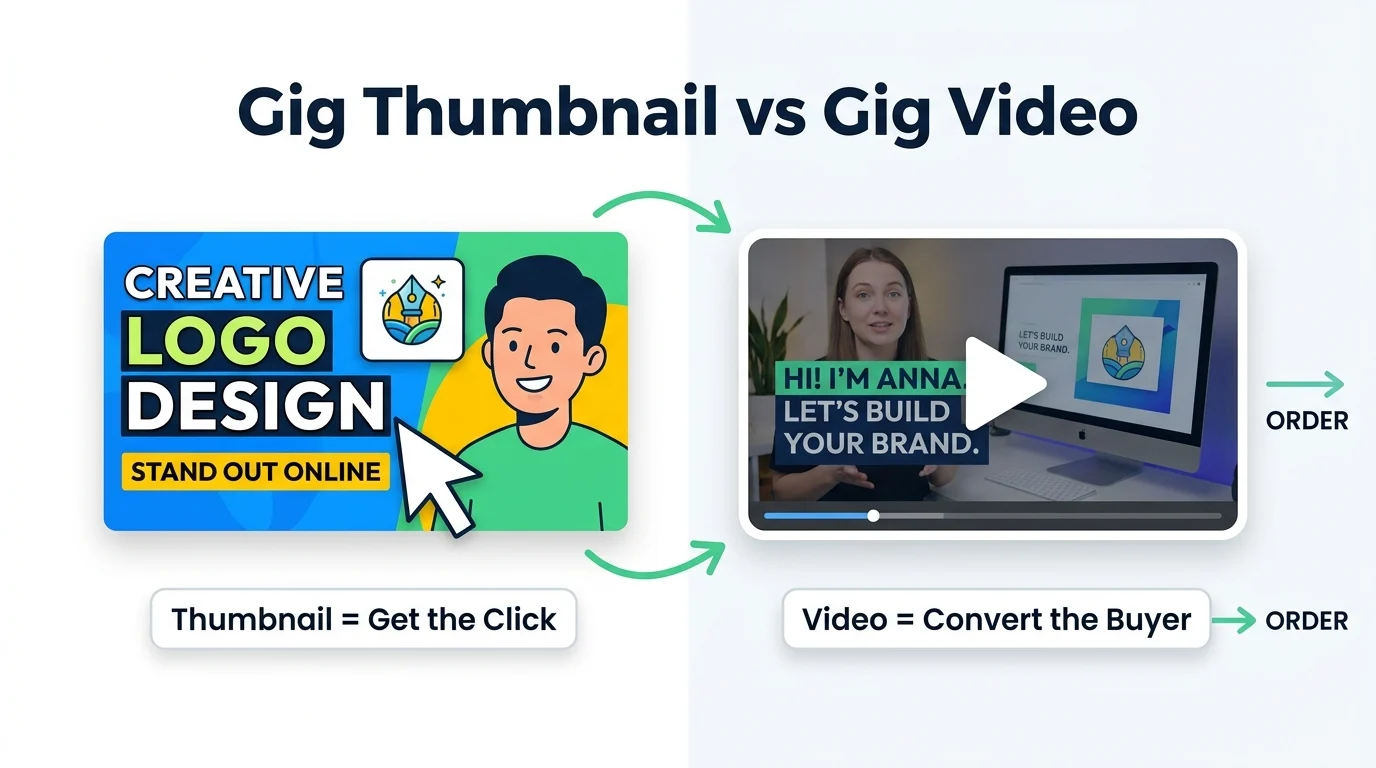
The arrival of video gigs created a false choice for many sellers: “Should I invest time in the thumbnail image or the video?” The answer is that they serve completely different purposes in the conversion funnel.
| Comparison Point | Fiverr Gig Thumbnail | Gig Video |
|---|---|---|
| Primary function | Earn the click from search results | Convert the click into an order |
| Algorithm effect | High CTR = more impressions | Presence alone = +30% impressions |
| Time buyer spends | Less than 3 seconds | 30–60 seconds |
| Without the other | Strong thumbnail, no video: you get clicks but lower conversion | Video without thumbnail: random blurry frame, fewer clicks, less video impact |
Community data is unambiguous: “In my experience comparing gig performance before and after having videos, I’ve gotten maybe a 30% increase of impressions and double the orders.” But the same seller also noted that the gig with the video and updated thumbnails was the only variable that changed.
The conclusion: A gig video without a controlled thumbnail undermines both assets. The thumbnail earns the click. The video drives the order. You need both working together.
FAQ — Frequently Asked Questions About Fiverr Gig Thumbnails
What is the best size for a Fiverr gig image in 2026?
The official recommended size is 1280 × 769 pixels. Upload at this resolution to prevent blurry compression. In practice, your thumbnail will display at roughly 550 × 370 pixels in desktop search results — meaning text must be large and messaging must be simple to be readable at that actual display size.
Why does my Fiverr thumbnail look different on mobile?
Fiverr applies a center-crop on mobile screens. Since phone screens are narrow and vertical, the system crops the left and right edges of your image to fit. Text or logos placed near the horizontal edges disappear on mobile. The fix: keep all important content within a 70px inset from both sides (the safe zone).
How do I change my Fiverr gig thumbnail after uploading a video?
Go to Edit Gig → Gallery. Hover over the video — a pencil/edit icon appears. Click it to access video playback with a timeline scrubber. Navigate to the frame you want, then click “Set as Preview” to save it as your search result thumbnail.
Will changing my gig thumbnail affect my ranking?
Yes — and significantly. Every gig edit, including thumbnail changes, triggers a re-crawl period where Fiverr temporarily removes your gig from rankings while recalculating CTR data. Based on community reports, this process takes 4–8 weeks. Avoid thumbnail changes when your gig is performing well.
Can I use AI-generated images for my Fiverr gig thumbnail?
Yes — with conditions. Fiverr’s official AI policy permits AI-generated content, including thumbnail images, under the following rules:
✅ Allowed:
- AI-generated images where you own all necessary rights (copyright, licenses)
- AI tools used to enhance or compose original work
- Images that comply with the AI tool’s own terms of service
❌ Prohibited:
- AI-generated deepfakes, fake faces, or impersonators — even for thumbnails
- Bulk-generated identical content delivered to multiple clients
- Any content that infringes intellectual property or violates Fiverr’s Community Standards (penalty: permanent account suspension)
⚠️ The marketing risk: For creative service gigs — design, photo editing, illustration — an AI-generated thumbnail sends a contradictory message. You’re selling your creative skill, but your own storefront image wasn’t made by human skill. Buyers who notice this will question the authenticity of everything you deliver. For technical service gigs (data entry, translation, SEO), the risk is lower.
Should I put my face in the Fiverr gig thumbnail?
A genuine, professional photo increases trust significantly — community data shows a 10x engagement advantage for gigs with real-face video thumbnails over text-only designs. If you include your face, ensure it fills 30–50% of the frame to remain visible at thumbnail size. For privacy, high-quality portfolio samples or a professional illustration work as alternatives.
Final Thoughts: The Thumbnail Is Your First Salesperson
Three things determine whether your Fiverr gig thumbnail brings you orders or wastes your time:
1. Technical correctness: Upload at 1280 × 769 pixels, respect the 70px safe zone, keep text inside the edges. Without this, even a great design fails mechanically.
2. Video control: If you’ve added a promotional video, take manual control of your thumbnail using the hidden Set Thumbnail feature — or embed your design as the opening frame of the video. Leaving this to chance means Fiverr picks a random frame that kills your CTR.
3. Design that converts: Use the 3-second rule, front-load your service noun, maintain a visual hierarchy that communicates instantly, and let your portfolio samples do the heavy persuasion.
[!IMPORTANT] Need a Professional Custom Thumbnail for Your Service or Channel?
Rather than spending hours wrestling with safe zones, color contrast, and resolution specs, let our professional designers handle it. We engineer click-worthy, high-converting custom thumbnails tailored specifically to your brand.
👉 Order Custom Thumbnail Design Service
Continue reading:
- 🎨 YouTube Thumbnail Size: Complete 2026 Guide
- 📈 High CTR Thumbnail Design Principles
- 🛠️ Best Tools for Designing Professional Thumbnails
- 🏆 MrBeast Thumbnail Design Formula
Official Fiverr Resources:
- 📋 Guidelines for Selecting Gig Images — official specs and image rules
- 📜 Fiverr Terms of Service — content ownership and thumbnail policies
- 🤝 Fiverr Community Standards — content rules and prohibited material
- 🤖 Fiverr AI Content Standards — AI-generated image guidelines