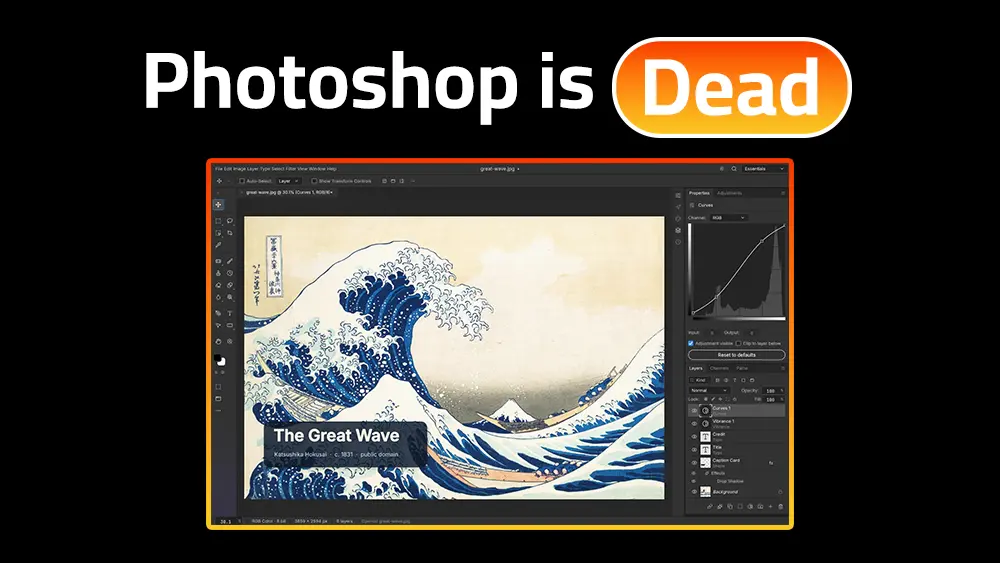
The release of PhotoCraft version 0.7.0 in October 2026 has generated substantial discourse across software development circles, digital art communities, and creator platforms. Billed as an open-source, native desktop alternative to industry-standard image editing software, the application warrants rigorous evaluation from the perspective of high-volume digital design workflows.
An extensive independent evaluation was conducted using version 0.7.0 on Windows, macOS, and Linux environments to determine its viability specifically for YouTube thumbnail design. The objective was to ascertain whether the software possesses the structural stability, performance characteristics, and typographical control required for professional, click-optimized graphic creation.
Quick Verdict: PhotoCraft v0.7.0 Evaluation
| Assessment | Details |
|---|---|
| Current Status | Early Alpha Release (October 2026) |
| Operating Systems Tested | Windows 11 (x64), macOS (Apple Silicon), Linux (AppImage) |
| Primary Use Case Match | Highly suitable for thumbnail design, basic compositing, and offline text layouts |
| Who Should Try It Now | Thumbnail designers seeking a subscription-free desktop application with true PSD layer support and robust typographical tools |
| Who Should Wait | Enterprise retouchers dependent on third-party plugins, CMYK pre-press pipelines, or AI-generative subject refinement |
What Is PhotoCraft?
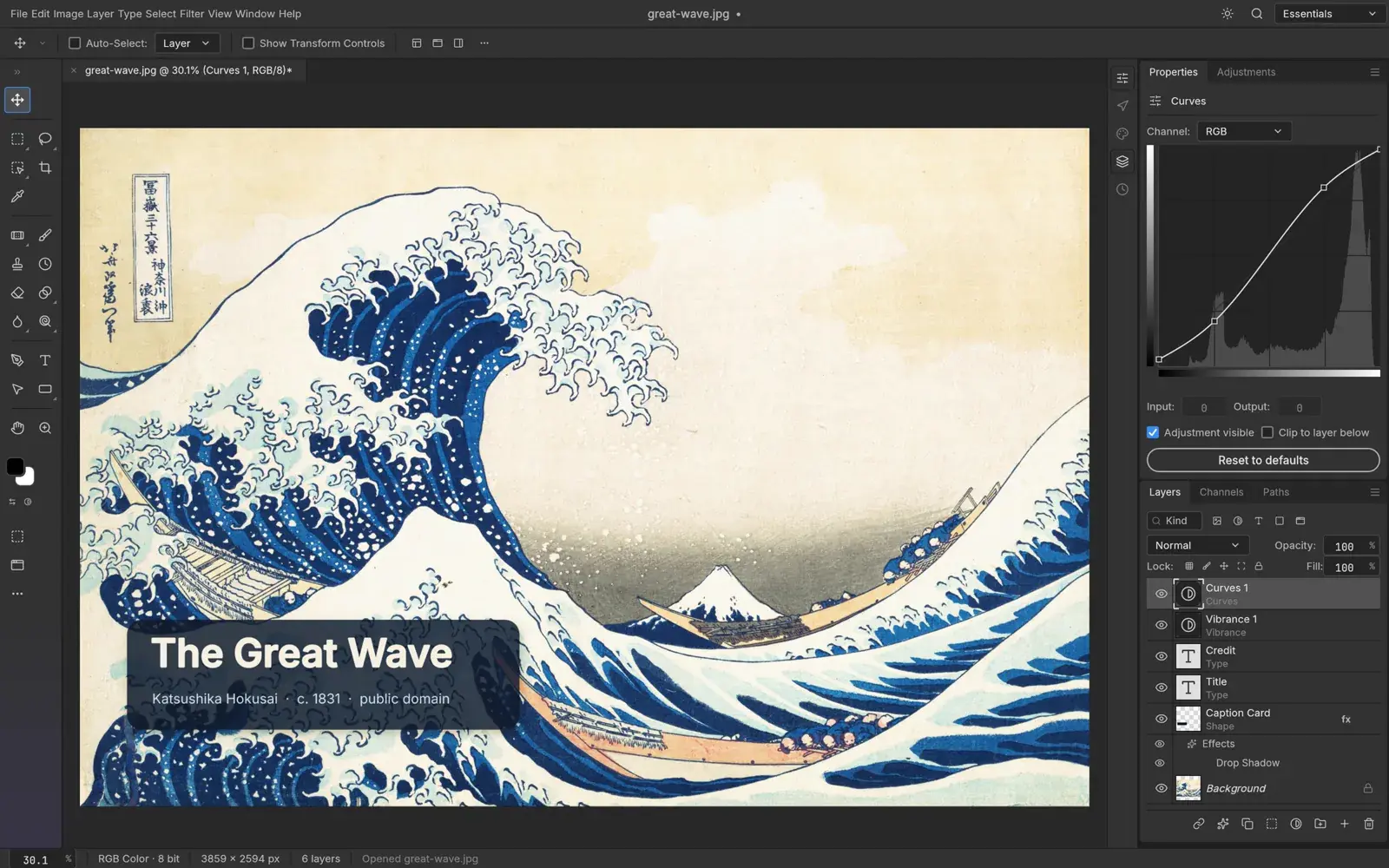
Understanding PhotoCraft requires situating it within the broader ArtCraft software suite. Spearheaded by developer Brandon Thomas, the project describes itself as a clean-room reimplementation of Adobe Photoshop workflows. The clean-room methodology indicates that the software was engineered strictly from public specifications and observed application behavior, utilizing no proprietary code, decompiled shaders, or unlicensed graphical assets.
PhotoCraft is not a standalone project. It belongs to the ArtCraft suite, which also includes open-source alternatives targeting other Adobe applications such as Illustrator and Lightroom. However, PhotoCraft is currently the most developed tool in the collection, and the only one with sufficient maturity for production thumbnail workflows. The remaining tools in the suite are at earlier development stages and were not evaluated in this review.
The application is written entirely in the Rust programming language, functioning under dual MIT and Apache-2.0 open-source licenses. While the rapid development pace was aided by AI coding assistants, this technical background context is secondary to the application’s core utility for designers. The software is fundamentally an offline, native desktop client requiring no monthly subscription, cloud processing credits, or persistent internet connection.
Despite the advanced capabilities demonstrated in version 0.7.0, the development team explicitly categorizes the software as being in an early alpha stage. The installation footprint reflects its highly optimized architectural foundation, requiring merely 70MB to 80MB depending on the operating system, making it an exceptionally lightweight addition to a local digital workspace.
Contrary to assumptions that localized markets lack immediate exposure to emerging design utilities, international technology coverage has been comprehensive. The Arabic technology publication almaghza.com analyzed PhotoCraft as early as October 8, highlighting its potential to liberate regional product teams from file-format lock-in and prohibitive currency conversion costs associated with software subscriptions.
Download and Installation
Because PhotoCraft operates outside of curated commercial application storefronts, acquisition relies on direct downloads from official repositories. The verified binaries for version 0.7.0 are hosted exclusively on the project’s GitHub release page and the associated getartcraft.com domain.
Installing the software across different operating systems reveals several early-alpha idiosyncrasies that designers must navigate:
| Operating System | Package Type | Installation Notes and Known Behaviors |
|---|---|---|
| Windows | MSI / Portable ZIP | The version 0.7.0 installer occasionally finishes without generating a desktop or Start Menu shortcut. Execution requires navigating to the Program Files/Photocraft directory to manually launch the executable. |
| macOS | Universal DMG | Apple Silicon and Intel support is robust, but specific hardware configurations may trigger a wgpu initialization failure. Launching the application via Terminal using the --safe-gpu flag forces the engine to bypass the driver issue by relying on the CPU compositor. |
| Linux | AppImage / Flatpak | Arch Linux and AppImage deployments execute smoothly, though stylus pressure and tilt mapping for drawing tablets remain incomplete, defaulting to maximum pressure on all strokes. |
PSD Compatibility - What Works and What Changes
The primary barrier preventing widespread adoption of legacy open-source image editors has historically been file-format lock-in. PhotoCraft directly addresses this through its dedicated photocraft-psd parser crate.
To evaluate this capability, the testing protocol required opening a multi-layer PSD sourced from a legacy thumbnail template, executing text modifications, manipulating layer masks, saving the document as a copy, and reopening the asset.
The evaluation demonstrates a crucial distinction between structural preservation and visual rendering. According to the project’s internal testing data utilizing the industry-standard psd-tools corpus, 307 out of 309 files exhibit perfect structural round-trip stability. However, when measuring algorithmic rendering parity against files authored with proprietary Photoshop filters, only 133 out of 256 test files match visually on a pixel-for-pixel basis.
| PSD Element | Testing Observation in PhotoCraft v0.7.0 |
|---|---|
| Standard Layers and Groups | Survived seamlessly. Opacity, blend modes, and folder hierarchies round-tripped without structural degradation. |
| Layer Masks and Alpha Channels | Fully functional. Pixel and vector masks remained editable upon reopening. |
| Typography | Editable point and paragraph text survived. Recent updates to manual and optical kerning engines successfully rendered legacy layouts. |
| Smart Objects and Filters | Partial support. Standard adjustment layers function perfectly. However, undocumented proprietary Adobe filters invoke a transparent pass-through mechanism. |
The transparent pass-through mechanism is highly advantageous. Rather than silently corrupting the file by discarding unrecognized data, PhotoCraft temporarily suspends interpretation of proprietary blocks, retaining the raw binary data in memory and serializing it unchanged upon saving. This prevents destructive file degradation when transferring assets back to collaborative agency environments.
Designing a YouTube Thumbnail in PhotoCraft - Step by Step
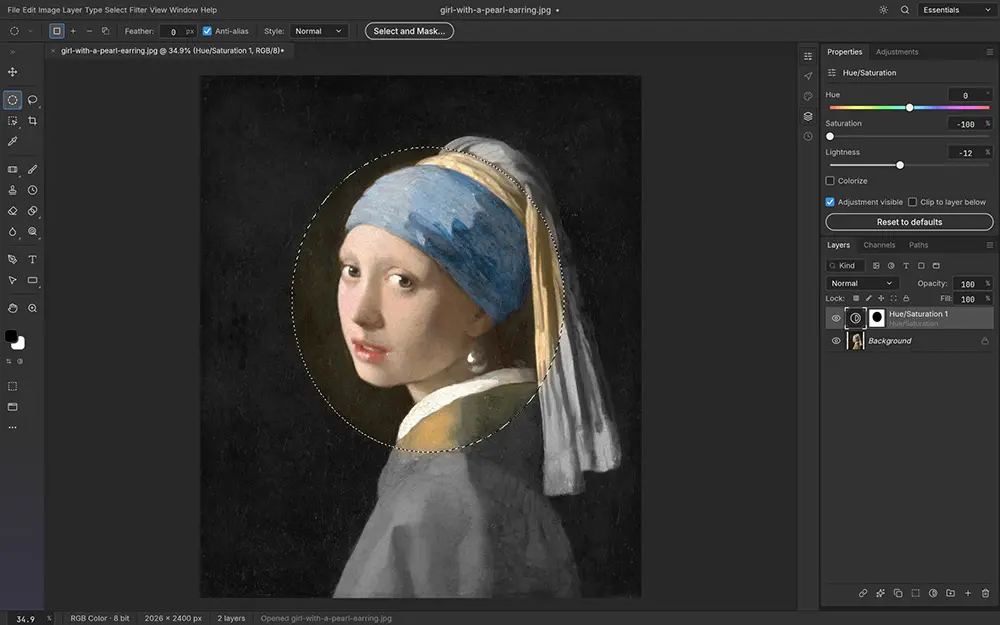
To determine the software’s practical utility, a rigorous workflow test was conducted focusing specifically on YouTube thumbnail composition.
Platform algorithms strictly enforce technical asset constraints. A standard thumbnail necessitates a resolution of 1280x720 pixels (a 16:9 aspect ratio) and a file size ceiling of 2MB for mobile uploads.
Canvas Setup
The process initiated seamlessly, utilizing a familiar New Document dialogue to establish the 1280x720 sRGB canvas. The interface architecture strictly mirrors legacy software, placing panels, tools, and keyboard shortcuts exactly where established muscle memory anticipates them.
Background and Image Import
Adding a high-resolution background asset functioned flawlessly. PhotoCraft supports a wide array of formats, including standard PNG and TIFF files. Notably, the documentation states that the software handles HEIC formats natively, though current official builds process these Apple-native files strictly as read-only inputs.
Subject Isolation
The composition required isolating a human subject from the background to establish a strong focal point. Engaging the Object Selection tool deployed a localized, on-device AI model that successfully identified the subject contour without relying on cloud processing. Duplicating the isolated subject onto an independent layer via standard keystrokes (Ctrl/Cmd + J) executed instantaneously.
Typography and Text Styling
Typography remains the most critical vector for thumbnail click-through rates. Utilizing the Text tool (T), bold messaging was applied. PhotoCraft’s text engine allows for comprehensive kerning and scaling, fortified by robust non-destructive layer styles. Applying a high-contrast white fill with a thick black stroke and a pronounced drop shadow provided the legibility necessary for mobile display scaling.
Shapes and Vector Elements
Integrating vector shapes - specifically directional arrows and underlying text rectangles - relied on the native shape toolsets, which function independently of raster resolution.
For occasional designers or creators requiring rapid, browser-based typographical adjustments without navigating complex software installations, transitioning workflows to a dedicated Touhfa Thumbnail Editor provides a streamlined alternative.
Export and Quality Check
The final asset was flattened and exported as an 85% quality PNG to balance visual clarity against the stringent upload limits. Before uploading any completed asset to the video platform, processing the design through a Thumbnail Previewer ensures the typography remains legible against native interface overlays and varied screen dimensions. Should the final export inadvertently exceed the 2MB mobile upload threshold, utilizing a Thumbnail Compressor easily resolves file size constraints.
Performance and Missing Features
While the design test validated PhotoCraft’s utility, the software remains constrained by its alpha development stage. The dual-compositor engine - pairing a reference CPU software oracle with a wgpu hardware-accelerated rendering pipeline - yields exceptional speed for specific tasks. For instance, executing wide-radius Gaussian blurs across large canvases resolves almost instantaneously.
However, the memory management system, which relies on 256x256 sparse tiling and copy-on-write semantics, presently exhibits friction when interfacing with desktop operating system clipboards. Observational testing corroborates community reports indicating that executing copy and paste commands on excessively large external canvases can trigger noticeable operational latency.
| Feature Capability | Status in Version 0.7.0 |
|---|---|
| Layer Adjustment Suite | Supported. Includes 16 non-destructive adjustments (Curves, Levels, Hue/Saturation, Color Lookup). |
| Complex Subject Refinement | Missing. Advanced cloud-based generative hair masking is unavailable; selections rely on local edge detection. |
| Color Space Flexibility | Supported. Natively handles RGB, Grayscale, CMYK, and Lab formats with ICC profile assignment. |
| Third-Party Extensions | Unsupported. Legacy .8bf retouching plugins and proprietary scripts will not compile or execute. |
| Advanced Web Export | Supported. Modern WebP encoding is integrated directly into the export pipeline. |
| HEIC Format | Read-only. Official builds can open HEIC files but cannot save or edit in this format. |
| AVIF Format | Requires custom build flags. Not available in standard release binaries. |
Understanding the foundational principles of visual hierarchy mitigates many software limitations. Regardless of the editing environment, implementing the strategies outlined in the Visual Composition Guide ensures maximum thumbnail efficacy.
Is PhotoCraft Safe?
The transition to open-source architecture necessitates an objective reassessment of software security. The visibility of the source code does not automatically confer invulnerability, particularly for applications tasked with parsing complex binary file formats.
File Parsing and Security Policy
The project’s security policy explicitly advises treating all ingested files, metadata, and automation requests as potentially malicious. The photocraft-psd parser lacks the decades of adversarial hardening present in commercial equivalents, leaving theoretical attack surfaces open regarding decompression bombs or memory exhaustion vulnerabilities. Consequently, acquiring the software exclusively from official repositories is imperative to avoid repackaged, malware-injected binaries.
The MCP Server: Automation Potential and Risk
The most unique security paradigm surrounding PhotoCraft involves its embedded Model Context Protocol (MCP) server. The software features an authenticated, loopback-only JSON control channel intended to allow coding assistants and autonomous AI agents to drive the editing engine programmatically.
While this architecture introduces unprecedented potential for automated batch asset generation, the security implications are significant. The CLI subcommands are not strictly sandboxed; they possess the capability to read and write to any directory accessible by the host user account. Furthermore, the control protocol remains unencrypted. Exposing this port to untrusted networks grants broad system access. Prudence dictates that complex, untrusted PSD assets should be tested as file copies within isolated directories, rather than executing scripts across primary root folders.
Who Should Try PhotoCraft Right Now?
The utility of PhotoCraft v0.7.0 correlates directly to the user’s specific operational requirements.
| User Profile | Recommendation | Contextual Rationale |
|---|---|---|
| YouTube Thumbnail Designers | Strongly Recommended | Delivers essential typographical controls, robust layer styles, and localized subject isolation without recurring financial overhead. |
| Linux Desktop Creatives | Strongly Recommended | Eliminates the need for Wine emulation layers, providing a native, hardware-accelerated interface across AppImage and Flatpak deployments. |
| Automated Marketing Teams | Recommended (with Sandbox) | The CLI and MCP server allow for programmatic template variation generation, provided strict directory access controls are enforced. |
| High-End Commercial Studios | Not Recommended | The absence of legacy third-party plugin support and AI generative fill functionalities renders the software inadequate for complex agency pipelines. |
For creators evaluating a broader spectrum of utilities tailored exclusively to platform optimization, exploring the comprehensive YouTube Thumbnail Tools Guide provides additional context.
Frequently Asked Questions
Is PhotoCraft just a UI clone of Photoshop running in a web browser?
No. The application is natively compiled utilizing the Rust programming language and leverages a wgpu graphical compositor to interface directly with local hardware. The familiar user interface was deliberately constructed to minimize friction for migrating users, but the underlying engine contains no embedded Chromium wrappers or Electron frameworks.
Does PSD really work? Do layers survive a save and reopen cycle?
Structural layer data, masks, typography, and standard non-destructive adjustments round-trip effectively. If the file contains proprietary filters that the open-source engine cannot compute, a transparent pass-through mechanism protects the undocumented data from corruption during serialization.
How is the software installed if it fails to open on Windows?
The current version 0.7.0 MSI installer frequently completes execution without populating a desktop or Start Menu shortcut. Launching the application requires navigating directly to the local Program Files/Photocraft directory to execute the binary.
Is it safe? Can AI-generated code be trusted with proprietary files?
The software should be treated with the standard caution afforded to any early alpha application parsing complex binary formats. The MCP server facilitates automation but lacks deep system sandboxing. Users should refrain from processing sensitive or untrusted assets while the control channel is actively listening on shared local networks.
What formats and features are still missing?
Current releases lack third-party .8bf plugin compatibility, cloud-based generative masking, and advanced multi-language localized glyph substitution. While native export formats are robust, AVIF support requires customized build flags, and HEIC parsing is currently restricted to read-only parameters.
Can the software handle large canvases?
Architecturally, the application fragments large canvases into 256x256 sparse tiles, allocating memory strictly to areas undergoing active modification. However, the alpha build exhibits occasional lag and latency specifically when executing systemic copy and paste operations across exceedingly large document structures.
Related guides:
- 🖼️ YouTube Thumbnail Examples + Best Thumbnails of All Time
- 🎨 Best Colors for YouTube Thumbnails + Color Psychology
- 🔤 Best YouTube Thumbnail Fonts by Niche
- 📐 Visual Composition Guide for YouTube Thumbnails
- 📊 High CTR Thumbnails: Proven Tips + Examples
- 🧰 YouTube Thumbnail Tools Guide
- 📏 YouTube Thumbnail Size: Dimensions and Format Guide
- 🎯 YouTube Thumbnail Tips 2026
- 🎬 50+ Camera Angles and Shot Types for AI and Photography