What Is a Thumbnail? Definition, Types, and Why It Matters
A thumbnail is a small, compressed preview image that represents a larger piece of content, such as a video, webpage, or digital document. Operating as a critical visual index, the fundamental purpose of a thumbnail is to provide users with an immediate, easily digestible snapshot of the underlying media, allowing them to browse massive amounts of digital information rapidly.
In the modern digital ecosystem, understanding what a thumbnail is and how to optimize it remains essential for content creators, web developers, and digital marketers. Whether navigating a smartphone photo gallery, scrolling through a crowded social media feed, or searching for specific content on video platforms, thumbnails serve as the primary gateway between digital content and audience engagement. As visual communication grows in popularity, these preview images must effectively convey complex narratives in a concise, visually compelling format.

Thumbnail Meaning - Where the Name Comes From
The word “thumbnail” is a direct anatomical reference to the human thumbnail, utilized to describe anything of a remarkably small size or concise nature. The earliest documented use of the compound word in a literal sense dates back to the 17th century. By the mid-19th century, the term had evolved into a figurative expression in the art, print, and design worlds, used primarily by directors, storyboard artists, and graphic designers to describe “a drawing the size of the thumbnail.” These miniature illustrations allowed visual artists to explore multiple ideas quickly and visualize concepts in shorthand before committing to final production.
As information technology evolved, so did the meaning of thumbnails. The transition to the modern digital definition occurred during the computing boom of the 1980s. Software developers and user interface designers adopted the term to describe a small graphical representation of a larger graphic, document, or page layout. Today, the modern technical definition refers almost exclusively to a miniature, heavily compressed digital image designed to conserve screen space and network bandwidth while maintaining maximum visual recognizability.
Types of Thumbnails (Where Thumbnails Are Used)
The application of thumbnails spans virtually every corner of digital media. While the core concept remains the same - a reduced-size preview - the technical requirements, algorithmic impact, and strategic applications vary dramatically depending on the medium and the hosting platform.

What Is a YouTube Thumbnail?
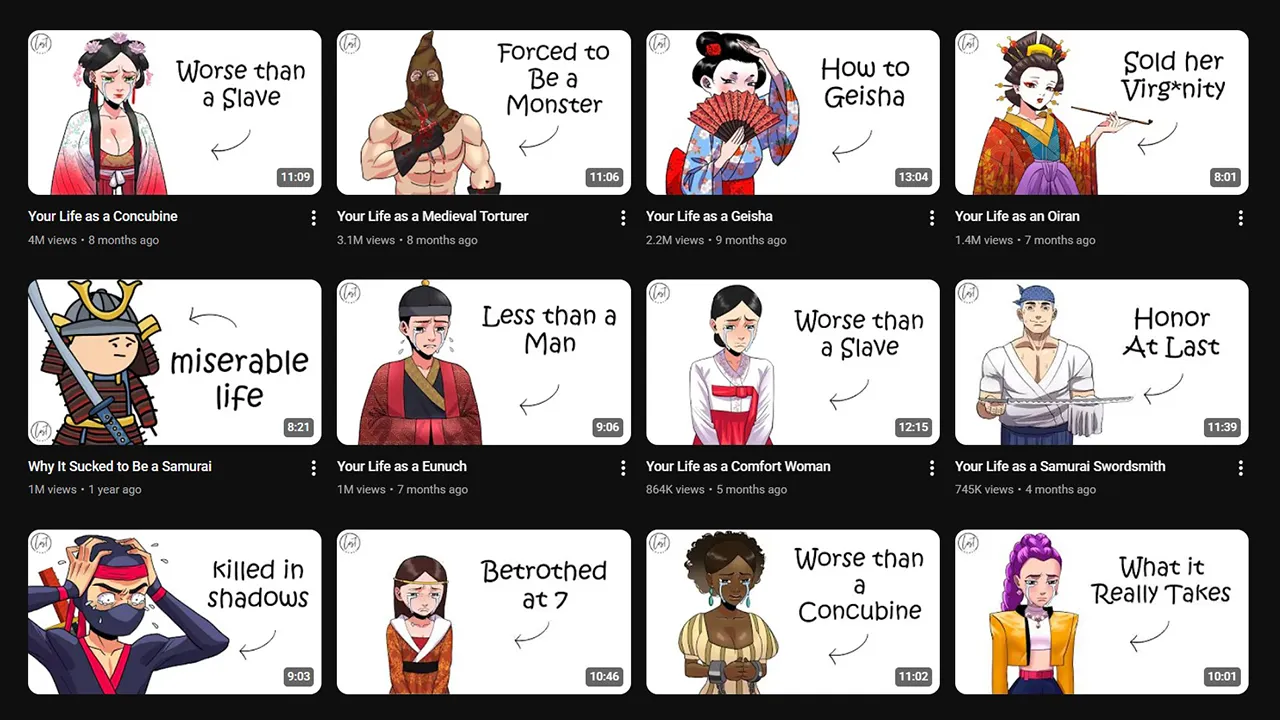
A YouTube thumbnail is the clickable preview image that viewers see before choosing to watch a video. It is displayed prominently alongside the video’s title in search engine results, algorithmic suggested video feeds, channel homepage layouts, and external website embeds. Content creators have two primary options for this asset: they can allow YouTube to automatically generate a thumbnail by extracting a random frame from the uploaded video file, or they can design and upload a custom image.
Custom YouTube thumbnails are fundamentally different from auto-generated frames. A custom thumbnail acts as a highly optimized digital billboard, purposefully designed with compelling text overlays, advanced color grading, and specific focal points to maximize user attention. Given that visual presentation is one of the heaviest weighted factors in viewer decision-making, mastering this format is critical for channel growth. Research indicates that custom thumbnails dramatically outperform auto-generated frames in driving viewer acquisition.
Creators seeking to leverage this mechanism should explore the comprehensive guide on how to add or change your YouTube thumbnail. Furthermore, to execute effective competitor research, professionals routinely utilize the YouTube Thumbnail Downloader to analyze the graphical strategies of top-performing channels within their specific niche.
What Is a Video Thumbnail?
While YouTube dominates the long-form video market, a general video thumbnail operates under the same fundamental premise across all digital platforms, including Vimeo, Wistia, TikTok, and native HTML5 website video players. A video thumbnail serves as the static poster image displayed over the media player container before the content begins playback.
Unlike a YouTube thumbnail, which must actively compete against dozens of other brightly colored, highly sensational graphics in a crowded feed, a standard video thumbnail embedded on a corporate landing page or a digital portfolio often prioritizes brand consistency, subtle aesthetics, and thematic relevance over aggressive, high-contrast visual tactics.
What Is a Thumbnail Image?
A thumbnail image refers specifically to the miniature representations of larger, high-resolution static files used primarily in web design, digital archives, e-commerce storefronts, and stock photography databases. When rendering digital galleries, loading dozens of full-resolution image files simultaneously would drastically decrease page load speeds, consume excessive bandwidth, and severely damage search engine rankings.
By utilizing thumbnail images, web browsers can render a page almost instantly. These compressed images act as visual placeholders that hyperlink to the full-size media files. The technology behind image thumbnails relies heavily on modern compression formats to balance file size against visual fidelity.
| Image Format | Compression Type | Performance Characteristics | Optimal Use Case |
|---|---|---|---|
| WebP | Lossy & Lossless | 25% to 34% smaller than JPEG at equivalent quality. | Standard web thumbnails and photographic previews. |
| AVIF | Lossy & Lossless | 20% to 30% better compression than WebP. | Complex raster graphics and high-fidelity photographs. |
| PNG | Lossless | Perfect quality with alpha transparency, but larger file sizes. | Logos, vector icons, and transparent backgrounds. |
| JPEG | Lossy | Universal compatibility, but suffers from artifacting at high compression. | Fallback for older browsers and email clients. |
Thumbnails on Social Media
Thumbnails on social media platforms have evolved significantly, particularly with the global shift toward short-form vertical video consumption. The aspect ratios and safe zones vary entirely based on the platform’s user interface design.
- Instagram: Users select a cover image for video Reels. This thumbnail is generated at a 9:16 vertical ratio (1080 x 1920 pixels) for the dedicated Reels feed, but the platform automatically crops the center to a 1:1 square (1080 x 1080 pixels) for display on the main profile grid.
- TikTok: The platform requires creators to select a cover frame directly from the uploaded video file, allowing for the addition of native, stylized text overlays to summarize the content before the user initiates playback.
- Facebook: Utilizes standard video preview thumbnails alongside Open Graph (
og:image) metadata protocols to generate clickable visual link previews when external URLs are shared in the content feed.
For a thorough breakdown of how to navigate vertical video previews and safe zones, consult the YouTube Shorts Thumbnail Guide.
Thumbnails on Computers and Phones
On local hardware systems, such as personal computers and mobile devices, thumbnails function as background caching mechanisms generated automatically by the operating system to facilitate rapid visual file browsing.
In Microsoft Windows environments, the File Explorer utilizes hidden database files, explicitly identified as thumbcache.db, to store microscopic preview images of videos, documents, and photos. When a user opens a directory containing hundreds of media files, the operating system reads directly from this cache database rather than utilizing processing power to render each individual file from scratch. This caching architecture results in massive performance gains and seamless directory navigation. On mobile devices, a nearly identical background process occurs within the core DCIM media folder.
Occasionally, these cache files become bloated or corrupted due to software conflicts, leading to broken images, slow load times, or solid black squares in the file explorer. When users execute the native Windows Disk Cleanup utility and observe “Thumbnails” listed among the temporary files, they are viewing these cached thumbcache.db databases. Deleting them is an entirely safe maintenance procedure; it simply forces the operating system to regenerate fresh, uncorrupted thumbnails the next time a folder is accessed.
YouTube Thumbnail Sizes and Specifications (Quick Reference)
Technical adherence is the foundational step of thumbnail design. If a thumbnail is poorly scaled, platform compression algorithms will degrade the visual quality, rendering text unreadable and focal points blurry. Furthermore, excessive file sizes will result in upload rejections.
| Specification | Value |
|---|---|
| Standard Dimensions | 1280 x 720 pixels |
| Aspect Ratio | 16:9 |
| Maximum File Size | 50 MB (Desktop, updated 2026) / 2 MB (Mobile) |
| Supported Formats | JPG, PNG, GIF, BMP, WEBP |
| YouTube Shorts | 1080 x 1920 pixels (9:16 vertical) |
To ensure that critical visual elements are not obscured by platform interface overlays (such as the video duration timestamp in the bottom right corner), creators must verify their designs before publishing. Use the Thumbnail Previewer to simulate how the thumbnail renders across different surfaces.
For complete dimension specs, safe zones, and mobile display sizes, read the YouTube Thumbnail Size Guide.
Why Thumbnails Matter (The Data Behind CTR)
The impact of a thumbnail extends far beyond simple aesthetics; it is a primary mechanical driver of algorithmic discovery and audience acquisition. Analytics data consistently indicates that up to 90% of the best-performing content across video platforms utilizes custom-designed thumbnails rather than system-generated frames.
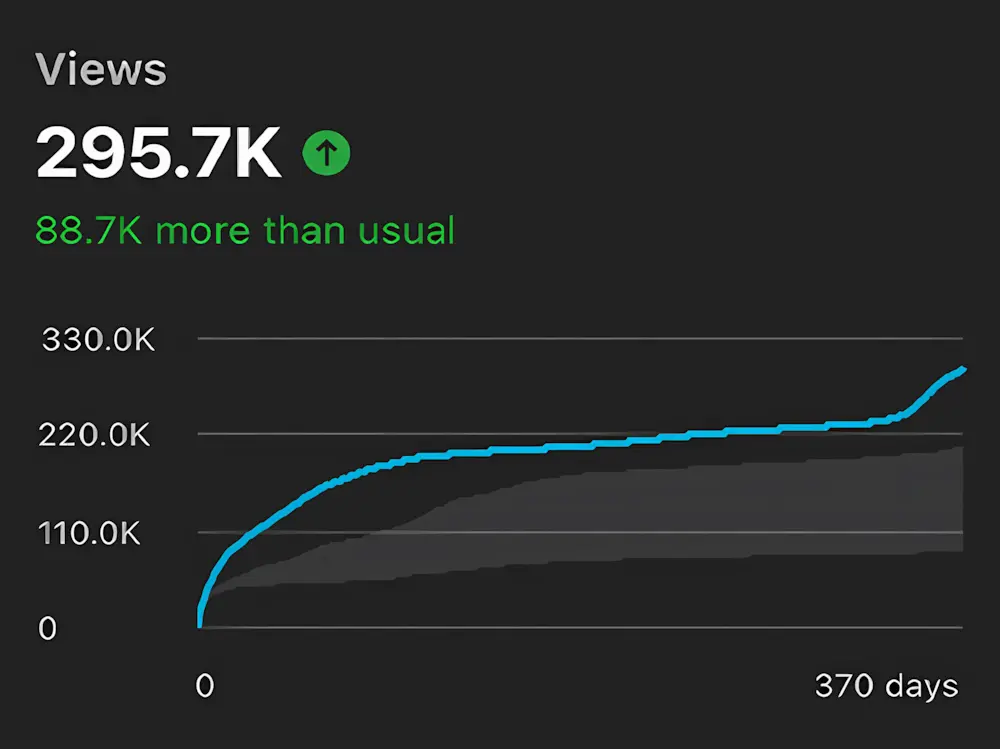
The primary metric used to measure a thumbnail’s success is the Click-Through Rate (CTR). CTR is calculated by dividing the number of clicks a video receives by the total number of impressions (how many times the thumbnail was rendered on a user’s screen), multiplied by 100.
A standard YouTube CTR typically rests between 2% and 10%. However, performance benchmarks vary based on the traffic source and specific content niche.
| Content Niche / Source | Average CTR | Contextual Note |
|---|---|---|
| Tech & Product Reviews | 7.5% | High intent; audiences actively seeking specific solutions. |
| Beauty & Fashion | 6.5% | Moderate intent; relies heavily on high-quality photographic aesthetics. |
| Finance & Business | 5.5% | Moderate intent; heavily text-dependent to communicate value propositions. |
| Search Traffic | 10% - 12% | Users typing exact queries generate inherently higher CTRs. |
| Browse Features (Home) | 3% - 5% | Broader audience targeting naturally depresses the CTR percentage. |
A CTR above 10% on broad algorithmic surfaces during the initial hours of a video’s launch indicates strong thumbnail-to-title resonance, which signals the algorithm to distribute the content to wider audience pools.
Visual Attention and Eye-Tracking Dynamics
The cognitive neuroscience of visual attention dictates that a thumbnail has fewer than two seconds to make an impact before a user scrolls past. Advanced predictive eye-tracking heatmaps demonstrate that human visual attention is naturally and subconsciously drawn to high-contrast elements, specifically human faces displaying intense, legible emotion. Exaggerated, genuine expressions consistently outperform neutral, closed-mouth expressions because emotional recognition is the fastest visual signal processed by the human brain.
Top graphic designers rely on strict rubrics to ensure legibility, the most prominent being the “3-element rule.” This principle dictates that a frame should contain a maximum of three distinct visual elements - such as a face, a prop, and a short block of text. Every additional element introduces visual clutter, shrinking the prominence of the core subject and splitting viewer attention.
Furthermore, text must be fully legible when scaled down to roughly 120 pixels wide, utilizing bold typography and strong background contrast ratios to prevent the image from merging into a muddy visual blur. To explore advanced design tips for higher CTR, creators must study these contrast and composition principles deeply.
The Importance of A/B Testing
Because CTR compounds dramatically over millions of impressions - where a mere 2% increase can yield tens of thousands of additional views - eliminating guesswork is crucial. It is a standard industry practice to test different versions of a design to determine empirical audience preference.
YouTube’s native “Test & Compare” feature allows creators to run automated A/B/C tests on up to three thumbnails simultaneously on live videos. Interestingly, YouTube’s native testing protocol does not determine the winner strictly by raw CTR; instead, it measures success via “watch time share.” This specific measurement distributes the total accrued watch time across the thumbnails being tested.
By relying on watch time rather than clicks, the system actively penalizes “clickbait” - thumbnails that promise content the video fails to deliver. When viewers click and immediately abandon the video, the watch time plummets, ensuring that misleading thumbnails lose the A/B test.
For professionals requiring more granular data, third-party software suites like TubeBuddy and Thumbnail Test allow for daily or hourly testing parameters, tracking CTR, engagement rates, and title variations alongside the imagery.
Thumbnail Sketches (In Art and Design)
Before finalizing complex digital layouts in software environments like Adobe Photoshop or Canva, professional designers often revert to the historical meaning of the term. A thumbnail sketch is a rapid, miniature drawing - literally the size of a thumb - used to explore multiple compositional ideas quickly and at an exceptionally low cost of time and resources.

The primary purpose of a thumbnail sketch is purely structural. It allows artists, animators, and digital designers to evaluate the balance of focal points, text placement, and the implementation of the “rule of thirds” without getting bogged down by high-fidelity rendering or color grading. Thumbnail sketching is a foundational technique that many YouTube designers use to plan their digital compositions.
By testing the visual hierarchy on a physical, small scale, designers ensure that the image’s structural integrity will survive the aggressive shrinking it undergoes when viewed on a mobile device screen. To study how top creators design thumbnails, analyzing their preliminary sketch work provides deep insight into their compositional psychology.
Frequently Asked Questions
What is a thumbnail?
A thumbnail is a small, compressed preview image that represents a larger piece of content, serving as an efficient visual index for users browsing digital media. The name originates from its historical meaning: a physical drawing or image small enough to be the size of a human thumbnail. On YouTube and digital video platforms, it serves as the clickable preview image viewers assess before choosing to initiate playback.
What does thumbnail mean?
“Thumbnail” originally referred to anything very small, roughly the exact size of a person’s thumbnail. Historically, it described a miniature, rapid drawing used by artists and printmakers to plan compositions. In contemporary digital media, the meaning has evolved to denote a miniature preview image used to represent videos, high-resolution photos, or software documents on digital screens. On YouTube specifically, it refers to the custom graphical cover image creators design to attract clicks.
What is a YouTube thumbnail?
A YouTube thumbnail is the specific preview image displayed alongside a video’s title in search engine results, suggested content feeds, and channel pages. Creators possess the option to either let the platform auto-generate a thumbnail from a random video frame, or upload a custom-designed image file. Custom thumbnails significantly increase click-through rates by utilizing marketing psychology, facial recognition, and graphic design principles. For technical deployment, see the guide on how to add or change your YouTube thumbnail.
What size is a YouTube thumbnail?
The officially recommended size for a YouTube thumbnail is 1280 x 720 pixels, which locks the graphic into a 16:9 aspect ratio. The maximum file size limit for desktop uploads was expanded in 2026 to accommodate up to 50MB, though mobile limits remain restricted. Accepted file formats include JPG, PNG, GIF, BMP, and WEBP. For short-form content, YouTube Shorts utilize a reversed 9:16 vertical ratio of 1080 x 1920 pixels. Access the YouTube Thumbnail Size Guide for complete dimension specs, mobile safe zones, and resolution caps.
What is a thumbnail sketch?
A thumbnail sketch is a small, rapidly executed drawing used to plan the visual composition of a piece before creating the final artwork. Fine artists, animators, and digital graphic designers use these rapid physical sketches to explore different layouts, test focal points, and establish structural hierarchies. Many professional YouTube thumbnail designers sketch multiple concepts on paper before committing to digital rendering in photo-editing software.
What are thumbnails on a computer?
On local computer hardware, thumbnails are small preview images generated automatically by the operating system to represent files within a directory. Windows and macOS systems create background cache databases - frequently stored as thumbcache.db files on Windows - to allow for instantaneous visual browsing without rendering large files. In the Windows Disk Cleanup utility, selecting “Thumbnails” targets this specific cache data. This cache is entirely safe to delete, prompting the computer to regenerate fresh preview images.
What is a custom thumbnail on YouTube?
A custom thumbnail is a purposefully designed image file created offline and uploaded to overwrite YouTube’s default, auto-generated video frame. Custom thumbnails allow creators to introduce highly legible typography, intense color grading, and expressive facial photography to maximize viewer acquisition and algorithmic standing. To utilize this feature, a YouTube account must first undergo phone verification to unlock custom upload capabilities.
What is a good thumbnail?
A highly optimized thumbnail features one distinct, clear focal point (frequently an expressive human face), utilizes three words of text or fewer, employs starkly high-contrast colors, and instantly generates visual curiosity or narrative tension. Above all technical considerations, it must remain highly legible when scaled down to mobile screen sizes (roughly 120 pixels wide). A successful thumbnail must also accurately reflect the video’s actual content to prevent audience drop-off. Use the Thumbnail Previewer to simulate rendering across different surfaces before publishing.