Empirical data reveals that 90% of the highest-performing videos on YouTube utilize custom thumbnails, and creators who actively implement testing protocols report click-through rate (CTR) improvements of 37% or higher. The cognitive bias of creators often leads them to select designs they personally prefer, yet the only objective method to determine audience resonance is through rigorous A/B testing.
Finding the best YouTube thumbnail A/B testing tools requires navigating an evolving landscape of native integrations, AI-driven predictive modeling, and human-feedback platforms. Whether utilizing a YouTube thumbnail tester free of charge or an enterprise-grade analytics suite, the following analysis details every tool worth evaluating in 2026.
Want the full methodology? Start with our pillar guide: YouTube Thumbnail A/B Testing: Free Community Voting and Tools 2026
What to Look for in a Thumbnail Testing Tool
Selecting the correct thumbnail tester solution requires an understanding of a channel’s operational bottlenecks, budget constraints, and specific optimization goals. When evaluating a YouTube thumbnail and title tester, consider these critical vectors:
- Pre-publish vs post-publish: Post-publish tools test variables on live videos using real audience data, which provides high accuracy but risks sacrificing the initial algorithmic surge if the control thumbnail underperforms. Pre-publish tools allow creators to validate packaging concepts before the video goes public, safeguarding the critical first 24-hour performance window.
- AI vs human feedback: Human feedback tools rely on community voting or live traffic to gauge emotional resonance, curiosity, and psychological triggers. AI testing tools evaluate technical design parameters - such as facial detection, contrast ratios, and text readability - delivering instant baseline scores without requiring live traffic.
- Pricing: Solutions range from completely free native features to enterprise-grade applications costing upwards of $75 per month. The optimal choice depends heavily on upload frequency and the financial scale of the channel.
- Metrics provided: Legacy tools optimized exclusively for CTR, which often rewarded deceptive clickbait. Modern native tools and advanced platforms evaluate watch time share and average view duration (AVD), ensuring that a winning thumbnail accurately reflects the content and preserves viewer retention.
- Ease of use: The ideal platform minimizes friction by offering seamless integration with YouTube Studio, clear historical data archiving, and automated winner selection mechanisms.
1. Touhfa Arena - Free Community Voting A/B Test
Type: Community Voting - Price: Free - When: Pre-publish - Feedback: Human
Touhfa Arena represents a unique approach to pre-publish validation by focusing on blind A/B community voting. The tool operates by allowing creators to upload competing thumbnail designs and generate a shareable voting link. Viewers and niche community members then vote on their preferred option before seeing the prevailing opinions of others.
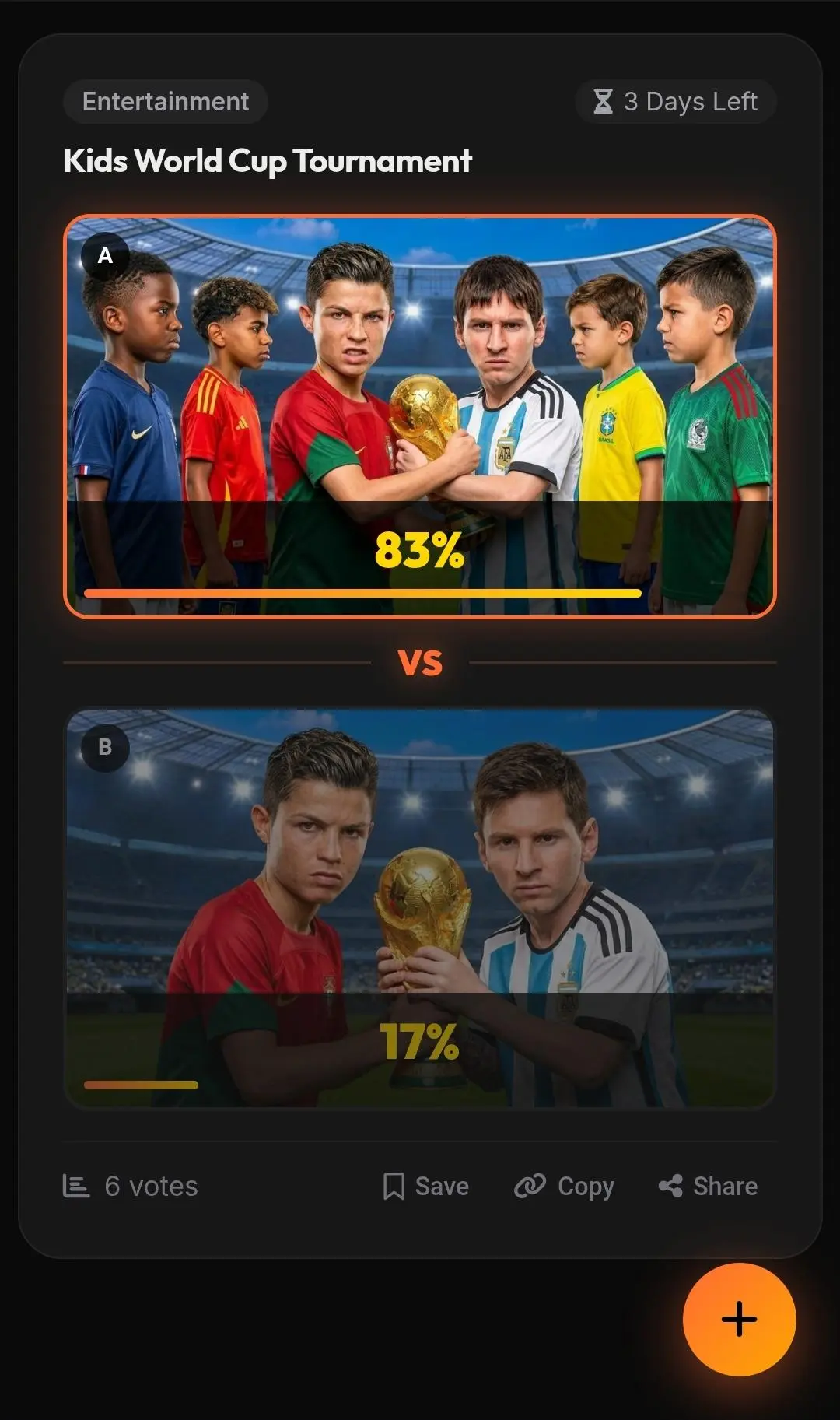
This “blind” voting mechanism is crucial, as it captures the immediate, uninfluenced instinct of the viewer - the exact psychological trigger that determines whether someone clicks a video in a real feed.
Pros:
- Completely free with no subscriber thresholds
- Pre-publish validation means zero risk to live algorithmic momentum
- Captures real human psychology that automated AI evaluators frequently misinterpret
- Tests title and thumbnail synergy simultaneously - voters see both together
- Results in hours, not days
Cons:
- Speed and statistical significance depend on the creator’s ability to distribute the voting link to a sufficiently large audience
- Requires an existing community (Discord, subreddit, email list) for fastest results
Best for: Early-stage creators, independent filmmakers, and strategists who want to validate visual concepts, emotional triggers, and title alignment before exposing a video to the YouTube algorithm.
Start your free test in Touhfa Arena
2. YouTube Test and Compare (Native, Free)
Type: Native Platform - Price: Free - When: Post-publish - Feedback: Human
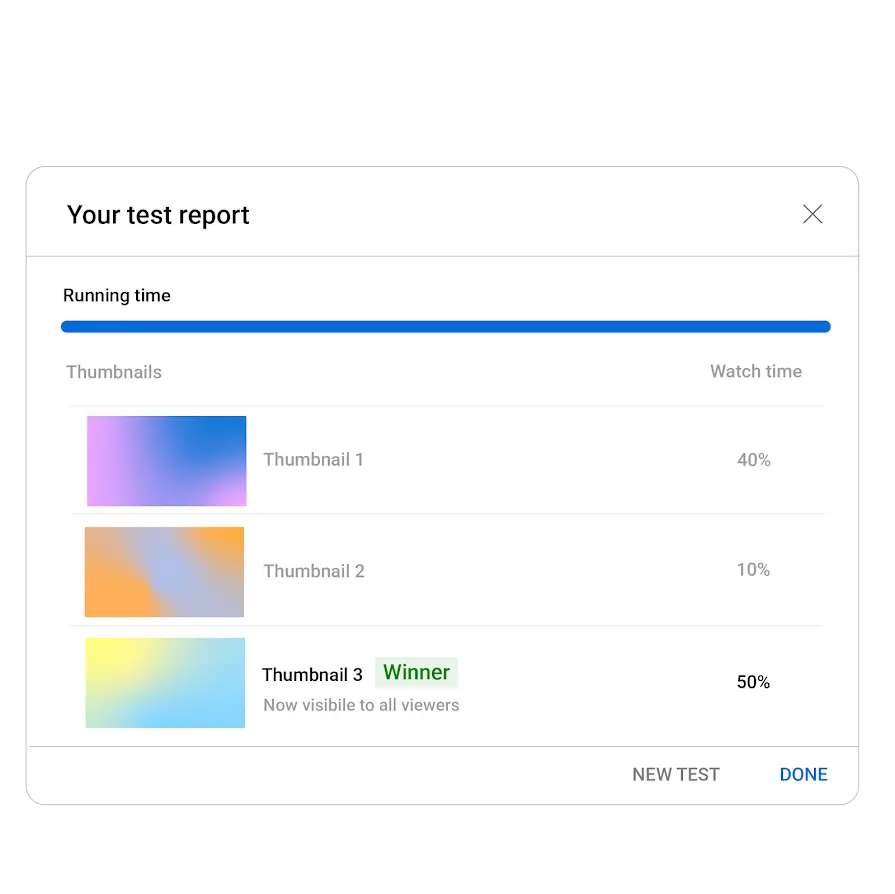
Rolled out globally to eligible creators in the YouTube Partner Program, YouTube’s native Test and Compare feature allows creators to run concurrent A/B or A/B/C tests directly within YouTube Studio. Creators can upload up to three different combinations of titles and thumbnails simultaneously. The backend algorithm serves these variations evenly to the audience and determines the winning variant based on watch time share rather than raw CTR.
Pros:
- Completely free and natively integrated into YouTube Studio
- Watch time share metric actively discourages clickbait
- Concurrent testing eliminates time-of-day bias
- Automatically updates the video with the winning variant
Cons:
- Cannot test before publishing - real audience is exposed to all variants including weak ones
- Not available for Shorts, Premieres, or age-restricted content
- Small channels may need 14 days to reach statistical significance
- Resolution below 720p on any variant downgrades all variants to 480p
Best for: Established creators who generate consistent daily impressions and want statistically pure, watch-time-optimized results without relying on third-party software.
3. TubeBuddy
Type: Browser Extension Suite - Price: ~$23-$49/month - When: Post-publish - Feedback: Human
TubeBuddy remains a foundational pillar in the YouTube optimization space, offering a comprehensive suite of browser-based tools that extend far beyond simple thumbnail comparison. Its robust A/B testing suite is locked behind the Legend plan ($49/month monthly or approximately $23/month billed annually).
| TubeBuddy Plan | Monthly Cost (Annual) | Key Features |
|---|---|---|
| Pro | ~$3.60 | Keyword Explorer, SEO Studio, Best Time to Publish |
| Star | ~$19.00 | Bulk Editing, Advanced Analytics, Competitor Tracking |
| Legend | ~$23.19 | A/B Testing, Unlimited Bulk Editing, AI Tools |
TubeBuddy’s testing engine allows creators to split-test thumbnails, titles, and descriptions. It provides advanced historical tracking, allowing users to analyze performance across previous tests to discover macro-level design trends over time. For a TubeBuddy A/B test to achieve statistical significance, the platform recommends a baseline traffic velocity of at least 1,000 views within a 48-hour window.
Best for: Active, full-time creators and channel managers who require bulk processing tools, advanced keyword research, and historical A/B test data archiving under one centralized dashboard.
4. ThumbnailTest.com
Type: Dedicated Tester - Price: $24-$75/month - When: Post-publish - Feedback: Human
For creators seeking aggressive, rapid-iteration optimization, ThumbnailTest.com operates as a highly specialized, dedicated platform. Pricing is structured across three main tiers: Basic at $24/month, Pro at $37-$45/month (supporting up to 3 channels), and Business at $75/month for larger operations.
ThumbnailTest.com distinguishes itself from native tools by offering unrestricted testing flexibility. Users can conduct unlimited A/B, A/B/C, and even A/B/C/D tests on thumbnails and titles. Most notably, the software permits hourly testing intervals rather than forcing users to wait the standard days or weeks required by native analytics. This feature is critical for trend-jacking or time-sensitive news content, where maximizing the initial CTR in the first few hours dictates the video’s ultimate trajectory.
Best for: Advanced power users, professional channel strategists, and agencies managing high-volume catalogs who require rapid, hourly testing and cannot wait for YouTube’s native 14-day cycle.
5. ViewStats
Type: Research and Intelligence - Price: Pro Tier (varies) - When: Pre-publish research - Feedback: Data analysis
Co-founded by prominent creator MrBeast, ViewStats operates primarily as a competitive intelligence and outlier-detection platform. Through its Outlier Video Search and Thumbnail Search tools, ViewStats allows creators to analyze the broader market to identify which thumbnails are currently over-performing relative to a specific niche’s baseline.
Crucially, the Pro version includes an A/B Test Tool that tracks and reveals the thumbnail split-tests being conducted by competitor channels. This transparency allows creators to observe exactly which thumbnail variations major competitors are experimenting with, how long the tests ran, and which visual ultimately won the traffic share.
Best for: Content strategists and researchers who want to study high-performing visual packaging, spy on competitors’ A/B tests, and build data-backed thumbnail variations before initiating their own experiments.
6. Thumbnails.com
Type: Extension and Dashboard - Price: Varies - When: Post-publish - Feedback: AI and Human
Thumbnails.com is positioned as an enhancement layer that sits directly on top of YouTube’s native Test and Compare feature. Through an automated Chrome extension, the tool seamlessly imports all native A/B/C testing data from YouTube Studio into a single, unified dashboard.
The core problem Thumbnails.com solves is data retention and organization. YouTube Studio does not natively save a comprehensive, easily accessible historical archive of past Test and Compare experiments. Thumbnails.com captures this data permanently, allowing creators to track long-term performance trends and refine their visual strategies over months or years. Additionally, the platform features an AI-powered thumbnail and title generator that can produce viral-worthy concepts in 10 to 30 seconds.
Best for: Highly analytical creators who utilize YouTube’s native Test and Compare feature but require permanent historical data archiving and AI-assisted variation generation to streamline their workflow.
7. Oona Lab
Type: AI Test Lab - Price: Subscription (varies) - When: Post-publish - Feedback: AI and Human
Oona Lab represents the next generation of AI-assisted testing environments, billing itself as a “lightning-fast multivariate testing” platform. The platform is designed to provide actionable results in hours rather than weeks, utilizing an advanced statistical engine and machine learning to distribute traffic intelligently and surface a clear winner.
Beyond simple CTR tracking, Oona Lab incorporates a Thumbnail and Title Analyzer that evaluates each uploaded variant across five distinct psychological and visual dimensions: Emotion, Clarity, Contrast, Composition, and CTR Potential. The platform’s “AI Insight Assistant” functions as an on-demand data scientist, allowing creators to ask plain-language questions and receive detailed breakdowns regarding visual attention patterns and click intent.
Best for: Data-focused creators and professional media brands that demand rapid, hourly test results coupled with deep AI analysis regarding exactly why a specific visual composition succeeded.
8. ChatGPT / AI Chat Tools for Quick Feedback
Type: AI Scoring - Price: Free to $20/month - When: Pre-publish - Feedback: AI only
While not traditional A/B testing platforms, utilizing advanced AI vision models - such as ChatGPT-4o, Midjourney, or specialized analyzers like Thumbmagic’s Thumbnail Rater or IntoThumbnail - has become a standard pre-publish workflow.
These AI evaluators analyze uploaded images to provide instant feedback on technical design elements. Platforms like Thumbmagic score thumbnails on a 0-100 scale based on four visual dimensions: contrast and clarity, face detection, text readability, and color pop. The systems identify weak points and provide actionable suggestions to correct them before publication.
The primary limitation of this approach is that AI lacks the cultural context and nuanced psychological understanding of a live human audience. An AI can confirm that a thumbnail is well-lit and technically flawless, but it cannot accurately predict if a specific visual hook will invoke the necessary curiosity or emotional resonance to trigger a click in a crowded feed. Therefore, AI chat tools should be utilized strictly for technical quality assurance rather than final strategic validation.
Best for: Quick technical baseline checks on contrast, resolution, and text legibility before moving to human validation.
Full Comparison Table
| Tool | Type | Price | Timing | Feedback | Variants | Best For |
|---|---|---|---|---|---|---|
| Touhfa Arena | Community Voting | Free | Pre-publish | Human | A/B | Early validation and blind feedback |
| YouTube Test and Compare | Native Platform | Free | Post-publish | Human | A/B/C | Real algorithmic watch-time testing |
| TubeBuddy | Suite Extension | ~$23-$49/mo | Post-publish | Human | A/B | Bulk editors needing historical data |
| ThumbnailTest.com | Dedicated Tester | ~$24-$75/mo | Post-publish | Human | Unlimited | Rapid hourly tests and high-volume catalogs |
| ViewStats | Research | Pro Tier | Pre-publish | N/A | Competitors | Studying competitor A/B test patterns |
| Thumbnails.com | Extension/Dashboard | Varies | Post-publish | AI and Human | A/B/C | Saving native test history and AI generation |
| Oona Lab | AI Test Lab | Subscription | Post-publish | AI and Human | Multivariate | Fast AI insights and rapid turnaround |
| AI Chat/Analyzers | Scoring Tool | Free to $20/mo | Pre-publish | AI | Single | Quick technical feedback on contrast/text |
Our Pick for Most Creators
The optimal strategy for modern thumbnail optimization does not rely on a single software solution, but rather a phased operational stack that maximizes free resources:
Start with Touhfa Arena (free, pre-publish). By utilizing blind community voting before a video goes live, creators can test vastly different conceptual hooks without risking the video’s crucial first 24 hours of algorithmic momentum on a weak design.
Then activate YouTube Test and Compare (free, post-publish). This native tool ensures that the final optimization is tied directly to actual watch time and live audience behavior, guaranteeing that the winning variant satisfies the viewer and promotes retention.
Scale up to TubeBuddy or ThumbnailTest.com when the 14-day native testing window becomes too restrictive and you need automation at scale, hourly test intervals, and deep historical archiving.
This three-stage stack costs nothing to start, delivers both human and algorithmic validation, and can scale with your channel without requiring an immediate paid commitment.
Frequently Asked Questions
Which tool is completely free?
Both Touhfa Arena, which facilitates pre-publish community voting, and YouTube Test and Compare, which is built directly into YouTube Studio, are completely free to use. Additionally, AI analyzers like IntoThumbnail and the Thumbmagic rater provide free technical scoring with daily usage limits.
Can I test titles too, not just thumbnails?
Yes. YouTube’s native Test and Compare allows creators to test titles alone, or test specific combinations of titles and thumbnails simultaneously. Advanced paid tools like ThumbnailTest.com and Oona Lab also feature robust title testing mechanics, often designed to alternate metadata safely to minimize negative impacts on search engine optimization (SEO).
How many thumbnails should I test per video?
While third-party tools theoretically allow for unlimited variant testing, best practices dictate testing no more than two to three distinctly different concepts per video. Testing more than three variants dilutes the traffic distribution, drastically increasing the time it takes to achieve statistical significance. Variations should focus on different psychological triggers - such as changing the emotional angle or focal point - rather than testing minute, indistinguishable changes like slightly different font shades.
Related Guides
- YouTube Thumbnail A/B Testing: Complete 2026 Guide - The full pillar guide covering all methods, CTR benchmarks, and step-by-step walkthroughs
- AI Thumbnail Analyzers vs Real Community Voting - Why AI scores fall short and when human votes give you a stronger CTR signal
- YouTube Test and Compare vs Free Community Testing - When to use each tool and why the best answer is both, at different stages
- Does A/B Testing Really Increase YouTube CTR? - The data behind thumbnail testing and realistic improvement benchmarks by niche
![50+ Camera Angles for AI Prompts: Complete Shot Types Guide [2026]](/images/thumbnails/camera-angles-guide/hero.webp)